Print Disappointment

mata.morrison

Suspended / Banned
Messages
1,033
Name
Matthew
Edit My Images
Yes
Well just got my second order from DSCL last night, I'm pretty disappointed to say the least...

Since my first order (which I also wasn't 100% with) I got a new monitor and got it calibrated with a Spyder 3 Pro. I got my prints and they are really dark compared to on screen, I used the correct colour profile as well. They are worse than using my old uncalibrated monitor.

What went wrong? Any ideas?
 
Last edited:
Sounds like your monitor isn't calibrated correctly. Screen brightness to high?
 
Well I calibrated twice before and it gave me both the same setting for the monitor but it must have been. The only option I wasn't sure about was the screen contrast. I no longer have the calibrator to check again so will have to try and get it back. I have turned the brightness down a bit but I was thinking of trying to replicate the print brightness to that of the monitor which I would have thought would compensate however that make the monitor brightness '1' :(
 
Would suggest editing the thread title to 'Monitor Disappointment' then rather than pointing the finger at DSCL - have you spoken to them about it? :shrug:
 
Would suggest editing the thread title to 'Monitor Disappointment' then rather than pointing the finger at DSCL - have you spoken to them about it? :shrug:

Good point as I have not yet confirmed what actually went wrong... However I am confident the monitor is good as it matches my work monitor (same screen) at work also. Will be getting in touch with them later today to ask a few questions.
 
Last edited:
Out of interest what type of lighting did you calibrate your monitor in..normal daylight, dark room etc?

Simon

also out of interest what type of lighting are you looking at the prints in?


monitor colour calibration is one thing- monitor luminance calibration is another. having a monitor that is set to 80cd/m2 is rare- most monitors won't even go down that low, and I don't think spyder can set monitor brightness? I know that the i1 match software doesn't so I had to invest in color eyes to get my display brightness down low enough

80cd/m2 is really dim, like so dim it's not pleasant to surf the web on, to watch films on etc- I have a monitor that I only use for photo work, and i use my laptop for everything else
 
Last edited:
post up the picture and i'll tell you whether it will make a dark print
 
also out of interest what type of lighting are you looking at the prints in?


monitor colour calibration is one thing- monitor luminance calibration is another. having a monitor that is set to 80cd/m2 is rare- most monitors won't even go down that low, and I don't think spyder can set monitor brightness? I know that the i1 match software doesn't so I had to invest in color eyes to get my display brightness down low enough

80cd/m2 is really dim, like so dim it's not pleasant to surf the web on, to watch films on etc- I have a monitor that I only use for photo work, and i use my laptop for everything else


Really? I have a monitor set to 80cdm using a colormunki. It's not dim at all.

The issue with the above sounds more like a profile issue
 
Calibrated under normal daylight, most of my editing takes place at that time too.
Prints checked in daylight and evening light (and every other kind of light I could find ;))
The spyder I used can't set brightness, however it 'reads' how bright the monitor is and you tweak it until you are at the correct brightness it tells you.

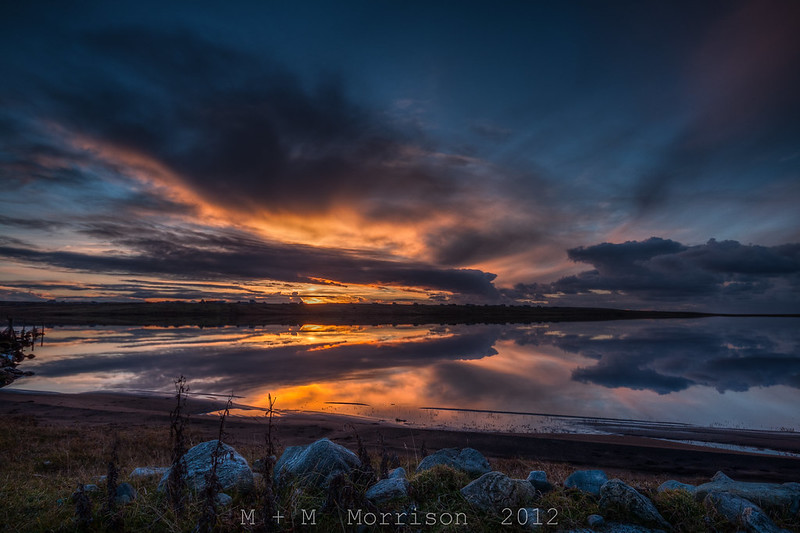
The main images is the following, it is quite dark to begin with and it's a sunset, however I can see on my PC and work pc the lightish blue sky mid picture to the left, detail in the rocks in the foreground and some colour to the grassy areas.


Sunset Over Brue by M+M Morrison, on Flickr

Not sure where to go to now though re-calibrate I guess...
 
looks dark to me
 
I'm not saying this is correct but I've lightened the rocks in the foreground more than the rest of the image. Could possibly do with a touch more.

8159261202_f9023d3a4e_c.jpg


EDIT

25529537.jpg
 
Now to me that looks spot on, thanks for the edit :) I just have to sort my monitor to print settings. Going to have to re-order that print tonight and take a bit of a gamble and bump the exposure and rocks up slightly as it's for a Christmas prezzie from someone else.

Still that's not acceptable in the long run, so will maybe invest in my own calibrator... now then Spyder or Colourmonki?
 
prints and monitors will never match truly, as a monitor creates light and a print reflects, so with a print (and black absorbing light) you have to shine a lot of light on it to get the dark tones to show up (which then puts too much light into the light tones)

all this talk of dynamic range for DSLRs still doesn't change the fact that most papers don't have a high Dmax (contrast) and we're only just starting to get higher gamut ink combinations

you have to tailor your prints to your intended environments
personally with landscapes with darker tones I make prints on fuji metallic paper, as the light gathering aspect of the paper works well for illuminating the dark tones

I made the same print on matt/glossy/metallic, and metallic was by far the clearest in the dark tones

admirable's edit will print much better
 
Now to me that looks spot on, thanks for the edit :) I just have to sort my monitor to print settings. Going to have to re-order that print tonight and take a bit of a gamble and bump the exposure and rocks up slightly as it's for a Christmas prezzie from someone else.
make a couple of prints at different settings, cheap enough at DSCL

Still that's not acceptable in the long run, so will maybe invest in my own calibrator... now then Spyder or Colourmonki?

i could be wrong but spyder doesn't seem like a professional solution, even the name doesn't sound professional, all the designers I know use the gretag macbeth stuff, which is now called X-rite
they are the definitive authority on colour though, spyder feel a little more like the 'vistaprint' of the colour world

I am a bit out of date with what's on the market though
 
Spyder is absolutely a professional bit of kit - I used to own one although now have the colormunki photo - just so I can profile papers for my printer
 
Spyder is absolutely a professional bit of kit - I used to own one although now have the colormunki photo - just so I can profile papers for my printer

i'm not so sure
I trained as a graphic designer and looking at the data colour website vs the x-rite website the difference in intented market position is pretty clear

spyder is for photographers (and there's even a 'christmas give-away'!)
x rite is for colour professionals and people in lab coats (and zero christmas cheer, hurrah)

i joke

but the impression I get is that x-rite (gretag macbeth) have a stronger history in colour management, and the opinion in the professional sphere is that x-rite is for pro's and spyders are for weekend warriors
 
Tell that to the millions of happy Spyder owners. I've used one - It's certainly excellent - i do however prefer the Colormunki but not really based on the monitor calibration - just does more.
 
Try the same photo with photobox to see if its still dark
 
..... I have a monitor set to 80cdm using a colormunki. .....

I have a ColorMunki too and use it with ColorNavigator http://www.eizo.com/global/products/coloredge/cn/index.html. The software defaults are slightly confusing though - when launched it gives these defaults for brightness:

Photography (viewing, editing, printing) - 100cd/m2
Printing (publications) - 80cd/m2
Web design - 80cd/m2

If however I choose 'create new target' (for photography) it gives a default of 80cd/m2 instead of 100cd/m2.
 
Last edited:
Screen calibration for print matching on anything but the best monitor seems doomed to failure in my experience, way too many variables and conflicting information.

Doing it by eye works for me.
 
I have ordered 100s of prints from DSCL. I use a calibrated Dell U2410 save with a sRGB profile and always specify "Uncorrected Pro Only" print option with DSCL.

Never had a bad print back yet !
 
Back
Top