Prepare for Gallery

Sharkey

Suspended / Banned
Messages
630
Edit My Images
Yes
I think I may have picked one or two images to upload. Best method for preparing them please. Two basic types of image 8mp raw & small 1.5mp jpegs. All will be as left camera. Bye the bye I am right in thinking the pics. must be in the gallery before I can post for critique. I don't have an on line way of displaying my stuff unless you count my imac account.:thinking:
 
You will need to re-size them for web use, particularly on here where any images posted must be 800 pixels on the longest side and no more than 160kb.

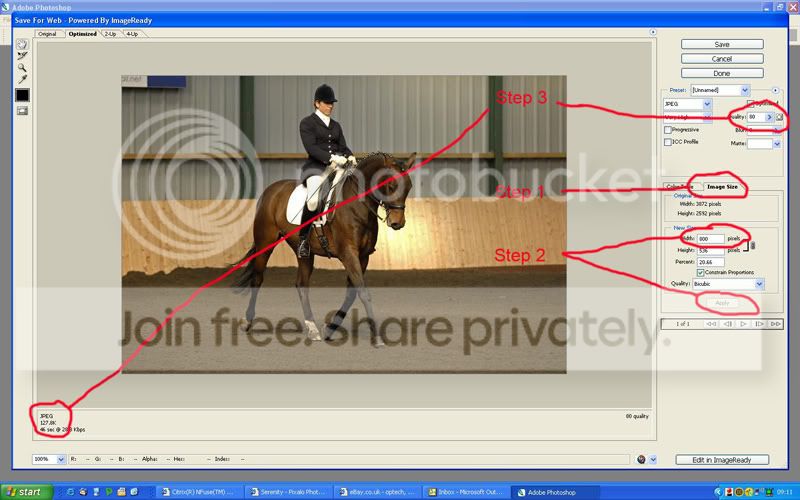
If you are using Photoshop go to the Save for Web option under File and do the following:

Save-for-web.jpg


Step 1: Go to image size
Step 2: Re-size to 800 on the longest side and click Apply
Step 3: Adjust until the image is just under 160kb.

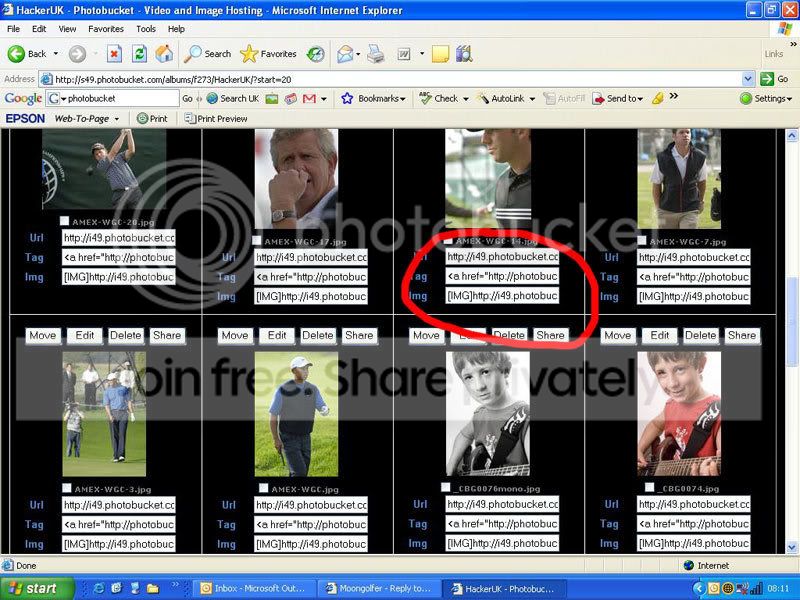
Once this has done upload to somewhere like Photobucket (or your gallery on here and use the
function to display your image in a post.

Bucket.jpg


Hope this helps.
 
TVM Hacker, very authorative. I will give it a go and let you know how it goes. Don't expect instant success though. It's the wine you know.
 
Doesn't save for web remove the exif info though? So it can save file space?
 
Back
Top