
and the site receives a small commission
You are using an out of date browser. It may not display this or other websites correctly.
You should upgrade or use an alternative browser.
You should upgrade or use an alternative browser.
Post Production Hell - Crooked kitchen cupboard?
- Thread starter mrk123
- Start date

AndrewFlannigan
Suspended / Banned
- Messages
- 11,977
- Edit My Images
- No
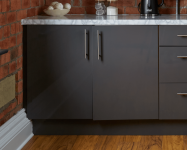
To be honest, I can't see a visual problem with that image.
If I take a ruler to the screen, there's a one millimetre horizontal difference between top and bottom. Is your client going to notice that?
If I take a ruler to the screen, there's a one millimetre horizontal difference between top and bottom. Is your client going to notice that?
Too late, shoot is over, house is now in use, and I would need to travel 50 minutes again.Take the door off, and reposition correctly, then retake the photo, lol.
Seriously if the only way is AI just do it, tools are there to be used.
It's very noticeable imo. Obvs it's zoomed in but I can see it a mile away,To be honest, I can't see a visual problem with that image.
If I take a ruler to the screen, there's a one millimetre horizontal difference between top and bottom. Is your client going to notice that?
You mean like CMD T and rotate?Make a selection around the door and move it.
The door would be crooked, is there a tool to evenly 'stretch' out the lines?Select the door, cut it and paste onto a new layer, straighten and use clone to patch the gaps.
Took a minute to do a reasonable job, but can't post it.
I tried SKEW but it does not seem to be fine enough, moves in large increments.
Last edited:

Sangoma
Suspended / Banned
- Messages
- 2,951
- Name
- Steve, Coventry, England
- Edit My Images
- Yes
Why would the door be crooked?The door would be crooked, is there a tool to evenly 'stretch' out the lines?
the_accidental
Suspended / Banned
- Messages
- 501
- Edit My Images
- No
Tricky. If you straighten it so the line break doesn’t catch your eye the reflection will still be wrong. I’d look to get rid of the reflection of the skirting in the left side as well so it doesn’t stand out as missing on the right..
AndrewFlannigan
Suspended / Banned
- Messages
- 11,977
- Edit My Images
- No
It's up to you but I've always remembered the wise, cautionary advice not to fix what ain't broke.It's very noticeable imo. Obvs it's zoomed in but I can see it a mile away,
Scratching that particular itch might result in your handing the client something they will take exception to. Perhaps make the changes but show the client both versions and ask which they prefer?
Sangoma
Suspended / Banned
- Messages
- 2,951
- Name
- Steve, Coventry, England
- Edit My Images
- Yes
On the one I roughly straightened you don't notice the reflection at all.Tricky. If you straighten it so the line break doesn’t catch your eye the reflection will still be wrong. I’d look to get rid of the reflection of the skirting in the left side as well so it doesn’t stand out as missing on the right..
The most telling thing is the height of the handles really

- Messages
- 49,339
- Name
- Nod (UK)
- Edit My Images
- Yes
Too late, shoot is over, house is now in use, and I would need to travel 50 minutes again.
To be brutally honest, you should have fixed it (or bodged it) before shooting.
You mean like CMD T and rotate?
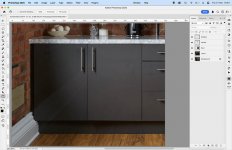
No, use the distort tool. This took about 5 minutes to do.

Terrywoodenpic
Suspended / Banned
- Messages
- 8,172
- Name
- Terry
- Edit My Images
- Yes
Select the door, cut it and paste onto a new layer, straighten and use clone to patch the gaps.
Took a minute to do a reasonable job, but can't post it.
Absolutely this is the correct way. Make a tight selection at the sides and top of door but include some of the shadow at the bottom as you will need it to line up the bottom.
Use the transform / distort tool to pull every thing into position not the warp tool.
Actually it's for airbb rental, I know you are going to say it's overkill but this particular image I want to use in my portfolio, so worth getting it right.If this is for a retail sale are you not getting towards misrepresentation? On a very low level I know
Terrywoodenpic
Suspended / Banned
- Messages
- 8,172
- Name
- Terry
- Edit My Images
- Yes
If this is for a retail sale are you not getting towards misrepresentation? On a very low level I know
Not at all, the door was improperly fitted It can be adjusted with a couple of twists of a screwdriver. So no one is being misinformed.
Terrywoodenpic
Suspended / Banned
- Messages
- 8,172
- Name
- Terry
- Edit My Images
- Yes
To be brutally honest, you should have fixed it (or bodged it) before shooting.
One of the reason I carry screwdriver and tips and Allan keys in my camera bag. Also sellotape. You never know when they will be called for. More tóols in the car as well.
Terrywoodenpic
Suspended / Banned
- Messages
- 8,172
- Name
- Terry
- Edit My Images
- Yes
Don't know why but I get jagged edges when I use rotate and distort? Can this be fixed?
View attachment 439257
If you are working on a full sized image you should not get steps.
I always shoot raw and work on a full sized tiff in Photoshop. Even if I am saving to a jpeg later.
Sangoma
Suspended / Banned
- Messages
- 2,951
- Name
- Steve, Coventry, England
- Edit My Images
- Yes
Unfortunately. as I mentioned, the handles give it awaywell being a bit pedantic ( and lazy), I would suggest that the reason is that the door is slightly open - its not badly hung etc. so the image is fine as it is showing that its a door that opens !

This is RAW and TIFF... JPG? Ugh no.If you are working on a full sized image you should not get steps.
I always shoot raw and work on a full sized tiff in Photoshop. Even if I am saving to a jpeg later.
Sangoma
Suspended / Banned
- Messages
- 2,951
- Name
- Steve, Coventry, England
- Edit My Images
- Yes
Don't know why but I get jagged edges when I use rotate and distort? Can this be fixed?
View attachment 439257
I didn't get that
Don't know why but I get jagged edges when I use rotate and distort? Can this be fixed?
View attachment 439257
Make sure Anti-Aliasing is selected when you make the selection and DO NOT set Interpolation to Nearest Neighbor when you use the distort tool.
Anti-Aliasing was selected.. Still giving me jagged edges?!Make sure Anti-Aliasing is selected when you make the selection and DO NOT set Interpolation to Nearest Neighbor when you use the distort tool.
I am unsure where this nearest neighbour option is?
Yes it's one of the stronger ones.Do you have to include that pic?

Raincloud
Suspended / Banned
- Messages
- 1,698
- Edit My Images
- No
Yes it's one of the stronger ones.
Blimey!
Nice, p*** taking.Blimey!
Let's see your pics mate.
I mean the pic as a whole is good, but the cupboard ruins it. Also it's a 48kb png just to post on this site which does not accept any large files.... Colours and quality ruined as a result.
Keep p***ing on others though. It's a good look.
Last edited:
Raincloud
Suspended / Banned
- Messages
- 1,698
- Edit My Images
- No
Nice, p*** taking.
Let's see your pics mate.
I mean the pic as a whole is good, but the cupboard ruins it. Also it's a 48kb png just to post on this site which does not accept any large files.... Colours and quality ruined as a result.
Keep p***ing on others though. It's a good look.
I said blimey because you said it was one of the stronger ones! What are the rest like?
No need to get nasty...i was only commenting on what you said my friend.

lindsay
Admin
- Messages
- 8,060
- Name
- Lindsay
- Edit My Images
- Yes
Stay calm guys, there are people trying to help, Kane.
FYI we limit directly posted image size deliberately on TP, but if you want to show full size you can post the link, ideally a BBCode link as most do using Flickr. That may not be helpful to you though.
FYI we limit directly posted image size deliberately on TP, but if you want to show full size you can post the link, ideally a BBCode link as most do using Flickr. That may not be helpful to you though.

- Messages
- 18,695
- Name
- LongLensPhotography
- Edit My Images
- No
looks like it is sorted, definitely no need for AI here.
I try to make double sure that I don't leave anything like this after initial property inspection. This is a time eater and doesn't pay any extra. Now if they had some mess and asked you to "fix" you have the license to bill for it all.
I try to make double sure that I don't leave anything like this after initial property inspection. This is a time eater and doesn't pay any extra. Now if they had some mess and asked you to "fix" you have the license to bill for it all.