Playing With HDR(and no idea!!)

  • Thread starter Thread starter P20
  • Start date Start date

P20

Suspended / Banned
Messages
197
Edit My Images
Yes
Hi,
I'm new to playing about with the D-SLR but that hasn't stopped me from messing around with the HDR stuff:cuckoo:
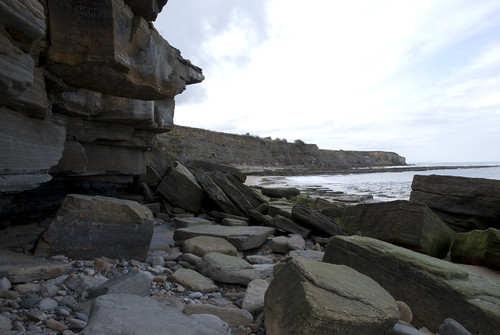
The 1st is the Program Auto setting:
2383142737_0810760587.jpg


The 2nd is a quick play with the HDR settings in Photomatix Pro:
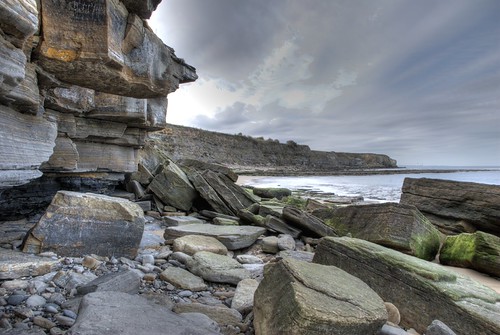
2383969850_3b652409bf.jpg


I like the increased depth of the HDR, but i'm unsure about the 'floating' rock on the upper left side or the sky.:thinking:
Bigger versions of the photo's here
Your thoughts and comments are more than welcome.

Its taken using a Nikon D80 with the stock 18-135mm and a numpty behind the controls:lol:
 
Well, I think you've done a good job with the HDR - its done what its supposed to do (purists - please, no flaming) which is to bring out some detail that isn't apparent in the original shot. Its quite subtly done too (which is good). As you can see, you've got some decent detail in the rock top left and the seaweed on the right.

Nice one.

If I can be a bit picky, its not the most interesting composition - its not bad - there's a nice vertical thirds (on the LHS) but dead centre horizons tend to lose impact and this pic has a sense of leading you out of the frame to the right with nowhere much to go.

But as an exercise in HDR, its fine.

MV
 
For my 1st attempt i'm quite happy. I should maybe spend more time on it, both setting up to take the photo and playing with hdr
 
I think you need to be more selective with your choice of images to go down the HDR road.
I find images with lots of colour in the original shot always work better :)

The start image is a little "Plain" if you know what I mean lol
The sky is quite blown in the first shot so its always going to be difficult to HDR it.

Try and dig out an image with lots of colour in and see the difference
 
I'm no HDR hater, and I think you did OK for a first go, but seriously, look at all that interesting play of light and shadow you've lost in the HDR version which is there in the original! The answer here was to make two exposures one for the foreground and one for the sky, then combine the two, OR use a grad filter to hold the sky back a bit.

This a down and dirty edit placing the sky in your HDR shot into the original, which is something like you'd have got if you'd done it in camera. Just had a final quick play with the levels. :)

conbined.jpg
 
Cheers CT:clap:
I've been busy with shifts, hence the delay in getting back. I guess i can 'rob' one of the skies from one of the original shots and put it into the final HDR.
It was a trial run, just a curious play with HDR
 
I think you've done very well for your first attempt at HDR, it can easily look rubbish. How many exposures did you use for this?
 
How many exposures did you use for this?

Thats exactly what I was going to ask, my guess is a single raw file and as the sky is blown in the origional the HDR process hasn't been able to pull back enough detail to sort the sky out.

The foreground rocks are a big improvement on the origional.
 
Hi. It was 7 photos taken at every two stops between the brightest and darkest areas. (this was the guide in Digital Photo mag)
Nice, simple (has to be for me) guide on how to do it, i haven't even got round to watch the dvd that talks you through the whole thing
 
Hi, I,ve also had a mess around with the trial downlload from photomatix and to be honest i,m not convinced enough to want to buy it, but i'll still keep having a dabble and maybe in time i might convince myself. Doe's any body else think its worth investing in?
 
Back
Top