Photoshop experts pls help - Photo painting

DavesPhotos

Suspended / Banned
Messages
2
Edit My Images
No
Dear all - HELP!!!!!!!!!
I'm using Photoshop 6. Does anyone know if there is an easy way of transforming a photo into looking like a painting and / or a pencil drawing? I'm a novice to Photoshop so the easier the better. Thanks in advance for any suggestions.

Dave
 
If you go to filter>filter gallery in PS it will open up all the different filters that are availible, there are several different ones in there that will do the things you need.

Have the picture open that you wish to work on at the same time that way you can see the effect in real time. :)
 
For a drawings I find it is often best to go into greyscale and boost contrast. Find edges can be useful and then have a play with the filters. I find that often the painting ones are not so effective - can't remember if you have "layers". If so duplicate, work on that and blend takes out some of the harshness of the filter. Have plenty of time and have fun.
 
Hi Im new to PS & currently use 6 too.
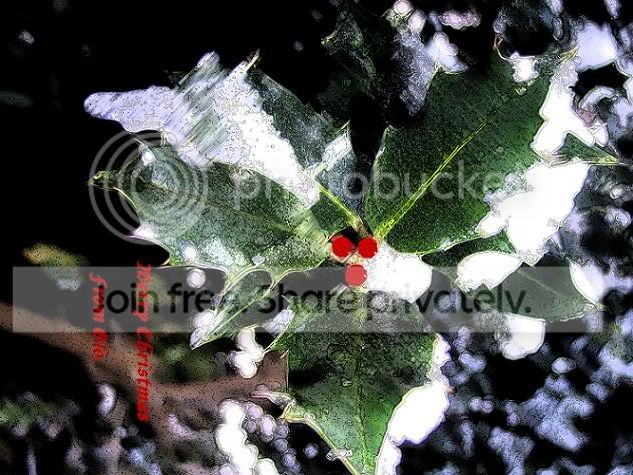
I did this at Xmas from a shot taken in my garden, dunno if its the kind of thing youre looking for ....

CopyofCopyofPicture036small.jpg


I selected the Filter > Brush strokes > Ink outlines and applied a ‘dark density of 20 and a light density of 10 with a brush stroke length of 4.
I then used the Sharpen tool and finished by clicking 'Save as ***'
Simple. Hth.
 
Thanks for the replies folks - I appreciate it. I've tried your suggestions, but they don't really give me what I'm searching for. I'm more looking for how to make a photo into a sort of "watercolour" painting effect. Again - any suggestions would be welcomed!!

Dave
 
Maybe post the photo that you wish to be changed and we can have a try for you?

You'll have to enable image editing in your profile as well though otherwise the edited pictures will just be removed.
 
Back
Top