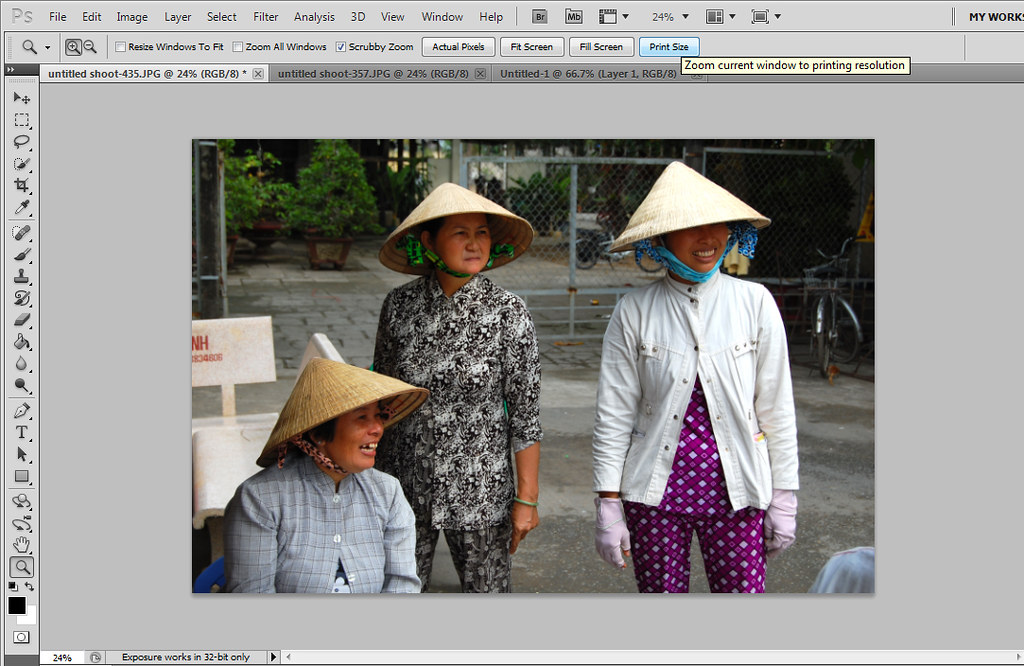
Photoshop CS5 Pic is blurry in zoom tool

Vantage

Suspended / Banned
Messages
781
Name
Roger
Edit My Images
Yes
:shrug:

I started to edit a photo which I took nearly a year ago and all seemed to be fine until I entered zoom mode. Its nice and crisp on fill screen and actual pixel mode but when I click on print size and fit screen it is out of focus noticeably. It’s got me thinking that there were some other pic’s recently that I dumped due to being out-of-focus and maybe its not the case now.

Has anyone else come across this problem and know how to fix it. Is it an update thing or a reset of some kind. Would be grateful for any suggestions!

Cheers

Roger.
 
I have seen this at certain zoom levels.
It looked fine at 25%, 50%, 100% but the in-between values looked soft.
I recall it was something to do with OpenGL. Since I built a new PC I have not seen it.
 
I have seen this at certain zoom levels.
It looked fine at 25%, 50%, 100% but the in-between values looked soft.
I recall it was something to do with OpenGL. Since I built a new PC I have not seen it.

Yeah the interpolation at values other than the ones you've mentioned has always been iffy in Photoshop. It's not actually an OpenGL issue, as it's existed in Photoshop since long before they started using OpenGL.
 
I have seen this at certain zoom levels.
It looked fine at 25%, 50%, 100% but the in-between values looked soft.
I recall it was something to do with OpenGL. Since I built a new PC I have not seen it.

That is normal with versions of Ps older than CS5 I think.
 
Photoshop only displays correctly at 100%, it's near enough at 25% 50% ect but inbetween it can look rough.
 
Sorry for the delay in replying as I hadn't realized that I had any replies.

Not sure what an openGL is and will have to look that up. I am running CS5. I think there is a noticable difference in the focus between Fill Screen and Fit screen and a little in Print size. As there is a difference my poor camera skills cant be blamed:D' Reading the replies I guess its just an issue with photoshop and not a new buggy thing.

The trouble is I don't remember noticing it before so I hope its not my eyes:suspect:

Thanks

Roger

Print size (out of focus)
6171744078_938ab31440_b.jpg


Fill Screen (in focus)
6171243771_591fed6510_b.jpg


Fit Screen (out of focus)
6171743598_b77a8da081_b.jpg
 
What graphics card are you using? Does PS5 think it is using h/w acceleration? To find out click: Edit->Preferences->Performance and there will be a window with GPU settings. What does that say. Is Enable OpenGL Drawing selected. What do the advanced settings say?

Zoom is one of the things that PS offloads to the graphics card.
 
Back
Top