PC started crashing when using Lightroom

Kennett

Suspended / Banned
Messages
142
Name
Barry
Edit My Images
No
I recently bought a Nikon D810 body and since I've been using it, Lightroom has started crashing when I work on the images. When I say "crashing" I mean the whole PC shuts down, not just Lightroom.

This never happens when I work on files from my Nikon D3s body, just from the ones from the D810. Having had a quick look, the processor is an AMD Athlon II 645 3.10GHz running 8mb RAM and it uses a ATI Radeon 5400 Series graphics card. Running Windows 7.

I appreciate this an "Elderly" PC, probably about four years old, and the D810 files are a lot bigger than those from the D3s. Apart from starting afresh with a new PC, is there anything simple that can be done with this one to help with the problem? Any help or advice would be most appreciated.
 
Last edited:
Thanks for the reply Neil. The PC stays off, it's doesn't reboot at all.
 
Might be worth a wee clean out, in case it's overheating?
 
Lightroom 6 is very memory resource hungry. Have you maxed out your RAM to 4GB - on a 32 bit m/c - (it can't quite use all of it I know), or increased to 16GB if on 64 bit m/c. How much video RAM have you got - 1GB is really needed though you can get by with 512MB

My 32 bit PC was put out to grass largely because it wouldn't run Lightroom 6 properly.
 
Thanks again for all the help.

Mike, I'll make sure to give everything a good clean out in the morning.

Cap'n Bill, from the best I can check, I believe I have 4863MB on the graphics card. Not sure what you mean by have I maxed out RAM to 4MB, do you mean I can add to the graphics card? I have 8MB RAM on the PC and it's a 64 bit system.
 
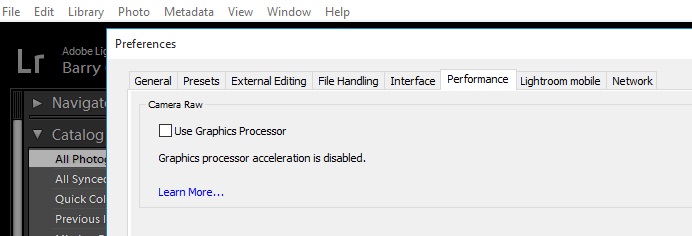
You could check/try turning off the Graphics Processor in Edit/Preferences/Performance.

A lot of users have (somewhat ironically) found NOT using the Graphics Card has improved the performance! :confused:

LR_Prefs.jpg
 
I kept getting a blue screen and/or freezing playing Battlefront. I messed about with GPU drivers but in the end a good clean out of dust sorted it. But after I'd hovered it out a friend on a gaming forum said 'NEVER HOVER YOUR PC' It's to do with the static the hover creates.
 
Thanks again for all the help.

Mike, I'll make sure to give everything a good clean out in the morning.

Cap'n Bill, from the best I can check, I believe I have 4863MB on the graphics card. Not sure what you mean by have I maxed out RAM to 4MB, do you mean I can add to the graphics card? I have 8MB RAM on the PC and it's a 64 bit system.

I didn't know whether you were using a 32 bit pc which takes 4GB max RAM and doesn't use all of it.

Since you have 64 bit pc you might increase your RAM from 8GB to 16GB RAM. That was recommended for my new pc and I have no problems at all.
 
I didn't know whether you were using a 32 bit pc which takes 4GB max RAM and doesn't use all of it.

Since you have 64 bit pc you might increase your RAM from 8GB to 16GB RAM. That was recommended for my new pc and I have no problems at all.
See if you can find this on your PC, this is mine. Depending on what Windows you are on depends how you get there. Just search 'System Information'

My rig 2 by Michael Parker, on Flickr
 
Last edited:
Check your event viewer for any error codes.May point to cause.
  • Open Event Viewer by clicking the Start button
    4f6cbd09-148c-4dd8-b1f2-48f232a2fd33_818.jpg
    , clicking Control Panel, clicking System and Security, clicking Administrative Tools, and then double-clicking Event Viewer.‌
    18abb370-ac1e-4b6b-b663-e028a75bf05b_48.jpg
    If you're prompted for an administrator password or confirmation, type the password or provide confirmation.
 
Thanks to everyone for the advice and help.

In the finish, I bought two cans of Spray Duster from Amazon and thoroughly cleaned the interior of the PC, fan blades ETC (what a mess) and everything now seems to be working well. I went through some of the same tasks in Lightroom that were causing the PC to shut down and so far no problems at all.
 
Always better to start with the basic things:D
 
Back
Top