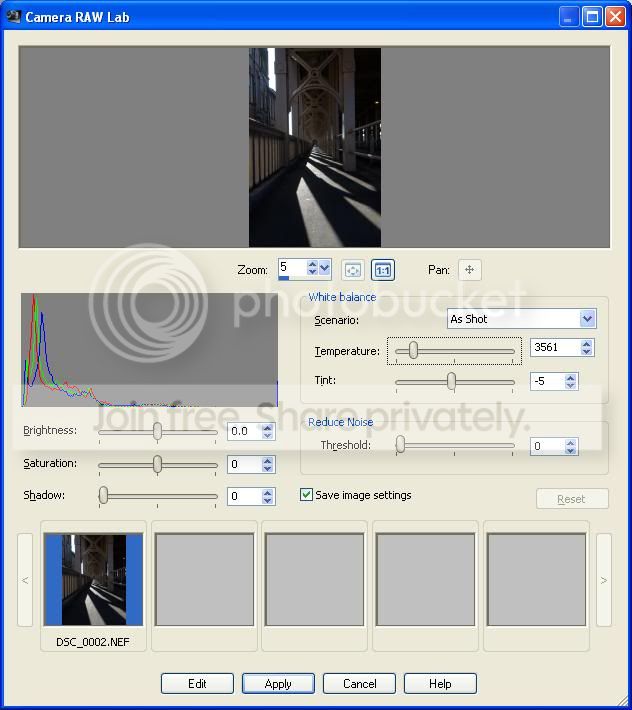
Paintshop Photo Pro X3 Nikon RAW support

davidww

Suspended / Banned
Messages
21
Name
David
Edit My Images
Yes
Hi,

Does anyone else here use Paintshop X3 for work with Nikon NEF files? I've been using it for a while and have been mostly quite happy with it. I Recently purchased a book to improve my skills a bit. The section in the book about importing RAW files shows some controls in the 'Camera RAW Lab' which I don't seem to have. In particular the sliders for Exposure and Sharpness seem to be missing. There also seems to be one less slider to control Noise. Do different RAW file type get different treatment/support?

Having spotted this I decided to have a play with the Nikon utility that came with my camera. Think it was ViewNX? Anyway, I was able to make exposure changes and adjust white balance easily. I saved the changes then tried to open the RAW file in Paintshop. In the thumbnail view within the Camera RAW Lab showed the modified image but when it was selected the image is shown in its original state. Is there anyway to get Paintshop to work with the changes made to the raw file in another application?

Cheers

David
 
Now I don't use PSP but I'm wondering if you have the latest update for that version, sometimes new features are introduced with an update.
I'd also be supprised if theres no sharpening control somewhere in the raw converter, are they different display options?
 
I have paintshop X2 and that has no Raw adjustment for photo files at all ,
It says it does raw but it is raw for some other web file type ...i have been using the canon software that came with camera ...would be interested to know if X3 does edit raw photo files
 
Just had a quick look and this is what I found on the net, this shows 2 noise controls and sharpening with a .NEF file, is yours different to this?

5593703068_166bf61d4d_z.jpg
 
Yep, mine is different. Essentially the same window but missing the sliders for exposure and sharpness. Also the Reduce Noise box has a single slider called Threshold. Doing all this from memory as I don't have the app in from of me. If I can get this baby to go to sleep I'll fire up the other PC and get a screen grab!

I found the video this screen grab comes from and noticed one of the comments indicated the same problem I'm having...

http://www.thedigitalcam.com/raw-image-editing-paintshop-photo-pro-x3


I will check my version numbers too but it's set to self update so it should be bang up to date.


Cheers

David
 
I'm wondering if your camera the d5000 isn't properly supported yet? Have you got an older nikon file to try with it? just to see if theres any difference.

Wayne
 
Also, just tried checking for updates and it returned with no update available.

The Camera RAW Lab window has few options and nothing to alter the view. I've looked in the main program for options but can't spot any. :thinking:

Think I may raise a case with Corel support and see what I get back.

Cheers


David
 
I'm wondering if your camera the d5000 isn't properly supported yet? Have you got an older nikon file to try with it? just to see if theres any difference.

Wayne

Good thinking. Maybe that's it. Don't have a file unfortunately. My D5000 is my first Nikon (and DSLR).

David
 
Wayne, thanks for the test file. I'm afraid the result is the same.

I wasn't able to raise a support case with Corel yesterday but I had a browse on their user forums. Found some more people complaining about the same issue. Sounds like the functionality may have been dumbed down in recent updates. Very strange. Their user community were recommending using camera manufacturer supplied utilities to process the NEF files then saving as 16 bit TIF for import into PSP. I've updated ViewNX this morning. Today's mission is to learn my way round this app and then rework some of the raw images I've worked on previously to see if I can improve results.

Thanks for your replies.

I notice amazon are currently selling PS Photo Pro X3 Ultimate for £28. Even with poor raw support that's a pretty good price!

Cheers


David
 
Dumbing it down seems a strange way to go forwards, especially removing things like exposure and sharpening from the raw converter, it's hardly lightly to encourage customers to buy the product. Sorry the file didn't work, it was worth a try anyway.
Wayne
 
Back
Top