
Over exposed area in light trails

PJS

Suspended / Banned
Messages
49
Name
Paul
Edit My Images
Yes
Can anyone provide any advice please. I am new to photo editing, and although i can do basics, this one has beaten me. Am i able to edit the over exposed bright area that the neon sign made in the middle of the light trails. I have the image as a RAW file and have access to Serif PhotoPlus and Adobe Photoshop
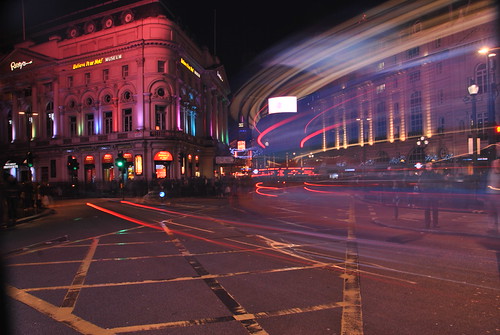


Picadilly Circus at night by Paul_Southgate, on Flickr
 
I had a play and I found the easiest way was to copy a square of the light trails and paste it over, then use free transform warp to get it to fit and match the trails, aA bit of layer masking to tidy up the edges and a bit of clone tool to finish it off.
I won't post the result as you have editing unticked.
Wayne
 
What Wayne said to fix it.

Next time take another shot exposed for the sign and overlay it.

I don't see it as a major problem though, it's what was there, it's easy for us to get too picky about these things.
 
Thanks for the feedback. Will have a play later, will try taking two photos next time.
Wayne, would be interested to see you work if you don't mind. Please feel free to upload if you still have a copy. Still fairly new to this great forum and was not aware of settings you mentioned
 
Here you go Paul.

Wayne

8370283710_7ceff6be66_b.jpg
 
Wayne, thanks. Great job looks a lot better. Will have a go myself later. Once again thanks for advice.
 
Back
Top