Damian Brown
Suspended / Banned
- Messages
- 2,685
- Name
- Damian Brown
- Edit My Images
- No
Tldr: What do you use for sorting by camera time, re ordering manually, and culling?
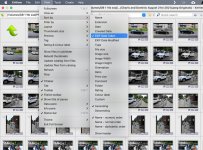
I have been using Photo Mechanic for years now but barely using 10% of what it does so started looking around again to see what else is out there now I'm using a new Mac.
I no longer use it for ingesting so that's not a problem but I do like the ability to sort by Capture Time as a job usually has images from at least two SD cards.
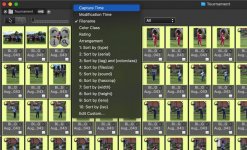
It works way better than Finder (Mac) which often fails to order the images correctly, even though the camera clocks are synced.
I no longer have Adobe bridge which was decent at that, as well as manual re-ordering of images in the browser (something I use Name Changer which has an image browser you use to move images around as you wish prior to renaming, albeit slightly awkward).
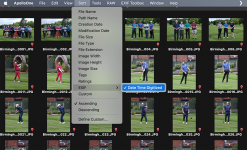
Apollo One has a sort by EXIF (Date Time Digitized) option which works for me better than Creation Date but until I purchase it I can't rename. It's possibly going to be purchased as it's only 25.99 and might be my new best option. Maybe. This is the point of the thread post I guess
Another big feature for me is culling fast, selecting ideally with one button, or as in Apollo One it's cmd+1 (iirc) and after I can delete all those I've selected for trash.
To be fair Finder is fast on the M1 but I like the full screen and even slideshow option with PM and Apollo One.
These seem like very simple functions to me that ideally the Mac could still handle natively in Finder but hey ho. I could get PM again and explore more functions, or go cheap and simple with Apollo One but maybe there's something else out there now.
I have been using Photo Mechanic for years now but barely using 10% of what it does so started looking around again to see what else is out there now I'm using a new Mac.
I no longer use it for ingesting so that's not a problem but I do like the ability to sort by Capture Time as a job usually has images from at least two SD cards.
It works way better than Finder (Mac) which often fails to order the images correctly, even though the camera clocks are synced.
I no longer have Adobe bridge which was decent at that, as well as manual re-ordering of images in the browser (something I use Name Changer which has an image browser you use to move images around as you wish prior to renaming, albeit slightly awkward).
Apollo One has a sort by EXIF (Date Time Digitized) option which works for me better than Creation Date but until I purchase it I can't rename. It's possibly going to be purchased as it's only 25.99 and might be my new best option. Maybe. This is the point of the thread post I guess
Another big feature for me is culling fast, selecting ideally with one button, or as in Apollo One it's cmd+1 (iirc) and after I can delete all those I've selected for trash.
To be fair Finder is fast on the M1 but I like the full screen and even slideshow option with PM and Apollo One.
These seem like very simple functions to me that ideally the Mac could still handle natively in Finder but hey ho. I could get PM again and explore more functions, or go cheap and simple with Apollo One but maybe there's something else out there now.
Last edited: