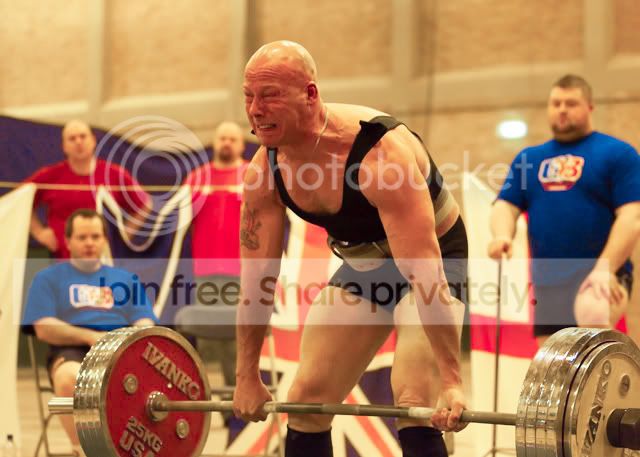
orange tint needs removing

KIPAX

Seriously Likeable
Suspended / Banned
Messages
21,370
Name
KIPAX Lancashire UK
Edit My Images
No
I ahve some pictures I shot in RAW inside a sports hall.. They all ahve an orange tint.. I thought to PP the white balance ...I use BIBBLE PRO and Photoshop but no matter what i do.. I end up with a light mauve colour where there should be white when I use and of the defaults such as incandesent or whatever

Anyone good with either BIBBLE PRO who can do a magic curve or Photoshop.. I spent most of yesterday and cant suss.. taken wiht a canon 1dmkII so either RAW or JPG available... I can then apply to all the pics

heres a small web pic of what I have.. will give an original to anyone why thinks they can do it and kind enough to help :)

tint.jpg
 
Here is a 1 minute edit in LR2 from the copy you posted.

A quick WB adjust to cooler, then an adjustment of the colour channels saturation tab ( I had a play around to see which I liked best)

weightlifter1.jpg
 
Wihtout knowing exactly what people change.. I cant apply it.. saying I had a playw ith this and that doesnt help me to change a whole batch :)

I can do it on photoshop.. When loading I set temprature and its looks OK ..But i dont have noise reduction in photoshop... BIBBLE has the noise reduction but leaves a purple haze even if i apply same temprature adjustment.. So i cant win..

You cant change temprature the same way on a jpg AFAIK in photoshop
 
I use Neat Image for noise reduction its a free download for the basic version and then appears under the filters menu in photoshop hope that helps on the noise front.
 
Pop a link to the RAW so we can have a play.
at nearly 9mb i didnt want everyone loading it to just see what it is with no interest.... bandwidth would go through roof... PM sent :)

I only have bibble pro and photoshop
 
Dont know if this is correct opened jpeg with acr
temp-72 brightness +20 saturation +10

tint2.jpg
 
I think you sent me the wrong RAW file, but I did change it using Canon DPP

tint.JPG
 
whiteflyer... great stuff... But ... you know when I said I only have photoshop and bibble pro? well... :)

and they all ahve the same cast so it dont matter which file :)
 
I sooo should have posted about my orange sports hall shots. I'd love to know how to do it!

I did a photoshoot with kids (not comfortable posting their pics as don't know the parents). They were taken is a yellow-lit hall with orange heaters. Everyone looks like they have been tango-ed.

How did you do what you did? It's amazing!
 
whiteflyer... great stuff... But ... you know when I said I only have photoshop and bibble pro? well... :)

and they all ahve the same cast so it dont matter which file :)

DPP should have come with your camera ?? Or you can download it from the Canon site if you have other Canon stuff installed like zoombrowser.
 
DPP should have come with your camera ?? Or you can download it from the Canon site if you have other Canon stuff installed like zoombrowser.

sorry just sent you a PM on this..

even if i did install it.. you ahvent even given any clues how... just that you did it in there.. am i to presume its all auto ?

its a great job thanks mate.. but of little use if i dont know how to replicate it on the other files eh? :)
 
I just went into file on CS3, clicked on 'open as' and clicked the bottom box (open as). Scrolled down to raw file. It then opens a jpeg as a raw file and gives you the same options. I clicked on 'white balance', clicked auto and then opened file.
I adjusted contrast and slight sharpen.
I'm sure its not the correct way to do it, but it always works for me!

Kev.
 
sorry just sent you a PM on this..

even if i did install it.. you ahvent even given any clues how... just that you did it in there.. am i to presume its all auto ?

its a great job thanks mate.. but of little use if i dont know how to replicate it on the other files eh? :)

Opps :lol:

I just use the white balance colour picker on his tee shirt, and selected Portrait for the Picture Style. You can then select the edits as a recipe and paste this to all your other images and it will sort them all out at once. all this in Canon DPP, which should come with any EOS camera.

Kipax PM sent
 
I just went into file on CS3, clicked on 'open as' and clicked the bottom box (open as). Scrolled down to raw file. It then opens a jpeg .

I never noticed open as .... just tried it with ps2 and it wont open the file.. arrgh... so close.. that would ahve been a perfect answer opening a jpg into the raw window :)
 
I never noticed open as .... just tried it with ps2 and it wont open the file.. arrgh... so close.. that would ahve been a perfect answer opening a jpg into the raw window :)


maybe you need to download a raw reader update of some sort for
cs2? :shrug:
 
Originally Posted by kevshore View Post
I just went into file on CS3, clicked on 'open as' and clicked the bottom box (open as). Scrolled down to raw file. It then opens a jpeg .


Nice tip I did not know about that.
 
If this version is any good as a sample I adjusted your original in CS2 using image/adjustments/select colour and removing yellow from yellow.
To be honest if you have a couple of hundred to do I think it might take a while doing my way

tintedit.jpg
 
I ahve some pictures I shot in RAW inside a sports hall.. They all ahve an orange tint.. I thought to PP the white balance ...I use BIBBLE PRO and Photoshop but no matter what i do.. I end up with a light mauve colour where there should be white when I use and of the defaults such as incandesent or whatever

Anyone good with either BIBBLE PRO who can do a magic curve or Photoshop.. I spent most of yesterday and cant suss.. taken wiht a canon 1dmkII so either RAW or JPG available... I can then apply to all the pics

heres a small web pic of what I have.. will give an original to anyone why thinks they can do it and kind enough to help :)

Does Bibble not have a tint adjustment as part of the WB controls? I'd be surprised if it doesn't TBH. The tint slider just needs moving towards green a touch if you have a mauve colour cast. But you have to get the WB temperature in the right place first.

Pete
 
Try UFRaw. You can select an area of white and it will do the rest. it will remember the settings so you can easily run through the photos.

P.s. send over a RAW file and I'll stick it through UFRaw.
 
If it's the same process for all shots then why not download the eval of lightroom.

Create your own custom develop setting and apply it to the import.

File, import (from device or disk), pick the files, then at the bottom of the import window is a box of Information to apply. Usually I just use this for the metadata import, but there is also an option to apply a develop setting. This was a bonus when I forgot once to change White Balance and shot a whole CF card with the wrong setting.
 
Back
Top