Optimising Images for Facebook so they stay sharp, tutorial.

SamAustin

Suspended / Banned
Messages
4
Name
Sam
Edit My Images
No
Hi guys,

I'm new here, just joined today! I felt that I should contribute something as my first post and therefore I've written a detailed guide on how to optimise images for Facebook.

I'm sure many of you like myself like to spread your most recent images across facebook but often notice the complete lack of quality after the compression stage of uploading (even if you do click "high quality"). So after alot of trial and error I found a perfect way of retaining a majority of the image clarity. So I have linked the tutorial below:

http://www.samaustinphotography.co.uk/optimising-sharp-photos-for-facebook/

I'm well aware there are various tutorials for this around the web already but they are all dated as Facebook recently upgraded the maximum size of images uploaded in late December with the arrival of the new timeline.

Anyway, I hope you enjoy the post and would appreciate it if you shared it with others via fb, twitter..etc if you find it useful.

Thanks for your time,

Sam Austin
www.samaustinphotography.co.uk
 
my virus alert just trapped a trojan after clicking above...:thumbsdown::bat:
 
dude are you serious ?

You sure that wasn't a coincidence or did it appear to come directly from my site ?
 
It may be a false alarm as the site has a 301 redirect from an old domain and this can often be mistaken for a trojan by various security software. I'd be interested to see if anyone else has this problem
 
ok so the file is gone now ? any ideas how I can eliminate this, I'm on a Mac so I'm pretty much immune to most viruses/trojans and completely unaware of this..
 
sorry no idea, I just know I opened the link and a trojan was caught...must be in the page somewhere, if youve used any pirate software or borrowed any code for the page I guess it must be in there somewhere.
 
No problems here at all...Looking at the source of the page there doesn't seem anything wrong either. The description of the security bulletin suggests it is a sql injection vulnerability it is using masquerading in an iframe in the page. There are no frames at all in the source, and such an attack would not download files to your machine either. No idea what you've experienced by seems like a false positive to me. I think the suggestion of pirated software is just ludicrous it is just standard wordpress stuff and no automatic downloads on that page.

Oh and you and your system would not have the rights to delete a file from his server so that is a bit odd as well.

SamAustin - nice write up, will try that some day
 
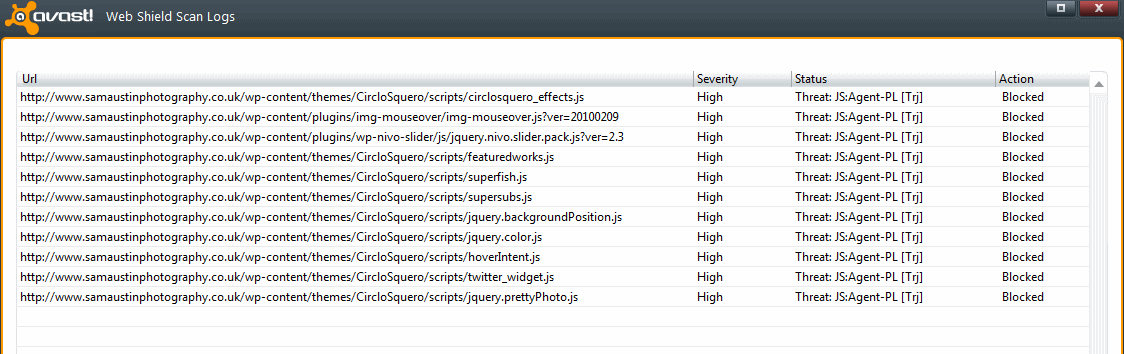
I also got the same threat detected...see below:

Untitled1.png
 
I'll check on another machine later, I wonder whether it is an MSE specific trigger. What kind of file is actually in those caches? Surely it is just the webpage cache in there and not an actual file or software as the MSE trigger suggests.
 
Perhaps you could summarise how to optimise FB images here so that people don't need to visit the external site?

I have an export preset in LR which basically sizes to 960 on long edge and quality 100% - seems to work fine. Also I tick the "HQ" box before I start the upload rather than during the upload.
 
I'll check on another machine later, I wonder whether it is an MSE specific trigger. What kind of file is actually in those caches? Surely it is just the webpage cache in there and not an actual file or software as the MSE trigger suggests.

I've just checked it on another machine. It is fine with Websense, Symantec End Point protection, Enterprise Protection. The IDS nor IPS devices dont get trickered either.

I'm confident there is just a false positive in MSE.
 
SamAustin said:
Hi guys,

I'm new here, just joined today! I felt that I should contribute something as my first post and therefore I've written a detailed guide on how to optimise images for Facebook.

I'm sure many of you like myself like to spread your most recent images across facebook but often notice the complete lack of quality after the compression stage of uploading (even if you do click "high quality"). So after alot of trial and error I found a perfect way of retaining a majority of the image clarity. So I have linked the tutorial below:

http://www.samaustinphotography.co.uk/optimising-sharp-photos-for-facebook/

I'm well aware there are various tutorials for this around the web already but they are all dated as Facebook recently upgraded the maximum size of images uploaded in late December with the arrival of the new timeline.

Anyway, I hope you enjoy the post and would appreciate it if you shared it with others via fb, twitter..etc if you find it useful.

Thanks for your time,

Sam Austin
www.samaustinphotography.co.uk

Image protection?

IPTC captioning, copyright, contact details and instructions?
Watermarking?
Dangers of uploading high res files?

If you're going to do a job then do it properly. Resizing isn't the only consideration for FB images.
 
DemiLion said:
Image protection?

IPTC captioning, copyright, contact details and instructions?
Watermarking?
Dangers of uploading high res files?

If you're going to do a job then do it properly. Resizing isn't the only consideration for FB images.

Btw; using Save for Web means that you've just created an orphaned work.
 
Btw; using Save for Web means that you've just created an orphaned work.
Why? Save for web allows you to keep Metadata, but FB will just dump it anyway.

BTW, here is what Avast pulls up when I visit your site:

samaustin.gif


You might want to check those files to see if they are what you expect them to be.
 
arad85 said:
Why? Save for web allows you to keep Metadata, but FB will just dump it anyway.

Natch. FB now preserves metadata & displays the captioning and copyright details. It started a few months ago.

As for Save for Web; it's inclusion of metadata is unreliable at best, and for pre CS5 is pretty much non existent! :)
 
FB now preserves metadata & displays the captioning and copyright details. It started a few months ago.
Ahh.. didn't know that. Have to say I export most of my files to FB through Lightroom. Will have to check what metadata is being allowed through.
 
No problems here at all...Looking at the source of the page there doesn't seem anything wrong either. The description of the security bulletin suggests it is a sql injection vulnerability it is using masquerading in an iframe in the page. There are no frames at all in the source, and such an attack would not download files to your machine either. No idea what you've experienced by seems like a false positive to me. I think the suggestion of pirated software is just ludicrous it is just standard wordpress stuff and no automatic downloads on that page.

Oh and you and your system would not have the rights to delete a file from his server so that is a bit odd as well.

SamAustin - nice write up, will try that some day

I trust you now accept given the multiple systems multiple av's flagging problems with the site that there may be something wrong?

I clearly pointed out, Ive no idea what may have caused it...I have heard of people using 'free' pirated software that has had some unscrupulous virus' propegated through them hence the comment. hardly ludicrous.

As for deleted file, I was talking about the file that was trapped had been deleted from the webcache (on my machine) never once mentioned deleting anything on the server. fwiw Im using firefox too.

appology accepted in advance. :thankyou:
 
I didn't realise that it had changed to 960px, I've still been uploading at 720. I find Lightroom to be great for exporting images to Facebook using Jeffrey's plugin.
 
I didn't realise that it had changed to 960px, I've still been uploading at 720. I find Lightroom to be great for exporting images to Facebook using Jeffrey's plugin.

Have you got the link for the plugin?
 
Looks like it could be a very helpful guide. An idea to help the guide even more is to post a 100% comparison of how facebook displays the image without this process and with?
 
Scottie68 said:
Have you got the link for the plugin?

Not on my phone, sorry. But if you google "Jeffrey Lightroom" you will find his page, he has quite a few good plug ins.
 
Back
Top