Only 2 monitors... Pah....

arad85

Suspended / Banned
Messages
9,438
Name
Andy
Edit My Images
Yes
I've just put another between my two U2410s...

Now running(from L->R) U2410 U2711 U2410

The U2410s - whilst nearly physically the same vertical size - now look like 1366 x 768 sized displays against a 1920 x 1080....

How did I manage before???? ;) :D

Is 6400 x 1440 (well, 1200 in places) desktop considered overkill?

 
Not overkill at all! I 'just' manage with my two pups.

sGU0Ku6.jpg
 
why is there no photo.
Tsk. I should have known you'd have wanted the computer porn...

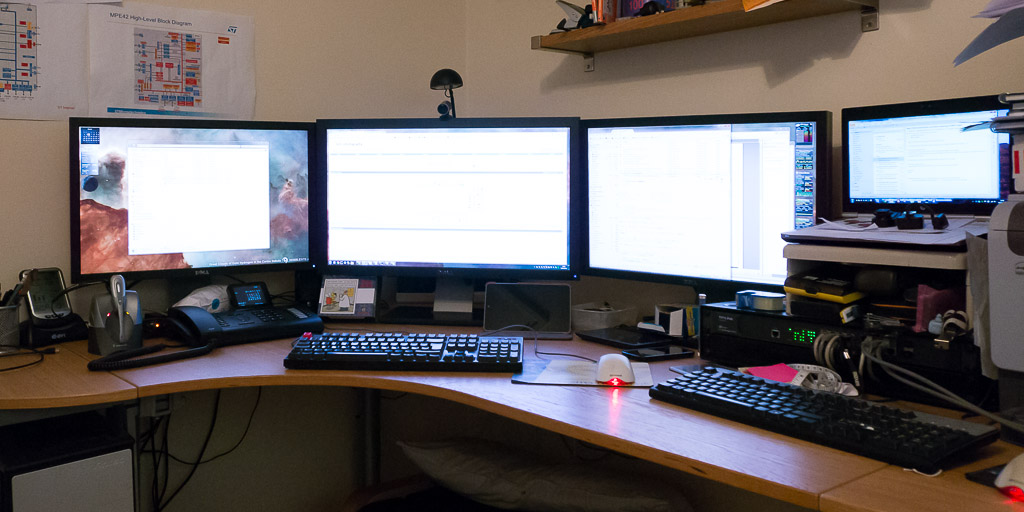
P1010518-1024.jpg


L->R

U2410, U2711, U2410, 13" HP i5 laptop sat ontop of a TP-Link 16 port switch. Underneath the right hand side of the U2711 is a Nexus 7 for size comparisons.

The only thing is, the graphics card that is driving the U2711 is a 610 (low spec) graphics card on a PCI-Ex4 connector. It shows.... I was intending to hang on until Haswell before upgrading... but <strokes chin>
 
better, thanks :D

you could pick up mid-range a twin DP + HDMI ATI card (with eyefinity :cool: ) for a reasonable amount..

(we've got that cordless headset on our reception..)

(and i had one of those MS mice until recently.)
 
better, thanks :D
You just wanted to check I had a clean desk :p

you could pick up mid-range a twin DP + HDMI ATI card (with eyefinity :cool: ) for a reasonable amount..
I had the card and Eyefinity means you have to drive all 3 monitors at the same resolution - which would have been fine if I had bought another U2410 - or another two U2711s....
 
OK Neil... I know nothing ATI related - can you spec me a mid range fanless ATI card with 3 digital outs.... (my turn to ask a question on here for a change :D).
 
Ta. The alternative is a new mobo with either 2x PCIex16 or one where I can use the video out of the 2600K.
 
Now that's some screen real estate!

Serious question Andy...

How do you use the three screens effectively - is one used to monitor processes/status updates and the other two allow you to have two applications open at full res at once?

Cheers
 
I knew times were tough for NASA, but I wouldn't have thought they'd have to outsource their entire command and control operations just yet ;)
 
How do you use the three screens effectively - is one used to monitor processes/status updates and the other two allow you to have two applications open at full res at once?
Well... I only got the third monitor at lunchtime... Having said that....

Firstly, I have 4 virtual desktops, so my virtual desktop is 25600 x 1440 (ish) :D I am organised as:

  • Desktop 1: media work. Typically used for ripping anything, PC based playback and management/recoding of off-air recordings. Left screen media manager, window on my server. Right screen command line prompts (normally 3-4). Centre screen unused. When used for photo, right screen used for main LR display, centre screen used for the 2nd monitor display (or at least that's how I ran it earlier - I may well go centre screen main display, one of the others as a second monitor.
  • Desktop 2: General. Left screen unused so far, middle screen Chrome full screen, right screen thunderbird
  • Desktop 3: Work. Left screen powerpoint, middle screen Chrome (I do a lot of web based interaction) right screen spreadsheet.
  • Desktop 4: VM space. I now have 2 machines running as virtualisation servers (one is being built for Ms Andys' business - I don't YET need 2 virtualisation servers :D). I run ESXi on these so left screen my ESXi machine, right Ms Andys, centre screen used to have the VM windows up

Some observations so far

  • I love the smaller pixel pitch of the 2711s!
  • It's really nice having a centre screen (it is my home screen) as I'm no longer looking at a bezel
  • Something on my system doesn't like the 2 graphics card configuration - the second graphics card is running hot and using a lot of CPU whenever I am on the compose a forum post tab in Chrome plus I am getting visual artefacts as I open/close things - I will probably get the graphics card linked to above
  • I now have sidebar gadgets to the left and right of the "desktop". I always felt the 2 x 2410's didn't give enough screen estate to allow me to do that so only had them on the right before

Looking at the price of the 27" monitors, I'd say this was a real bargain at just over £500 delivered, although given the manufacture and ship date, it looks like there isn't a big demand for them so perhaps I'm alone on that... It's a nice screen which has the same look and feel of the 2410s (buttons/bezels etc...)
 
I knew times were tough for NASA, but I wouldn't have thought they'd have to outsource their entire command and control operations just yet ;)
I do the early morning shift ;) :D
 
My, you must move your mouse pointer MILES in a day! :lol:
 
Thanks Andy

I guess with those three running you can configure your desktops to run just as you like to get the most out of them/ease of use.

PS I bet you never need the room lights on!
 
This graphics card will drive 3 digital monitors at different resolutions :)

Asus GeForce GTX 650 1058MHz 1GB PCI-Express 3.0 HDMI (£77+VAT from dabs)

We've got 2, one running 3 x 1920x1200 and the other running 2 x 1920x1200 and 1 x 1920x1080
 
Not overkill at all. Nice set up.

30" + a portrait 20" here. The 20" is the same horizontal res as the 30's vertical, so once rotated in portrait, both screens are 1600 vertical res. This gives me a 3760x1600. I'm looking for a decent second 20" 4:3 screen for the other side to give me 4960x1600.
 
I've no idea how people manage with just one monitor, I upgraded to three cheap IPS screens at the end of last year and I don't think I could ever go back to one. It's fantastic for gaming too!

116j1b8.jpg


Not sure if I would bother with eyefinity if I wasn't gaming though.
 
Asus GeForce GTX 650 1058MHz 1GB PCI-Express 3.0 HDMI (£77+VAT from dabs)
But it has a fan on it!! As I don't game, quiet is where I am ;)

As I have free overclockers delivery, I've just ordered one of the 7750s - something is not right with the two Nvidia cards running together :)
 
I've no idea how people manage with just one monitor, I upgraded to three cheap IPS screens at the end of last year and I don't think I could ever go back to one. It's fantastic for gaming too!

116j1b8.jpg


Not sure if I would bother with eyefinity if I wasn't gaming though.

That looks like fun (is it F1 201x?). What graphics card have you got feeding them?
 
That looks like fun (is it F1 201x?). What graphics card have you got feeding them?

Yeah F1 2012, at that point I had a single 7950, which worked great for F1 2012 at 5760x1080 but struggled with Far Cry 3 and a few other games on higher settings at that resolution, so I've stuck in another 7950 everything's running so much smoother at the higher settings.
 
Yeah F1 2012, at that point I had a single 7950, which worked great for F1 2012 at 5760x1080 but struggled with Far Cry 3 and a few other games on higher settings at that resolution, so I've stuck in another 7950 everything's running so much smoother at the higher settings.

Great stuff, looks really immersive with 3 screens like that.
 
Sorry got sidetracked.. 7750 should do the job :)

Wonder if the nvidias are trying to run in sli or something daft?
No idea what is going on, but although it works, it definitely isn't happy.. Let's see what ATI are like - my last experience wasn't great but that was a few years ago now.
 
ive never had any bother with ATI to be honest.. got a saph 7850 now and its been excellent (although twin fan'd so you wouldnt like it :D, but you can firmware them up to GTX580 & 7950 levels), had xfx 5770 (single and crossfire), xfx 4650, saph 4550 passive (had a couple of those) and asus 3650 passive (that was a big b****r).

i think thats it?
 
Last edited:
Just had inordinate problems with a laptop with ATI and their drivers some years ago (XP days). It was a works laptop (don't start me). I've never gamed so have never been in need of anything remotely high end so have always had passive cards (I currently have 5 PCs in the room here so any extra fans in the room are bad news).
 
Back
Top