
russellsnr
Suspended / Banned
- Messages
- 3,121
- Name
- Russell
- Edit My Images
- Yes
Solved
Last edited:

Rose (Support & Assistance) Dec 26, 2025, 5:39 AM GMT+1 Hello Russell, Thank you very much for your detailed follow-up and for testing this so thoroughly. We also appreciate you sending the RAW files and sharing the results of your additional checks. After reviewing your case and the files provided, we can confirm the following:
Regarding your question about why the files may appear to work when exported from ON1 Photo RAW or accessed from certain folders: in those cases, the files are no longer treated as untouched native RAW files by PureRAW 4, which can lead to inconsistent behavior. However, this does not change the underlying limitation—PureRAW 4 cannot officially process RAW files from the Nikon Z8 or Z6 III. In short, this issue is not related to macOS Tahoe, Lightroom, or file corruption. It is strictly a camera compatibility limitation in PureRAW 4. Camera and lens support only expands with new major versions of the software. Thank you again for your patience, your detailed testing, and for sharing your findings with us. |

Not tried that but will have a look but it did work before as used it often and think this reply from DXO is a brush off, Russ.What about DNG does PR4 support that? Not ideal but it might be a wprk around if it has support.

In response to @swanseamale47 suggestion, Pure Raw will not process DNGs unless they have come from a camera that uses the DNG format as its native "Raw" format.Thought this was solved but unfortunately it's and the response from DXO although good the final one is a bit confusing to me but then I am an OAP>
Nikon Z8 and Nikon Z6 III RAW files are not supported in DxO PureRAW 4?????
Rose (Support & Assistance)
Dec 26, 2025, 5:39 AM GMT+1
Hello Russell,
Thank you very much for your detailed follow-up and for testing this so thoroughly. We also appreciate you sending the RAW files and sharing the results of your additional checks.
After reviewing your case and the files provided, we can confirm the following:
- The behavior you are seeing in DxO PureRAW 4 is expected.
- Nikon Z8 and Nikon Z6 III RAW files are not supported in DxO PureRAW 4, regardless of how the files are imported (directly from card, via Lightroom, Finder, or third-party software).
- This is why PureRAW 4 reports “format not recognized or image already processed”.
- DxO PureRAW 5 does support both cameras, which explains why the exact same files open and process correctly in the PR5 trial, as you observed.
Regarding your question about why the files may appear to work when exported from ON1 Photo RAW or accessed from certain folders: in those cases, the files are no longer treated as untouched native RAW files by PureRAW 4, which can lead to inconsistent behavior. However, this does not change the underlying limitation—PureRAW 4 cannot officially process RAW files from the Nikon Z8 or Z6 III.
In short, this issue is not related to macOS Tahoe, Lightroom, or file corruption. It is strictly a camera compatibility limitation in PureRAW 4. Camera and lens support only expands with new major versions of the software.
Thank you again for your patience, your detailed testing, and for sharing your findings with us.
Russ.
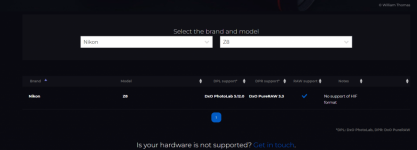
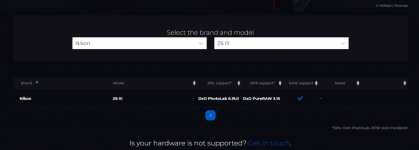
Hi, March 2024 Z8 April 2024 DXO Pure Raw but that has nothing to do with the problem as all worked fine previously, believe maybe DXO does not no what the problem is and the reply from themSeems a bit odd that the Z8 is not supported by PR 4. Out of curiosity did you get your Z8 over a year after you purchased Pure Raw 4?
It will still work with older NEF files. But just as all DNGs are not the same, all NEFs are not the same. The NEF extension only identifies it as a raw file from a Nikon.Tried the DNG and as myotis has said that will not work.
This did work with NEF files previously and don't no why it has stopped.
Sent these screen captures to DXO.
View attachment 470939View attachment 470940
