

No Mike on Win10 issue

stryvya

Suspended / Banned
Messages
1,158
Name
Lennard
Edit My Images
Yes
Hi, I have just bought a Gaming Headset and cannot get the Mike to work, any ideas??

It seems that Win10 will not let you adjust the Slider Control on the Mike input from 0%, see attached.

I have been to various Websites including Microsoft followed all, and I mean all, suggestions but still not able to get this to work,
has anyone had this and got over it.

Would appreciate any help.
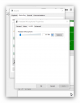
upload_2016-11-13_9-15-53.png
 
Did you install any driver software that came with the headset? If so does that have its own setting?
And has the headset been selected as the "audio input device" first?
 
Hi Ian, Headset HyperX Cloud II, just Plug and Play.
Headset shows up on Windows Sound as default Mike and when I speak I get Green Bars on the right side showing that Win10 is getting an Input
but no output from Win10, if that makes sense!!
 
so the mic is working but youre expecting to hear the mic through the headphone part of the headset?

you dont even get that with a standalone mic if i remember rightly, i imagine you cant get the mic to playback through the default sound output because it could create feedback (i know we're on headphones here, but windows doesn't know that)
 
youre expecting to hear the mic through the headphone part of the headset?

Don`t remember saying that.

but no output from Win10

Ah that's what I said.!!!

OK, so I Dial from my computer (Landline) to Iphone and I can hear my Wife but she cannot hear me. I plug the Headset into Iphone Dial home to Landline Phone and we can both each other.

So as previously stated "no output from Win10"

And to correct a previous statement it downloaded and installed its own Driver.
 
Did you change the default recording device?

View: https://youtu.be/GNfAMN6jNDg


When you say you are seeing the Green bars are these in windows? What application are you using to call the wife, as it might have its own "recording device" selection in it.
 
Back
Top