Nikon NX studio

gjhill

Suspended / Banned
Messages
1,029
Name
gary
Edit My Images
No
Thought I'd try out the above with files from my new Z5 , I hoped it may save me the subscription fee for Lightroom.

Failed miserably it won't let you save the edited NEF file or export it, not tried to print as I can still use Lightroom for that even though I am planning Not to renew

Not a good start to my Nikon ownership
 
Hello Gary

Any edits on a RAW file will stay unless you cancel them. If you close the program & then re-open it, the edit will still be there.
Yes, you can only export as JPEG or TIFF 8/16 bit.
I use it for all my editing as I'm not a professional, so won't pay for programs like Lightroom.
 
That's my problem
After editing it will not export as jpeg
I have raised a call with Nikon suppprt
 
Thought I'd try out the above with files from my new Z5 , I hoped it may save me the subscription fee for Lightroom.

Failed miserably it won't let you save the edited NEF file or export it, not tried to print as I can still use Lightroom for that even though I am planning Not to renew

Not a good start to my Nikon ownership
Raw files can never be saved with edits. Edits are saved "next to" raw files (usually automatically).
 
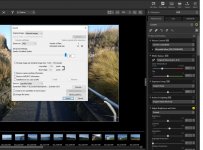
When you hit the 'export' top right, do you get the dialogue box shown?
 

Attachments

  • N X S_1.JPG
    N X S_1.JPG
    404.1 KB · Views: 8
Yes but it then says wrong type of file selected
I am trying NEF to jpg
It is successful if you select a jpeg file and export to jpg
 
I would un-install and then re-install.
Failing that, wait for response from Nikon.

My system - Win10 64bit + HP all-in-one with 16Gb - works ok but rather slow.

Have seen a couple of issues mentioned on Nikon Forums, but rarely get a response as to if the issue has been solved & how.
 
Last edited:
Yes but it then says wrong type of file selected
I am trying NEF to jpg
It is successful if you select a jpeg file and export to jpg
Have you checked that you have the latest version of NX Studio? I believe it should be v.1.1.0 - an earlier version may not have Z5 NEF file compatibility.
 
Have you checked that you have the latest version of NX Studio? I believe it should be v.1.1.0 - an earlier version may not have Z5 NEF file compatibility.
Yes I have downloaded and installed again it is 1.1
I am on macOS Monterey which may be the cause of the problem
 
had an email from Nikon support
they pointed me to a support document dated 15/9/21

nx studio is not yet compatible with Monterey

guess I'll use affinity or Lightroom or maybe give capture 1 express a go

gary
 
I suppose they'll fix it eventually, but it's a shame that Apple's OS updates routinely seem to break things, and (knowing this) it's a shame that Nikon, who must have had early access to Monterey as developers, didn't take the opportunity to make whatever changes are required. NX is a very decent package when it works.
 
Last edited:
it's a shame than Nikon, who must have had early access to Monterey as developers, didn't take the opportunity to make whatever changes are required
But they don't make NX Studio, do they? They commission it from a subcontractor. So the supply chain isn't so immediate.
 
But they don't make NX Studio, do they? They commission it from a subcontractor. So the supply chain isn't so immediate.
Don't know. Capture NX was based on Silkypix. Not sure about Studio, but either way the developers should be on the ball about upcoming OS changes. If it's Silkypix they should be fixing compatibility for their own product.
 
quick update

resolved my problems by registering under the file open menu in nx studio , affinity and capture one so then
open file in nx, make any changes then open in one of the above 2 allows edits and file saves
 
Back
Top