Nikon NEF and TIFF files - just a question

BillN_33

Suspended / Banned
Messages
13,952
Name
Bill
Edit My Images
No
I am using an application that uses TIFF files and will not recognise Nikon NEF, (RAW), files

I can take TIFF 8 bit files in camera using my Nikon DSLR

Is it better to take TIFF files in camera or NEF files and then convert them using software

The reason I ask is that I notice that it's possible to have 16 bit TIFF files ...... can these be produced from Nikon NEF files

or is there really little difference between TIFF 16 and 8 bit files
 
You don't say which Nikon DSLR you have, but I think they are all pretty much the same. From the manual for the D500, "uncompressed TIFF-RGB images at a bit depth of 8 bits per channel (24-bit color)."

From the Grays of Westminster Glossary, "There are two principal advantages in using the NEF RAW file format.

The first relates to the fact that NEF RAW image files contain 12-bit data and therefore have a far greater tonal range compared with 8-bit files such as those saved in the JPEG and TIFF format, which allows much finer control of colour and helps reveal more detail in shadow areas."

If the application you plan to use needs TIFF files, and you want the maximum amount of information recorded, I would save the Nikon RAW NEF file as a 16bit TIFF. Whether you would see any difference of pics taken in average light is debatable, but you 'may' see a difference in scene containing a wide dynamic range. Be prepared for the much larger file sizes too. ;) :LOL:
 
Thanks for your replies - I'm using the D810/D850 for macro shots and the Stacking software that I am using, (initially on a trial basis), can only process TIFF or jpeg files - as I indicated the D850 can take 12 bit NEF or 8 bit TIFF.

Stacking can be time consuming anyway, but it just adds another complication if I have to take NEF files and then convert them to TIFF before importing them into ZereneStacker ....... so I think that I will give Helicon a try before making a decision - Stacking in PS is not bad but the retouching tools in Zerene are easy to use and both Zerene and Helicon allow you to "stack" in 2 ways for Z and 3 ways for Helicon.

I wonder why Nikon only allow the TIFF 8 bit option in camera and not the 16 bit

The file size is not that important as after the "stack" only one image is kept
 
You can import camera-produced raw files and convert to 16-bit tifs in software (ACR / PS, etc) before further actions.
 
I would shoot NEF or jpeg. Shooting an in-camera tiff seems to me the worst of both worlds - huge files that will fill up the media card quickly and take longer to write to it (and transfer later), but still limited to 8-bit and with fewer downstream options than a NEF. If you want a simple solution for conversion to 16 (or 8) bit tiff that will also give you fine control over the conversion process, take a look at Nikon's free NX Studio:


At its simplest, you just need to select images and File->Export. By default, the conversion will match an in-camera tiff or jpeg closely, but there are lots of parameters you can change if you choose.
 
Last edited:
Thanks for your replies - I'm using the D810/D850 for macro shots and the Stacking software that I am using, (initially on a trial basis), can only process TIFF or jpeg files - as I indicated the D850 can take 12 bit NEF or 8 bit TIFF.

Stacking can be time consuming anyway, but it just adds another complication if I have to take NEF files and then convert them to TIFF before importing them into ZereneStacker ....... so I think that I will give Helicon a try before making a decision - Stacking in PS is not bad but the retouching tools in Zerene are easy to use and both Zerene and Helicon allow you to "stack" in 2 ways for Z and 3 ways for Helicon.

I wonder why Nikon only allow the TIFF 8 bit option in camera and not the 16 bit

The file size is not that important as after the "stack" only one image is kept
The file size may be important depending on the setup of your computer. I've just converted a RAW file to Jpeg at max quality, an 8bit Tiff and a 16bit Tiff, and from a 20Mb NEF file, the file sizes were;
2Mb
60Mb
120Mb
And they were from a 20Mp camera, from a D810/D850, the files may be a quite a bit larger. I just found a D850 NEF file online, which was 60Mb, and saved as a 16bit Tiff, it is 260Mb. :oops: :$ :LOL:

Depending on how many images you are stacking, your computer may struggle. I know mine would with the Tiffs. ;) :LOL:

Unless there are wide dynamic rage issues with the images you are taking, I would try it with Jpegs to see what the quality is like.
 
Last edited:
The file size may be important depending on the setup of your computer. I've just converted a RAW file to Jpeg at max quality, an 8bit Tiff and a 16bit Tiff, and from a 20Mb NEF file, the file sizes were;
2Mb
60Mb
120Mb
And they were from a 20Mp camera, from a D810/D850, the files may be a quite a bit larger. I just found a D850 NEF file online, which was 60Mb, and as a 16bit Tiff, 260Mb. :oops: :$ :LOL:

Depending on how many images you are stacking, your computer may struggle. I know mine would with the Tiffs. ;) :LOL:

Unless there are wide dynamic rage issues with the images you are taking, I would try it with Jpegs to see what the quality is like.

Thanks - I've just looked at the TIFF file sizes and as you say they are rather large - with some of the "retouched" files being almost 300mb

I'll give it a try with jpegs
 
There is so much that it depends on...

The D850 (and D810/most cameras) never delivers more than 8bit/channel color (24bit RGB). So there is no penalty to using 8bit there...
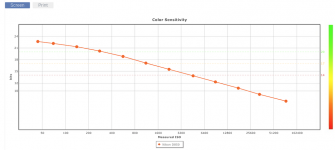
Screen Shot 2021-09-22 at 9.42.41 AM.png

But it does nearly approach 14EV of dynamic range capability at low ISO's. So, if the scene you're trying to record has/requires the dynamic range, then you are better using 12bit NEF's below ISO 12,800, and 14bit NEF's below ISO 400... if recording raw files.
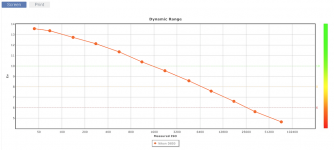
Screen Shot 2021-09-22 at 9.43.12 AM.png

It requires 1bit of data/EV for a raw file (exposure and bits are both logarithmic). But if the scene has a low dynamic range requirement, then 8bit might not really matter there either.
And it does not require 1bit/EV for a processed jpeg/tiff. An 8bit image with a gamma curve applied can display approx 12EV of dynamic range (by compressing excessive/useless highlight data). So again, above ISO 400 there isn't much penalty to 8bit.


The real difference comes in the file processing... both a jpeg and a tiff are processed by the camera based upon the picture styles/settings chosen... and any additional information not required for the output image is discarded. The only difference between the camera generated tiff and jpeg is that the tiff data is not compressed (much larger files) and jpegs are lossy compressed (even more data discarded).

And no, you cannot get 16bit data by storing 8bit data in a 16bit file format. However, you can get much greater accuracy during editing by converting an 8bit image to 16bit... I highly recommend all edits be made in 16bit when possible (minimizes banding and other processing errors).


To simplify... w/ the D810/850 (and most cameras really)... above ISO 400 there is no real penalty to recording 8bit jpegs/tiffs *IF* the camera processing produces an image that is as desired SOOC; or nearly so and additional processing is done in 16bit (in LR, or as 16bit tiff/psd in PS or other program).
Otherwise you are better off recording raw files; 12bit is fine above ISO 400, and there is some small benefit to using 14bit below ISO 400. And in your case you would then want to use software like Nikon's free NX Studio to export/convert the 16bit raw file format into a 16bit tiff format for your final program (the actual bit accuracy w/in those files will depend on what the camera generated).

Personally, for what you are doing I would probably start by choosing a very mild picture style (neutral or flat) for the in-camera processing and record jpegs for stacking. It will just be so much less demanding and save a ton of space/time... you can always decide to try raw>tiff later if you find some shortcoming to using jpegs.

 
Last edited:
Most of that is really nonsense... 8bit/channel (24bit color) can represent neary 17M different colors/tones and more than a human can discern.
Most of the issues come down to the accuracy of the math... it's all math with digital images. I.e. 10÷2 doesn't require much accuracy (=5); whereas 10÷3 requires much more accuracy to avoid rounding errors (=3.3333333333). And you don't really know how much accuracy your edit(s) require.

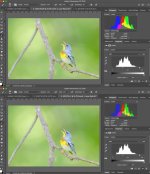
Here I've taken the same 8bit jpeg and applied the same levels adjustments (WP/BP/gamma) to both in PS; except I switched the first to 16bit mode prior to applying the edit. Note the difference in the histograms; the lower image edited in 8bit has a lot of notches in the histogram which is what causes banding; but there are none in the version edited in 16bit mode. And yet the original 8 bit data that was edited is the same in both instances.

(unfortunately the images look very similar because they are screen shots which I had to convert to jpegs and downsample signifcantly)

67754587_2594780100545733_7273935481266503680_n (1).jpg
 
Last edited:
Most of that is really nonsense... 8bit/channel (24bit color) can represent neary 17M different colors/tones and more than a human can discern.
Most of the issues come down to the accuracy of the math... it's all math with digital images. I.e. 10÷2 doesn't require much accuracy (=5); whereas 10÷3 requires much more accuracy to avoid rounding errors (=3.3333333333). And you don't really know how much accuracy your edit(s) require.

Here I've taken the same 8bit jpeg and applied the same levels adjustments (WP/BP/gamma) to both in PS; except I switched the first to 16bit mode prior to applying the edit. Note the difference in the histograms; the lower image edited in 8bit has a lot of notches in the histogram which is what causes banding; but there are none in the version edited in 16bit mode. And yet the original 8 bit data that was edited is the same in both instances.

(unfortunately the images look very similar because they are screen shots which I had to convert to jpegs and downsample signifcantly)

View attachment 330826
Good to know, thanks
 
Back
Top