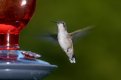
Nikon D5: raw vs jpeg

sk66

Suspended / Banned
Messages
9,557
Name
Steven
Edit My Images
Yes
I've been working with the D5 for about a month now, and I've been seriously exploring the benefits (?) of raw with this camera. I've found a few things I thought I would share.

First is that at ISO's 1600 and above I don't see any additional "recovery" in the raw files compared to the jpegs. I haven't really tried lower ISO's, this isn't the camera for that. But based on the specs/tests I expect it will be minimal, if at all, even at minimum ISO.

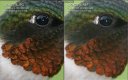
Secondly, the raw files seem to handle hard speculars oddly... there tends to be a scattering of blown pixels around the catchlight which are not present in the jpegs. The jpeg instead has a larger catchlight, but it looks better overall IMO. This example is not "worse case" but it is evident, and this characteristic also affects other highlights/details. (I don't normally leave these types of catchlights in the image... I'm not certain how my D4/D810 renders them in raw files offhand but I don't recall it being "notable").

jpeg (edited) vs raw (SOOC) 100% crop
jpeg_raw.jpg

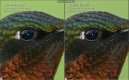
Here I have edited both in LR to the best of my abilities. Minimal tweaks to the jpeg. Numerous edits to the raw file; probably 3-4x the time required. The "noisy" characteristic of the catchlights/speculars remains even with significant noise reduction (~15% luminance and 50% color). Additionally, looking at the details in the darks near the eye, the jpeg looks a little better IMO (raw file sharpening is at 50% with 50 masking). I could potentially have removed more noise from the catchlight (luminance) with a negative effect elsewhere, or selectively treated/removed with additional time/effort.

raw vs jpeg edited 100% crops (note that they have flipped sides)
jpeg_raw_edits.jpg

I'm not trying to say that the raw files are crap, they're fine. But I'm not seeing any real benefit to using the raw files... There might be a benefit if you have to push the colors hard or the WB is way off, but the files do not seem to tolerate it as well as my other Nikons. There is a real possibility that LR processing for the raw file is not nearly as optimal as the built in jpeg rendering. I did open the raw file in Nikon's software (which I hate) with *slightly* better results, but still not as good as the jpeg IMO... that doesn't make a lot of sense to me as the software automatically applies the jpeg settings. And yes, with a lot of tweaking/fussing I could probably have gotten slightly better results from the raw file that I did... but I don't see the point.

So my current approach with the D5 is to record raw + jpeg to separate cards and just use the jpegs by default... when I have a jpeg I can't quite get what I want/need from then I'll revisit the raw file editing. In the long term, I may go to only recording jpegs... we'll see.
To show how minimal these differences really are, here's a 1:4 view of both...
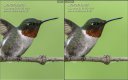
edited.jpg


These results are very relative…

I trust the JPGs as they were generated by Nikon
but the RAWs could have been rendered in many
other subjective versions as is this version.
 
Thanks Steven .. really useful and you will remember what i did with D810 RAW's versus jpegs - for me the camera seems to be able to "do better" than most people ....... but I think that it depends on ISO and shooting conditions ..... (and obviously any pp skills) ....... as far as my skills are concerned in normally shooting conditions at sensible ISO levels I found the jpegs "better" than RAWs ...... obviously jpeg OOC were better but also when I had used my limited pp skills on both the RAW and the jpeg

I think many are confused by this RAW mystique, (promoted throughout Forums and the internet), - thinking that somehow jpegs are inferior and if they do not take RAW images somehow they are less of a photographer


These results are very relative…

I trust the JPGs as they were generated by Nikon
but the RAWs could have been rendered in many
other subjective versions as is this version.

I'm not sure what your point is. Of course they are relative... and both images could have been rendered in numerous other "subjective versions." To minimize the subjectivity I did my best to edit them to the same final result (looks like my BP is slightly off on the raw file, and no, there were no more highlights/whites recoverable in the raw file).

My point is that, after ~ 1month of extensive testing I see little (if any) benefit to using raw files w/ the D5. In fact, my opinion is that the built in jpeg processing does something to the data that is not replicable from the raw file, and with better results. What exactly that is I don't know. It is possibly a limitation with current raw converters (latest versions of ACR/LR/Capture), I don't know.
 
Last edited:
I think many are confused by this RAW mystique, (promoted throughout Forums and the internet), - thinking that somehow jpegs are inferior and if they do not take RAW images somehow they are less of a photographer
I think many overestimate their abilities to edit a raw file to the maximum potential... and some will likely question my abilities here as well.

With the D810 I feel I can consistently equal the jpeg output. But if it is only "equal," then why waste the time/effort? At low ISO's (<800) and with very demanding scenes I feel I can consistently exceed the jpeg output... but not every scene/image requires it. With the D810, my default is still to record raw + jpeg and use the raw files first. But, for me the D810 is a different tool for use in different situations.
 
Last edited:


For both these reasons, I would be curious to
try my hands at the same RAW file.
Sure, and if anyone else wants to try have at it. (The goal should be to create "the same best image" and see if one file can generate a better result for you (i.e. edit the jpeg as well))

Here are both files SOOC.
13.2MB Jpeg
24.8MB raw
 
Pardon me for being a trifle blunt here but it's a highly subjective thing you applying here - especially using the Internet (purely, jpg/png) with its own colour restrictions.

How can you expect a RAW file to look like anything SOOC? It's the RAW, native format of the sensor! It needs some processing applied to it. Also, it's got a minimum of an extra 4 bits of data per channel and you try to compare it with an edited JPG?

That's why @Kodiak Qc has replied as he has.... it can only ever be subjective.

The only 'real' test is to print out from a TIF on the same paper/inks/dyes in both cases - even then you're subjecting yourself (even as you said) to your own editing abilities - and anybody else's for that matter.

I admire your tenacity in formulating a robust, test comparison regime but it simply as a case of 'horses for courses'. It's been said before; it's impossible to compare an 8bit image against a 12/14bit image unless you're using additional metrics eg, convenience etc,.


Cannot download unless I create and
account or download a software!


Tx Paul, got it!


I took your .NEF in my converter and treated it in a
very "mathematical" way as I do with mine that are
not to reflect any artistic intent:


No sharpening
no saturation
no WB
just DRL and mid-tone taming
Pure Nature.

As I did not see the live bird, I have no reference to
its real appearance…


_SGK0316pp%201.jpg


I will be most happy, if you wish so, to send to you
in any file format, resolution, size and compression
you may want.
 
Last edited:
How can you expect a RAW file to look like anything SOOC? It's the RAW, native format of the sensor! It needs some processing applied to it. Also, it's got a minimum of an extra 4 bits of data per channel and you try to compare it with an edited JPG?
Where did you get that from? I have no expectation that a SOOC raw file would compare favorably to a jpeg. What I expect is to see "a benefit" for my increased time and effort in editing the raw file. I am well aware that the raw file uses 14bit data. But at best case the D5 is recording slightly over 8bit color, and it is only slightly more than 6bit color (and ~8bit tonality) at ISO 1600.

The 8bit jpeg format isn't really the limitation here... the non-selective/default editing (in camera) could be, depending on how it is set up.

Edit: the reason for showing the unedited raw file was to show the odd catchlight behavior SOOC (which cannot be corrected).
 
Last edited:
I will be most happy, if you wish so, to send to you
in any file format, resolution, size and compression
you may want.
No need... the real question, and the whole point of this is, can you produce an equivalent image from the jpeg?
I already know the answer is yes (I can)... so what's the point of using the raw file?

Edit: I would be interested in knowing if you were able to eliminate the odd catchlight characteristic (surrounding hot pixels)... but based on the edits done, I don't think so.

BTW, you've created a bit of a "halo" around the bird. (I suppose it could be compression "banding")
 
Last edited:
You'll find the same point discussed at length in any of the Fuji forums; there is no doubt that the raw file will contain more data, but if you don't need it, and the camera engine, be it Nikon or otherwise, is doing a good job in the conversion, then save yourself the time, use the jpeg and spend more time behind the camera.

Of course all these elements are subjective, but increasingly people are finding the camera engines are getting more sophisticated in their processing.
 
You'll find the same point discussed at length in any of the Fuji forums; there is no doubt that the raw file will contain more data
Not really, in this case the limitation is the accuracy of the information (8bit or less). To say otherwise would be like saying converting a 14bit raw file into a 16bit tiff/dng somehow generated more information/accuracy.
but increasingly people are finding the camera engines are getting more sophisticated in their processing.
And truly, only the manufacturer can know all of the specifics of how the sensor/ADC/etc work/respond in their camera.
 
Last edited:
Edit: I would be interested in knowing if you were able to eliminate the odd catchlight characteristic (surrounding hot pixels)... but based on the edits done, I don't think so.
Cosmetic considerations were not in the scope
but natural rendition.

BTW, you've created a bit of a "halo" around the bird. (I suppose it could be compression "banding")
After publishing I noticed that…
so I did not create but the compression.
 
Not really, in this case the limitation is the accuracy of the information (8bit or less). To say otherwise would be like saying converting a 14bit raw file into a 16bit tiff/dng somehow generated more information/accuracy.

Not sure I agree with this - each photosite on the sensor is recoding an analog signal which is being passed through an analog to digital converter - be it 12 bit or 14 bit typically, giving either 4K or 16K individual variations in terms of the count of the number of photons hitting that particular photo site.

Each photosite records only one colour - typically either red, green or blue, and when the raw file is decoded for use, the demosaicing algorithm will combine the correct three photosites to create a 'colour pixel' with over 4 trillion combinations. The problem comes when you actually want to look at the file; there's not a device known to man at this stage that can display that level of granularity, and even if there was, our poor old eyes have not got a cat in hells chance of distinguishing them anyway.

So it usually maps back to an 8 bit representation (jpeg,your monitor etc); 8 per colour channel, 24 bit image, sometimes called 32 bit on monitors because people like to round things up etc, giving some 16 million individual variations - still more than the eye can distinguish.

Now back to my point - you can choose with a raw, as part of the conversion, which of the 4 trillion variations you want mapped into the 16 million. If you push or pull exposure, you are in effect telling the mapping algorithm to skew the mapping to one side, and therefore in effect draw more detail from the lower or upper of the range and so on.

A raw file does contain more information than a jpeg.

Whether you need it or not, I think we agree on that.
 
A raw file does contain more information than a jpeg.
It doesn't matter how many decimal places you add, the accuracy of the information will be limited by whatever is lowest. At ISO 1600 the D5 is recording/delivering just over 6bit color from the sensor (18.9 bit total). Putting that into a 12/14/16bit file changes nothing but the file size.

Screen Shot 2016-06-15 at 9.45.28 AM.png

In fact, most cameras barely exceed 8bit color at any setting, and the D5 never does. The main negative you are incurring by using 8bit jpegs with most cameras is a potential loss of fidelity (steps) w/in the DR (the photon/electron count you mention). But at ISO 1600 the D5 is just under 8stops/bits of PDR, so no real loss.
(*PDR is different/less than the engineering DR reported by DXO)

With the D5 they have introduced "optimized jpeg compression" which is why the jpeg is still half as large as the 14bit raw file. And it's probably another part of the reason why I am seeing no notable increase in recovery/editability from raw files (at higher ISO's anyway).
 
Last edited:
Ok serious question here from someone who came from film, but never developed my own.
How did people cope back then, for me it was a case of getting it right when I took the picture, in the case
of slides it was even for unforgiving.
If you knew you had set the camera wrong you could ask the developer to push the film but other then that
you had little control, other the a preference for a particular brand that gave you the tomes etc you liked
So how did we cope without all this post processing faffing about ?
For me it's jpeg all the time, tried RAW and just couldn't see the point in wasting time of PP trying to get it
to look as it does on the camera
 
It doesn't matter how many decimal places you add, the accuracy of the information will be limited by whatever is lowest. At ISO 1600 the D5 is recording/delivering just over 6bit color from the sensor (18.9 bit total). Putting that into a 12/14/16bit file changes nothing but the file size.

In fact, most cameras barely exceed 8bit color at any setting, and the D5 never does. The main negative you are incurring by using 8bit jpegs with most cameras is a potential loss of fidelity (steps) w/in the DR (the photon/electron count you mention). But at ISO 1600 the D5 is just under 8stops/bits of PDR, so no real loss.
(*PDR is different/less than the engineering DR reported by DXO)

With the D5 they have introduced "optimized jpeg compression" which is why the jpeg is still half as large as the 14bit raw file. And it's probably another part of the reason why I am seeing no notable increase in recovery/editability from raw files (at higher ISO's anyway).

Thanks for that - so having read the background to the test (http://www.dxomark.com/About/In-depth-measurements/Measurements/Color-sensitivity), the basic message is that the noise per photosite reduces the effective range of values that can be returned and reliably distinguished from one another (ie. the variances need to be greater than the noise level to count). So even if I could have 16K measurements with a 14bit ADC, because each 'jump' or graduation needs to be higher than the base noise level, the number of effective graduations will be reduced.

Given no sensor is noise free at any ISO, even at the lowest level, I can see the sense of this, so yup, I get the point.
 
Last edited:
Ok serious question here from someone who came from film, but never developed my own.
How did people cope back then, for me it was a case of getting it right when I took the picture, in the case
of slides it was even for unforgiving.
If you knew you had set the camera wrong you could ask the developer to push the film but other then that
you had little control, other the a preference for a particular brand that gave you the tomes etc you liked
So how did we cope without all this post processing faffing about ?
For me it's jpeg all the time, tried RAW and just couldn't see the point in wasting time of PP trying to get it
to look as it does on the camera

:-)

Couldn't agree more on the last point.
 
Ok serious question here from someone who came from film, but never developed my own.
How did people cope back then, for me it was a case of getting it right when I took the picture, in the case
of slides it was even for unforgiving.
If you knew you had set the camera wrong you could ask the developer to push the film but other then that
you had little control, other the a preference for a particular brand that gave you the tomes etc you liked
So how did we cope without all this post processing faffing about ?
For me it's jpeg all the time, tried RAW and just couldn't see the point in wasting time of PP trying to get it
to look as it does on the camera
You did have quite a bit of adjustability in the darkroom, but yeah... it was much more "get it right" and move on...

IMHO, most spend most of their raw editing time just to get the file up to SOOC jpeg levels. And most have not really spent any time testing/optimizing the jpeg settings for their optimal results (either SOOC, or to enable greater editing).

*I don't generally advocate/recommend a jpeg only approach... but I do believe that in the majority of instances it is more than adequate.
 
Last edited:
You did have quite a bit of adjustability in the darkroom, but yeah... it was much more "get it right" and move on...
.

Yes but like myself, not everyone had a darkroom, so had to rely on our local print/camera shop, film being pricey, you learnt to get it right ................. hopefully;)
 
Well, I have finally found an image where raw would be a benefit w/ the D5... I completely messed up the shot because I had switched settings for a different subject/situation and forgot to switch them back. Anyway, I was able to recover about a stop of overexposure, some of which was baked into the jpeg and unrecoverable (it's still a crap image).

I'm not sure why I'm seeing this difference now. My best guess is that it's due to having set the in camera jpeg settings for less editing...i.e. increased contrast a bit, etc. I could go back and set the jpegs completely flat again which might "fix" it. But I think jpegs mostly processed SOOC + CYA raws to the second card is the best answer... at least for me, for now. (NEFs are still much noisier and harder to work with)

_SGK0688.jpg _SGK0688-2.jpg
 
Well, I have finally found an image where raw would be a benefit w/ the D5... I completely messed up the shot because I had switched settings for a different subject/situation and forgot to switch them back. Anyway, I was able to recover about a stop of overexposure, some of which was baked into the jpeg and unrecoverable (it's still a crap image).

Since RAW has a larger dynamic range than that of a JPEG it makes sense that you can of course recover the data since its was probably underexposed in the first place even though the JPEG/histogram is reporting somewhat different results.

I'm not sure why I'm seeing this difference now. My best guess is that it's due to having set the in camera jpeg settings for less editing...i.e. increased contrast a bit, etc. I could go back and set the jpegs completely flat again which might "fix" it. But I think jpegs mostly processed SOOC + CYA raws to the second card is the best answer... at least for me, for now. (NEFs are still much noisier and harder to work with)

The reasons your NEF's are harder to work with and noisier is because you're probably underexposing inspite of what your histogram and the subsequent JPEG info is telling you.
I found that since I work in soley in RAW (Jpegs dont cut it for me) I had to establish what the working ceiling of the sensor is and subsequently use a completely different exposure approach, totally ignoring the information relayed by the histogram,
Not ideal but if I want to work in RAW with the cleanest files, its the only way.
Why we cannot have RAW histograms inbuilt in this day and age is beyond me.
 
Last edited:
Since RAW has a larger dynamic range than that of a JPEG it makes sense that you can of course recover the data since its was probably underexposed in the first place even though the JPEG/histogram is reporting somewhat different results.
Depends on the ISO... with the D5, at ISO 1600 and above everything fits w/in an 8bit jpeg file. The difference is almost certainly that the jpeg contrast/exposure setting caused it to discard the information.

Why we cannot have RAW histograms inbuilt in this day and age is beyond me.
I don't think there is such a thing as a raw histogram... there can only be a histogram once the raw data is converted into an image, which necessarily involves processing. You can get closer if you set your camera's jpeg settings very flat so it better matches the default processing your program applies. Or you can try uni-WB if you're really determined and you don't mind all of your images starting out green. But it's still hit/miss... my D4 was very close, my D800 lied badly no matter what I tried.
In the end, I found it not worth the hassles...
 
Back
Top