

D
Deleted member 19071
Guest
Hi, if anyone can help with this would be great.
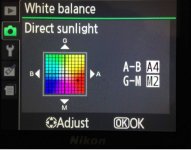
I've found an old Nikon to play around with for personal work but I don't love the white balance basic adjustment options. I've not used it yet which is why I'm asking the questions first. Included the usual cloudy, fluorescent, sunny etc, I'm used to using kelvins on my Sony's and just wondered if there was a conversion chart of A-B/G-M values. So if I wanted 5000k what would the values be for A-B/G-M. Is the answer as basic as just putting the dot nearer the blues if I wanted a cooler option.
Thanks again.
Col.
I've found an old Nikon to play around with for personal work but I don't love the white balance basic adjustment options. I've not used it yet which is why I'm asking the questions first. Included the usual cloudy, fluorescent, sunny etc, I'm used to using kelvins on my Sony's and just wondered if there was a conversion chart of A-B/G-M values. So if I wanted 5000k what would the values be for A-B/G-M. Is the answer as basic as just putting the dot nearer the blues if I wanted a cooler option.
Thanks again.
Col.

