New Router for Adsl

sep9001

Suspended / Banned
Messages
5,610
Name
Kev
Edit My Images
Yes
Hi

We do not have fibre broadband in our area and am currently using the old TalkTalk router with my plusnet adsl connection. It is time to upgrade the router and am looking for a decent dual band router with a good wifi range and with modem built in.

At present looking at the Asus range, with Asus DSL-AC68U being one. However looking at various sites it is not clear if this will work on adsl.

Anyone use this one with adsl and does it work, are there other I should look at. Looking at spending between £60 to £70. The Asus DSL-AC68U in the price range are used, so does not have to be new.

Thank you

Kev
 
What is it that you actually require.

A router
A modem
An wifi access point

It sounds to me like you desire that latter first and foremost but go straight down the solution path for an all in one solution and replacement.

There are many ways that lead to Rome as the saying goes. For example if your internet connection is stable then you could use your talk talk router/modem in something that is called bridge mode, basically just turning it into a modem.

That way you could use nearly any router on the market without worrying whether it has a modem or ADSL support.

However if the reason for a change is that your WIFI isn't good enough then you may be able to just plug in a WiFi access point. However if you have a range problem that isn't necessarily resolved by a new router or wifi access point anyway.

It all depends on what the actual problem is you are trying to resolve.
 
What is it that you actually require.

A router
A modem
An wifi access point

It sounds to me like you desire that latter first and foremost but go straight down the solution path for an all in one solution and replacement.

There are many ways that lead to Rome as the saying goes. For example if your internet connection is stable then you could use your talk talk router/modem in something that is called bridge mode, basically just turning it into a modem.

That way you could use nearly any router on the market without worrying whether it has a modem or ADSL support.

However if the reason for a change is that your WIFI isn't good enough then you may be able to just plug in a WiFi access point. However if you have a range problem that isn't necessarily resolved by a new router or wifi access point anyway.

It all depends on what the actual problem is you are trying to resolve.
Hi

I just want to replace my modem/router. The wifi range is not very good, I have already used another router to extend the wifi, but I am hoping that one of these Asus router/modem will help resolve the wifi issues and I only have to use one router.

Thanks
 
It will all depend on your wall and ceilings. If one can't penetrate them it is unlikely another can. I've been there and done it. My ASUS AC3200 provides no improved signal to my talk talk ISP router.
 
It will all depend on your wall and ceilings. If one can't penetrate them it is unlikely another can. I've been there and done it. My ASUS AC3200 provides no improved signal to my talk talk ISP router.
Thanks. I have had the old netgear dg834gt ones before and they have been okay, the only issue with them is that they are not wireless n and are very old now.
 
Cannot recall the model number but I chose a Billion over an Asus that was not that good either with settings or Wi-Fi
 
Cannot recall the model number but I chose a Billion over an Asus that was not that good either with settings or Wi-Fi
Thanks

Was it the 7800n?
 
I've got the 7800n on a shelf. Best broadband modem I've ever had. Easily squeezed another 2.5Mbps out of my connection compared to the BT ADSL modem.

Wifi wise, same story can't penetrate my walls. Excellent broadband modem though.
 
Update

Mine is a the Billion Model BIPAC 7800DXL

PS and I am on PlusNet ADSL service :)
 
Have you checked that you're using the clearest wifi channel

Have you oriented your wifi aerials for the best signal strength

You say you're running two access points - hopefully these are on different channels but have the same ssid ?
 
Thanks, what download speed do you get.

Firstly, i was never happy with the free Plusnet routers and switched to Netgear which never let me down but with the advent of Fibre (which I have yet to take up due to costs) I wanted a more versatile router that could be connected to the BT modem should I ever go Fibre.

The stats currently are:-
SNR 4.4
Attentuation 53.0
DL rate 3727
UL rate 719
 
Firstly, i was never happy with the free Plusnet routers and switched to Netgear which never let me down but with the advent of Fibre (which I have yet to take up due to costs) I wanted a more versatile router that could be connected to the BT modem should I ever go Fibre.

The stats currently are:-
SNR 4.4
Attentuation 53.0
DL rate 3727
UL rate 719
Can you do the Snr tweaks on the dxl model? On my n I went to the router IP address and then append /snr.html and you can tweak it. I was able to get a stable faster speed out of it. Saying that 3.7 at 4.4 looks pretty poor already.
 
Have you checked that you're using the clearest wifi channel

Have you oriented your wifi aerials for the best signal strength

You say you're running two access points - hopefully these are on different channels but have the same ssid ?
Hi

Yes have check the channels and made sure I am using ones that are less used in the area.

Both routers using a different channel.

Thanks
 
Personally I would just get a wireless access point instead of a whole new router.

A router, an access point and a modem are three different things.
ISP's just bundle them into one device these days and call it a 'router'
 
FWIW I had some issues with Wi-Fi periodically dropping out in the furthest reaches of the house. I didn't want a Wireless Extender (flawed idea) or Powerline Adapters (seurity concerns) nor an additional Wireless Access Point unless absolutely necessary (electricity consumption).

The already existing Wireless Access Point (bought for a fiver from a boot sale!) has detachable external antennae. I substituted the stock antennae with slightly higher gain ones. I've not seen a drop out since. The penalty has been a slight drop in signal strength in the vicinity immediately above the access point, but not enough to make a noticeable difference.

The problem with continuing to use your existing modem in bridge mode, is the running of yet another continuously switched on device (another router/access point) and increasing power consumption. On a power meter, the drop in power consumption going from normal WAP/router/modem mode to bridged modem mode with the WiFi switched off isn't much.

Going dual-band too, again will increase energy consumption and only brings real benefit when the 2.4 GHz band is already congested.

Admittedly these things generally consume somewhere between 5 and 10 Watts, which on their own won't make a significant difference to the electricity bill / burning of fossil fuels, but generally trying to reduce the vampire energy drain in your home still merits consideration.

So, practical advice, if you have some Wi-Fi signal in the far reaches of your home and a wee boost to the signal strength will be enough to stop drop outs occurring, then a device with detachable external antennae (or better Wi-Fi coverage) might solve your problem. If there are areas in your home which are complete dead zones, then you're looking at installing additional Wireless Access Point(s) to cover those dead zones, preferably connected to your main 'hub' via Cat 5e, if not power line adapters.
 
I'm using a TP-Link TD-8817 ADSL modem bridged to my Firewall, and having attached a meter to it this morning, it's only consuming 1.6-1.8 W, compares quite favourably with the old TalkTalk router which used to clock-in at 5-6W with WiFi disabled.

https://www.amazon.co.uk/TP-LINK-TD...1477822222&sr=8-1&keywords=tp-link+adsl+modem

If you are thinking about using separate devices, it's an option worth considering.
 
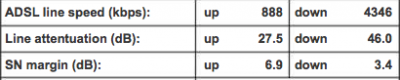
Thank you all for the help and suggestions, any idea if the stats below look okay:

Screen Shot 2016-11-01 at 06.04.20.png


If not what should they be, as when I check the internet speed on a pc connected wired to the router I get anything between 560kb to 3.5mbps.
 
Do you know how far away your home is from your exchange?
If you don't know, this site should help you find out where your exchange is: https://www.samknows.com/broadband/exchange_search

Your downstream line attentuation [SIC] looks a bit high, but it does correspond (loosely) with your download speed.

My min downstream attenuation is currently 39.5 with a max downstream data rate of 6752 kb/s. It should better given that I'm 1.4 mile (2.2 km) away from the exchange. That said, it doesn't seem atypical for my area.

Check broadband speeds in your area:
https://www.broadbandspeedchecker.co.uk/broadband_speed_in_my_area_v2.aspx

Some useful info from speedguide:
http://www.speedguide.net/faq/what-is-considered-good-dsl-line-attenuation-371
 
Back
Top