New photographer HELP!

filip123

Suspended / Banned
Messages
9
Name
Filip
Edit My Images
No
Hello everyone.

I have recently found one of my parents old cameras (Hitachi HDC-641E).
When i first found it i took out the sd card and put it into my laptop to take out some family photos so it can be empty for me to use.
Then i put it back in and the screen of the camera goes black and after some time says 'card error'.
I have bought a new card with the same MB (64) and it is still doing the same thing.
When i take the SD card out the camera works fine, however i want my photos to save to the SD card.
I'm not sure what the issue is as it was working perfectly a couple days ago.

If anyone has any ideas please tell me!
Thank you!!
 
For now, just put the old card aside - you don't want to lose any data if there is any. :facepalm:

Secondly, you may need to format the new card in the camera I expect. I have no experience of that particular camera, but I have known this problem in other units.
 
For now, just put the old card aside - you don't want to lose any data if there is any. :facepalm:

Secondly, you may need to format the new card in the camera I expect. I have no experience of that particular camera, but I have known this problem in other units.

i cant format it as when i put the sd card in the screen goes black (however the camera is still turned on) and the menu button wont work - is there a way to format it from my laptop? (mac)
 
Ah! That's not good - sorry I missed that. :rolleyes:

In that case, I'm afraid I don't know. :(

Someone may be along in a while who has seen this before, so give 'em a little time.

Good luck. (y)
 
Make sure the card is not set to lock on the side.

If you formatted the card on your computer you may need to do it on the camera. If you are sure there is nothing left on the old card I'd try reformatting the old card in the camera.

That camera also has internal memory so you might want to connect it to a computer to see if there is anything to download.

Could be a bad new card. (At the risk of a daft suggestion, are you sure you haven't got a new 64GB card as the maximum is 1GB on that camera).
 
Make sure the card is not set to lock on the side.

If you formatted the card on your computer you may need to do it on the camera. If you are sure there is nothing left on the old card I'd try reformatting the old card in the camera.

That camera also has internal memory so you might want to connect it to a computer to see if there is anything to download.

Could be a bad new card. (At the risk of a daft suggestion, are you sure you haven't got a new 64GB card as the maximum is 1GB on that camera).
i have got a 64GB but the old SD card was also 64GB and so i thought it would be okay? The old SD card used to work i don’t know why it doesn’t anymore
 
Hi and welcome to TP

Firstly .a surmise
That you handled the camera &SD correctly i.e. turned off the camera before removing and inserting the card.

Next to bear in mind is to make sure the SD cards "write protect" switch is not 'on'

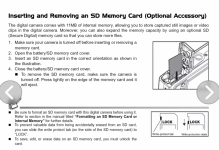
So, for reference I could not find model 642 but did find 651 user manual and this page covers usage of SD and (models) internal memory.

Screenshot_20250226-182623.png
 
i have got a 64GB but the old SD card was also 64GB and so i thought it would be okay? The old SD card used to work i don’t know why it doesn’t anymore

Are you *quite* sure the old card was 64GB and not 64MB. If the camera is as old as it sounds then it definitely wouldn't be able to manage a 64GB card.
 
Are you *quite* sure the old card was 64GB and not 64MB. If the camera is as old as it sounds then it definitely wouldn't be able to manage a 64GB card.
If the SD card max is the same as the 651 manual I found then it can take up to a 1GB card.
 
Are you *quite* sure the old card was 64GB and not 64MB. If the camera is as old as it sounds then it definitely wouldn't be able to manage a 64GB card.
It says 64MB i’m very confused about the situation - i will try and purchase a 1GB card and see if that works … thank you!
 
Are you *quite* sure the old card was 64GB and not 64MB. If the camera is as old as it sounds then it definitely wouldn't be able to manage a 64GB card.
I now understand what you mean - the old card was in fact 64MB and not 64GB. Need to learn how to read before getting into stuff like this. Thank you so much! Would a 1GB card work, or will it need to be under 1GB?
 
If the SD card max is the same as the 651 manual I found then it can take up to a 1GB card.
Would i be able to use a 1GB card, or will it need to be under, as the smallest i can find on amazon is 1GB
 
Would i be able to use a 1GB card, or will it need to be under, as the smallest i can find on amazon is 1GB
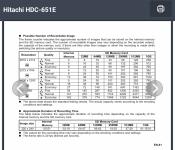
I can only post the page for the slightly different model number I found, that I hope helps

Screenshot_20250226-214342.png
 
Last edited:
Make sure the card is not set to lock on the side.

If you formatted the card on your computer you may need to do it on the camera. If you are sure there is nothing left on the old card I'd try reformatting the old card in the camera.

That camera also has internal memory so you might want to connect it to a computer to see if there is anything to download.

Could be a bad new card. (At the risk of a daft suggestion, are you sure you haven't got a new 64GB card as the maximum is 1GB on that camera).
I can only post the page for the slightly different model number I found, that I hope helps

View attachment 446638
I'm assuming this means i can use a 1GB card as it is listed up to and including 1GB on this table? Thank you so much for your help
 
I'm assuming this means i can use a 1GB card as it is listed up to and including 1GB on this table? Thank you so much for your help
Yes, 1GB is the maximum capacity.
 
Seems card isn't totally essential, cam has internal memory of 11Mb. But SD cards up to 1Gb supported ... & said to be 'optional'.
 
Seems card isn't totally essential, cam has internal memory of 11Mb. But SD cards up to 1Gb supported ... & said to be 'optional'.
as it is an old family camera i dont have the wire which is used to export the photos and so my only way is through the sd card
 
as it is an old family camera i dont have the wire which is used to export the photos and so my only way is through the sd card
There is nothing in the specs in the manual about which type of USB port it has .......bearing mind it's age & physical size it will likely be micro USB as I surmise USB A would be too big.

USB cables are quite common and can be bought for a few £'s

If in doubt, if you have local camera shop perhaps drop in there to make sure you get a suitable cable?
 
Might be a mini usb. The micro ones look flat while the mini ones are older and are chunkier.


You can still get micro usb cables all over the place (eg poundland) while mini ones are a bit harder (Amazon).
 
Might be a mini usb. The micro ones look flat while the mini ones are older and are chunkier.


You can still get micro usb cables all over the place (eg poundland) while mini ones are a bit harder (Amazon).
A good point re: micro or mini USB
 
Back
Top