New pc for lightroom

They look OK - I personally like the fact that they start at 16Gb memory. If it were me, I'd be tempted to up the primary SSD to 1Tb (it's not a lot more to do so, and riunning our of spce on C is a real pain!), and swap the secondary HDD to a SSD - since you'll be doing a lot of data access / saving via that disk (as it 't your data disk).
Depending on the quantity of photos you take (and how big they are), you can probably 'upgrade' a 2Tb HDD to a 1Tb SSD, if funds are tight (but 2Tb would be better, longer term).
Which model you 'need' will again depend on the size of images (processing power goes up significantly if you're using a 50Mb camera rather than a 24Mb one).
 
There's a lot of personal preference involved - I'd be tempted by the "Best Value" (£851), but then swap the drives to a 1Tb and 2Tb SDD, bith 870 QVO 's, up the CPU to an intel i7, drop the graphics to an NVidia GT1030 (unless you want to play games, LR doesn't really work the GPU), and drop the WiFi (as I have a wired connection to my router - which will beat WiFi in performance every time).
That bring it to £1020 - but it's really a case of looking at your budget - you'll still get a good machine without all the upgrades (I'd go i5 at a minimum though, or AMD equivalent), and if you have a bigger budget, going for 32Gb, etc is always a good option (you can also go for faster SSD's, etc).

 
Even the most pricey one would be better with RAM doubled to 32GB but that shouldn't be too much to add on.
My ten year old one has 16GB RAM it was a lot at the time but now it feels slow compared to the two year old one specced for editing 4K video seamlessly.
Having said that powerful video card has become vital now and makes more difference to overall performance as software has evolved to make use of it.
 
Last edited:
Size of drives depends on how much stuff you have & where you keep it, but for me a 500Gb system drive is enough plus a 2Tb storage drive ...
 
How many memory slots does it have? If you have the option to add more memory such as another 2@16GB sticks later then I think that looks fine although the Ryzen 5 card is not the fastest so this will ultimately slow the system down but as always it’s a balance between spend and performance.

edit: here’s an article which may help (or not!) with regards to performance and the various processors/cards etc.
 
Last edited:
Just for reference. I've got amd ryzen 5 3600, with 32g ram, and a 1650 gpu. Photoshop and capture one run fine.

If anything, I'd upgrade the stock cooler, as the quiet case will get pretty toasty.
 
PCSpecialist is a good site to use. I've bought 2 desktops in the past from them. Can't fault them. Bought my 2nd in November.

They have a good forum for help.

Don't go for Windows 11 yet. There's lots of problems with it. I personally am not upgrading any time soon until I have to.
 
Last edited:
Personally, I'd go for a 500GB primary drive and SSD secondary one. I would also want a 5GHz WiFi adaptor unless you have a cabled Ethernet connection to your router. You will find 2.4GHz speed limiting.
 
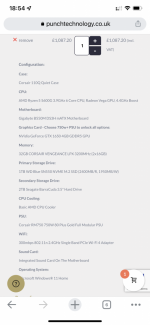
Any thoughts on this spec?View attachment 338522
It would be FINE, but some things just seem thrown in for no obvious reason. This is 5600G APU with VEGA graphics but you are getting a separate card which is better but not a monster either. And if you are why not instead get a better 5600X chip then?
NVME could be a little faster like at least WD 750, or even 850 if you get the X rated CPU.

And you certainly don't need or want noisy 3.5" 2TB drive. These are worse than waste of money. Much worse. Get something external. It will at least be quieter and portable.

It is all not a big deal today at all for just Lightroom but could be some time down the line. This platform will be essentially non-upgradable with the next refresh so probably the only changes you can do will be faster GPU or 5900X. Next chip will use a different AM5 socket.
 
Back
Top