


Garry Edwards
Moderator
- Messages
- 13,475
- Name
- Garry Edwards
- Edit My Images
- No
Another project that we can do whilst stuck indoors . . .
And following on from Brightfield lighting, where only the background is lit, and all that we can actually see of the subject is the edges, or other areas that distort the passage of light.
Darkfield lighting is the opposite, it involves lighting the glass and nothing else, and I used the same nearly empty bottle of after shave. It has a fairly complex shape, with various bulges, convex and concave surfaces. All of the branding on the front takes the form of labels. That’s a pity, it would photograph better if the branding was integral to the moulding. It still has a drop of that green smelly stuff inside…
When people photograph glass without trying very hard they usually crop off the bottom of the subject. This makes life easier, but in these example shots I’ve shot ‘full length’. Full length involves including whatever the object is standing on, and here I placed it on a piece of shiny black acrylic, which can create a very strong reflection – sometimes too strong, people really ought to experiment with all sorts of different surfaces such as acrylic, plain glass, ceramic tiles and various found materials.
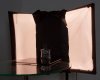
The setup shot above is the basic arrangement I used for my brightfield lighting shots, with a softbox masked off with Cinefoil at the edges. Here though, although I used the identical softbox/table arrangement I masked it off the opposite way, with the centre blacked out but with light escaping at the sides. You’ll see that the masked off area is providing a black background, the acrylic base is providing a black reflection and light from the sides is catching the edges of the subject and defining its shape. It’s as simple as that!
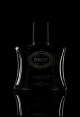
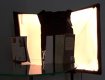
But there’s not a lot of detail showing so our next step is to use a couple of reflectors to push a bit of light onto the front and front edges. This setup shot, below , shows how it’s done, with pieces of A4 white paper supported by a book on each side.
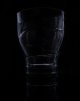
So now we have this
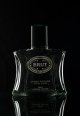
You can see the result in the photo above, and it’s clear that the reflectors have lit the front pretty well in addition to putting more light on the edges. You can adjust the amount of light reflected back onto the front of the edges and the front of the subject very easily, to make it brighter just move the reflectors closer, to make it darker, do the opposite. By this point, the shot is becoming less of a darkfield shot, and you may feel that the lighting is overdone, but all that I’m trying to show you here is what you can do, not what you should do – you have to make the decisions yourself.
I then shot a variation, I simply removed the softbox with the blacked out centre section and shot the product against a black wall - it was actually a white wall but of course it photographed as black because it was unlit. This meant that there was now no light at all, so I substituted a pair of honeycombed standard reflectors, as below.
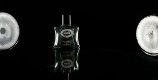
Changing to this lighting arrangement didn't produce a "better" shot but it did allow further options, in particular it allowed me to put a lighting gel on to another flash and to use this to light the background. As almost always, I also added a honeycomb, to control the spread of the light.
So, this is what we now have.

That's my standard blue gel, and the effect isn't what I wanted because the blue is too bright for me. All of these lights are being used at very close distances and have been set to the lowest power possible. But the honeycombed and gelled light, even though it’s on minimum power, is still too bright and the solution is simple, just double up the lighting gel, this will reduce the power by at least one stop, but in this case I think it reduced the brightness by about 1.5 stops.

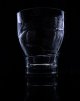
And this is the result It might even have been a good idea to double it up yet again, to get a more subtle effect, but you can experiment with this yourself.
You’ll see a distinct line between the lit background and the surface of the circular table, you can either leave it where it is or you can easily edit it in Photoshop but as always in my tutorials the photos shown aren't edited.
One very important point…
Absolute cleanliness of the glass surface is critical, it will show every mark. The particular product photographed here had been lying around in a drawer for a while and was in far from perfect condition, but really you need to photograph new items, after cleaning them thoroughly. For these tutorials, I just use items that I happen to have lying around.
So, we've started with Brightfield lighting, this produces a high key effect that often works brilliantly but all that can photograph is obstruction to the passage of light, that is it will show any engravings, printing on the glass and of course the edges and any other bits where the light has been diffracted. Sometimes Darkfield lighting can work better but the result is inevitably dark and sometimes a bit gloomy, so sometimes it can work to start of with Darkfield lighting but to also push a bit of light through from behind, as in the shots above.
And there's something else that we can (sometimes) do - if the subject has anything that has a positive relief (sticking out of the glass) - then we can add an extra light, honeycombed of course, at a very acute angle so that it just catches the relief, which accentuates it. There's no positive relief on this bottle.
And finally, I'm always banging on about using lighting gels.There are loads of different ones available but nearly all needs are covered by having just 3 of them - red, green and blue - because they can be made much brighter or darker simply by increasing or reducing the amount of light that we push through them, and we can change the colour simply by combining any two of them. I do however have just one that does its own job, and I'll try to get around the swear filter by double spacing - it's called b a s t a r d amber, and here's the colour. I can't show you the full image because it's NSFW.

It's as simple as that. If you have any questions just ask, but more importantly, please have a go and post your results here.
And following on from Brightfield lighting, where only the background is lit, and all that we can actually see of the subject is the edges, or other areas that distort the passage of light.
Darkfield lighting is the opposite, it involves lighting the glass and nothing else, and I used the same nearly empty bottle of after shave. It has a fairly complex shape, with various bulges, convex and concave surfaces. All of the branding on the front takes the form of labels. That’s a pity, it would photograph better if the branding was integral to the moulding. It still has a drop of that green smelly stuff inside…
When people photograph glass without trying very hard they usually crop off the bottom of the subject. This makes life easier, but in these example shots I’ve shot ‘full length’. Full length involves including whatever the object is standing on, and here I placed it on a piece of shiny black acrylic, which can create a very strong reflection – sometimes too strong, people really ought to experiment with all sorts of different surfaces such as acrylic, plain glass, ceramic tiles and various found materials.
The setup shot above is the basic arrangement I used for my brightfield lighting shots, with a softbox masked off with Cinefoil at the edges. Here though, although I used the identical softbox/table arrangement I masked it off the opposite way, with the centre blacked out but with light escaping at the sides. You’ll see that the masked off area is providing a black background, the acrylic base is providing a black reflection and light from the sides is catching the edges of the subject and defining its shape. It’s as simple as that!
But there’s not a lot of detail showing so our next step is to use a couple of reflectors to push a bit of light onto the front and front edges. This setup shot, below , shows how it’s done, with pieces of A4 white paper supported by a book on each side.
So now we have this
You can see the result in the photo above, and it’s clear that the reflectors have lit the front pretty well in addition to putting more light on the edges. You can adjust the amount of light reflected back onto the front of the edges and the front of the subject very easily, to make it brighter just move the reflectors closer, to make it darker, do the opposite. By this point, the shot is becoming less of a darkfield shot, and you may feel that the lighting is overdone, but all that I’m trying to show you here is what you can do, not what you should do – you have to make the decisions yourself.
I then shot a variation, I simply removed the softbox with the blacked out centre section and shot the product against a black wall - it was actually a white wall but of course it photographed as black because it was unlit. This meant that there was now no light at all, so I substituted a pair of honeycombed standard reflectors, as below.
Changing to this lighting arrangement didn't produce a "better" shot but it did allow further options, in particular it allowed me to put a lighting gel on to another flash and to use this to light the background. As almost always, I also added a honeycomb, to control the spread of the light.
So, this is what we now have.
That's my standard blue gel, and the effect isn't what I wanted because the blue is too bright for me. All of these lights are being used at very close distances and have been set to the lowest power possible. But the honeycombed and gelled light, even though it’s on minimum power, is still too bright and the solution is simple, just double up the lighting gel, this will reduce the power by at least one stop, but in this case I think it reduced the brightness by about 1.5 stops.
And this is the result It might even have been a good idea to double it up yet again, to get a more subtle effect, but you can experiment with this yourself.
You’ll see a distinct line between the lit background and the surface of the circular table, you can either leave it where it is or you can easily edit it in Photoshop but as always in my tutorials the photos shown aren't edited.
One very important point…
Absolute cleanliness of the glass surface is critical, it will show every mark. The particular product photographed here had been lying around in a drawer for a while and was in far from perfect condition, but really you need to photograph new items, after cleaning them thoroughly. For these tutorials, I just use items that I happen to have lying around.
So, we've started with Brightfield lighting, this produces a high key effect that often works brilliantly but all that can photograph is obstruction to the passage of light, that is it will show any engravings, printing on the glass and of course the edges and any other bits where the light has been diffracted. Sometimes Darkfield lighting can work better but the result is inevitably dark and sometimes a bit gloomy, so sometimes it can work to start of with Darkfield lighting but to also push a bit of light through from behind, as in the shots above.
And there's something else that we can (sometimes) do - if the subject has anything that has a positive relief (sticking out of the glass) - then we can add an extra light, honeycombed of course, at a very acute angle so that it just catches the relief, which accentuates it. There's no positive relief on this bottle.
And finally, I'm always banging on about using lighting gels.There are loads of different ones available but nearly all needs are covered by having just 3 of them - red, green and blue - because they can be made much brighter or darker simply by increasing or reducing the amount of light that we push through them, and we can change the colour simply by combining any two of them. I do however have just one that does its own job, and I'll try to get around the swear filter by double spacing - it's called b a s t a r d amber, and here's the colour. I can't show you the full image because it's NSFW.
It's as simple as that. If you have any questions just ask, but more importantly, please have a go and post your results here.
Last edited:





 untitled-224.jpg