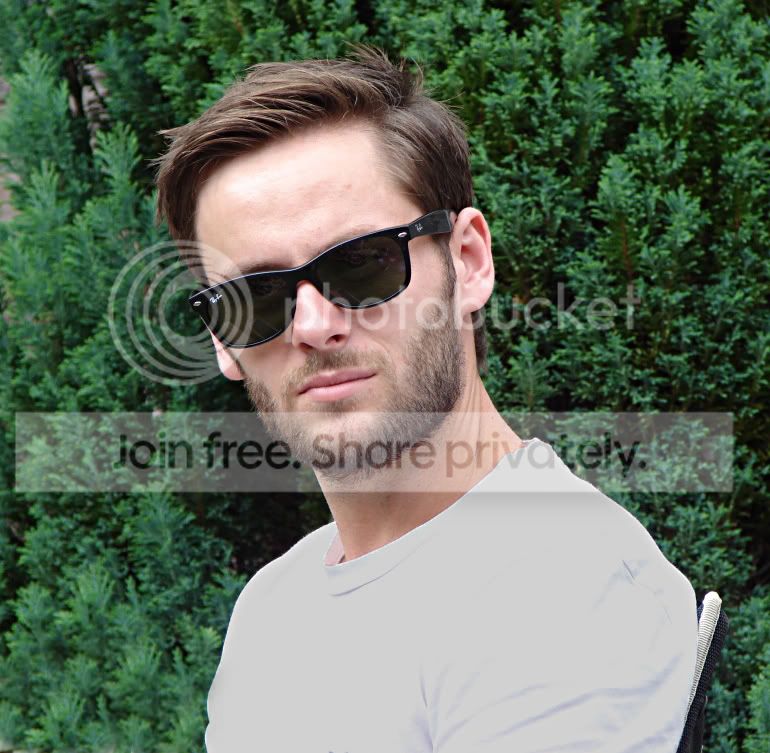
New at this so be gentle.........

green_rizla

Suspended / Banned
Messages
25
Name
Peter
Edit My Images
Yes
Hi All,

I'm new to this. I've just bought a new (well second hand) camera. Panasonic Lumix DMC-FZ30 and thought I might try my hand at some proper photography.

Shutter speeds, ISO, priorities, filters is all a bit gibberish to me so I'm going to have a lot of learning to do.

Hope to put up a few piccies as I go along and would love some criticism good or bad so I can take some better ones.

This one is one I snapped off back in the summer of my son (he is too bloody handsome for his own good that boy).

DSC02692.jpg


Peter
 
Welcome to the forum.

The shutter, ISO and aperture are all one big learning curve and there's lots to read on here to help you out.

Looking at the EXIF data you were on the right aperture setting (F3.5) for a portrait, I'm assuming this is the widest for your camera and lens. The ISO was at a low 80 which is good for daylight and low noise.

I'd have maybe moved the chair out of the way and framed it so that the gutter down the wall wasn't visible. also the t shirt does look a bit dazzling but I'm assuming this was more of a candid shot so you had little control over what he was wearing.

Just my opinion of how it could be improved, I'm sure others will chip with more tips and pointers.

Good points are it's in focus and sharp with the correct exposure and settings for the environment.
 
Last edited:
Thanks Jimmy,

You comments are much appreciated. It was an "off the cuff shot" and the camera was on auto. It was a bright sunny day and he was facing south early afternoon.

How could I sort the "glaring" on the shirt ???? Would it have been better with a filter on the lens of some description ????

Cheers
Peter
 
Sorry......should have said "the camera was on "portrait" not auto.
 
Short of changing the t shirt which wasn't really an option you had at the time I'm not aware of anything you can do filter wise to darken it unless someone else knows more.

In Photoshop I've very quickly selected the t shirt and reduced the exposure of it (there will no doubt be a better way of doing this than exposure). A quick crop and clone out of the chair and a slight sharpen... could be a much better edit but I did it very quickly to give a rough idea.

ed.jpg
 
welcome to the forum Peter, it is as you say a long learning curve, but hey we all started somewhere- enjoy your new hobby and help and advice is always available here, should you need it

Les :wave:
 
Back
Top