New AMD Computer Build using Existing CPU

Marcus Geezer

Suspended / Banned
Messages
3,522
Name
Marcus
Edit My Images
Yes
I currently have a pre-build purchased from PC World a few years back, and now after a bit of time my tolerance for it's (lack of) speed is wearing a bit thin. It was just about ok for my 10MP and 12.1 MP RAW files but now I'm on a 5D MkII the 21MP are a bit much for it to handle. It also takes its time opening and closing images and the thumbnail reviews in Bridge take too long and for my larger composites it takes yonks to process and save! I constantly get warning messages Bridge and Photoshop are using excessive memory.

I've been researching and researching and for the moment think my processor is ok, but I'm seriously lacking in RAM however my existing board only allows max of 4Gb.

System as it is.
CPU: AMD Athlon II x3 440 3.0Ghz
MOBO: M2N68-LA with on board graphics GPU Nvidia Geforce 6150SE
Micro-ATX case
500Gb drive Win 7 64 plus photoshop etc.
2Tb drive with all files on.
3Gb RAM
Optical drives
Random Micro-ATX PSU

I'm going to recycle the processor, the optical drives, the hard drives, and put it together with new items to form the following;

Case: Coolermaster Elite 334u
MOBO: Asus M5a99x EVO 990x (allows max of 32Gb)
CPU: AMD Athlon II x3 440 3.0Ghz
Graphics Card: Asus HD 540 1Gb
RAM: 16Gb (2x8Gb) DDR3 1600
PSU: Coolermaster Elite 500W
500Gb drive Win 7 plus photoshop etc.
2Tb drive with all files on.
DVD-Rw etc Optical drives

Excluding the bits I have, on Ebuyer the price for the components seems to be about £250 which is something I can afford at the moment. I understand I'll need a fresh install of Win 7 as the one I have is OEM installed and probably linked to the original MOBO.

I'm hoping this will future proof my system a little so when I'm ready I can fit one of the AMD Bulldozer CPU's and upgrade the RAM to 32Gb. Probably also invest in an SSD for Win 7 Etc.

For reference I use my PC primarily for photoshop and bridge. I play music, browse t'internet, simple office type tasks. It isn't a gaming machine and I think the most demanding thing I do on is it processing my composites of which the largest PSD file is nearly 1Gb. I revert to factory install of Win 7 about every 6 months to clear the rubbish that slows itself down.

Am I taking a sensible approach regarding this? Will I see a benefit using the same processor but increased RAM on a new motherboard? Comments welcome!
 
I'd be inclined to check your processor usage while using photoshop and bridge, I'd bet it's pretty high..


No point getting 32gb memory, you won't use it all. Bedsides windows home won't support more than 16.

Also if you're reinstalling every 6 months you need to assess what you're installing. Nothing should need that amount of reinstalls.
 
Last edited:
I'd be inclined to check your processor usage while using photoshop and bridge, I'd bet it's pretty high..


No point getting 32gb memory, you won't use it all. Bedsides windows home won't support more than 16.

Also if you're reinstalling every 6 months you need to assess what you're installing. Nothing should need that amount of reinstalls.

Hi Neil. Do you think the processor is a limiting factor for me here? I know a triple core 3.0Ghz isn't state of the art, but was hoping it would be ok for my photoshop work?

Thanks for the advice on the memory. Didn't know that.

Initially I left it about 18 months before the first re-install and it was almost unusable. I now do the re-install more as a preventative, but it seems to slow down bit by bit as the months roll by. I only really install photoshop CS5, Bridge, printer software, anti-virus, MS office starter, Samsung phone software, drop-box, stuff like that?
 
Last edited:
No SSD drive? I would think this should solve all those reinstall problems.
 
Am I taking a sensible approach regarding this? Will I see a benefit using the same processor but increased RAM on a new motherboard? Comments welcome!
You should check your memory and CPU usage during normal usage.

If you are swapping to disk (you will know this as youd disk activity will be high as you change open applications) a lot you will see a large benefit adding extra memory. If you are not swapping to disk, there will only be a minimal benefit. Your computer will still be pretty slow though by what is achievable today.

I have to say that an extra £200 on top of that (CPU & cooler) would be a huge step up in performance.
 
No SSD drive? I would think this should solve all those reinstall problems.

It's on the wish list, but not within my budget for the moment. By the way followed your build threads, good work and nice one for posting up all your pics etc!

You should check your memory and CPU usage during normal usage.

If you are swapping to disk (you will know this as youd disk activity will be high as you change open applications) a lot you will see a large benefit adding extra memory. If you are not swapping to disk, there will only be a minimal benefit. Your computer will still be pretty slow though by what is achievable today.

I have to say that an extra £200 on top of that (CPU & cooler) would be a huge step up in performance.

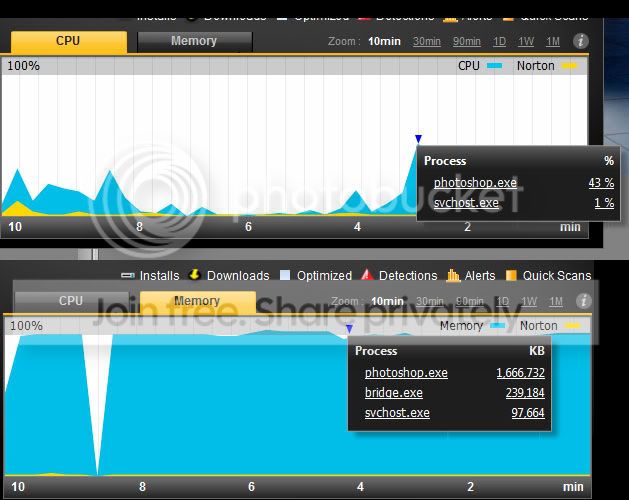
I've had a look using my Norton utilities and came up with the following.

MemoryCPU.jpg


There is a time offset between the two due to my fiddling in photoshop but the sample points are about at the same point in time. I opened up photoshop and bridge (first CPU peak at 10 mins) whilst opening up google chrome (2nd peak). I then opened up a big multi-layered composite with a file size of 608Mb and told it to re-size up to 110% (which causes all the smart layers and filters to render again). Whilst it was thinking about this I started up streaming radio, facebook, TP, and a few random website tabs (3rd peak on CPU).

Photoshop peaked at 43% CPU usage during this time whilst the memory just maxed out and pretty much stayed there.

I agree a new CPU would definitely improve performance, at the moment I don't believe it is the weakest link here? Would you agree?

EDIT: Closed down Bridge and the Photoshop and becuase of the large composite my PC hangs for a few minutes. Guess this is down to the cache being full or a transfer of virtual RAM from the hard drive?

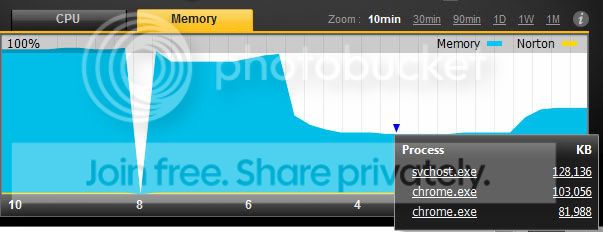
Grabbed another screenshot of the memory.

CPU.jpg


The drop after 6 minutes is after bridge and photoshop closing down and sitting steady with just Chrome. The peak on the right is opening up just photoshop and it sitting idle with no image.
 
Last edited:
From that, it looks like you will get away with your present CPU.

I built one with that AMD chip a year or so ago and thought it was rather quick at the time.

Now then, you bring me onto my pet hate, Norton.

I wouldn't mind betting if you ditch Norton and use MSE or Avast, your machine will speed up a fair bit.

Last point, it is Win7 64bit you have?
 
From that, it looks like you will get away with your present CPU.

I built one with that AMD chip a year or so ago and thought it was rather quick at the time.

Now then, you bring me onto my pet hate, Norton.

I wouldn't mind betting if you ditch Norton and use MSE or Avast, your machine will speed up a fair bit.

Last point, it is Win7 64bit you have?

Hi Mike, thanks for the insight as I think I'm on the right lines with looking for a RAM expansion (which is only possible with new MOBO) but really wanted to gain an additional insight from here.

My wife's company use avast and have been victim to a few virus problems so that one doesn't fill me with confidence. Just googled MSE and it is a Microsoft product? Is it any good? I use Norton being fully aware it causes it's own problems but it seems to do the job. Not one virus, or trojan or anything in the time I've used it plus it has a few additional features which I quite like.

And yes Win 7 64.
 
..... Just googled MSE and it is a Microsoft product? Is it any good? I use Norton being fully aware it causes it's own problems but it seems to do the job. Not one virus, or trojan or anything in the time I've used it plus it has a few additional features which I quite like.

And yes Win 7 64.

Yes MS bought out an AV company and rebadged it.

Had a couple of folk get viruses with it but it has got a pretty good reputation and hardly takes up any resources.

Why not have a wee try before you build your new PC.

One thing's for sure, you shouldn't need to reinstall an OS every 6 months.
 
It's on the wish list, but not within my budget for the moment. By the way followed your build threads, good work and nice one for posting up all your pics etc!

Nice one, hope it helped. I found the link to Youtube guide to be excellent though and it pretty much took me through the whole build!
 
I think the fundamental problem is my PC has always been on the limit of it's potential mainly due to the RAM, and any little degradation in performance impacts greatly on the overall performance. I'll have a think about the virus software as well thanks.

I'm more confident now about my thought process on existing CPU more RAM, but has anyone any comment about the motherboard 990x chipset? Is it ok. Is it overkill even considering future proofing?
 
Yup. More RAM will help!

I must admit to being an Intel fanboy at the moment, so would personally jump ship to an i5 but if costs dictate.... Having said that, I should say that my server is a fully spammed up 990FX/16G memory with Athlon II x4 630 in. I had everything apart from the motherboard and wanted to get some extra SATA ports (the board I have has 10 x 6Gb/s, and I have 2 x 4 port HBA cards in it giving a total of 18 SATA ports!!) with the view to upgrading to an AM3+ chip at some point in the future.
 
How often do you do house keeping on your pc? Eg clear out temporary files (temp internet files / windows temproary files, history, cookies etc etc) and defrag? This can make a huge difference in performance too.

I use and would recommend Ccleaner and Auslogic disk defrag for general house keeping.
 
How often do you do house keeping on your pc? Eg clear out temporary files (temp internet files / windows temproary files, history, cookies etc etc) and defrag?
Never, but then I'm never at a point where I have close to full disks.

This can make a huge difference in performance too.
I've not noticed a performance degradation since I installed this machine in January last year and I must use it 10-12+ hours a day.......
 
How often do you do house keeping on your pc? Eg clear out temporary files (temp internet files / windows temproary files, history, cookies etc etc) and defrag? This can make a huge difference in performance too.

I use and would recommend Ccleaner and Auslogic disk defrag for general house keeping.

Win7 has auto defrag system, I do use ccleaner every month or two though.
 
Back
Top