

Networking/streaming assistance if you please

  • Thread starter Thread starter stupar
  • Start date Start date
S

stupar

Guest
I want to switch my VM superhub into modem mode and use a 3rd party router to cover the networking in my house.
As such I would also utilise the USB port that comes on most routers and plug in my external hard drive so I can share its contents throughout the house.

Now the question - in light of not having a smart TV, if I plug a chrome cast into the TV can I stream movies to it from the hard drive?
If so how easy is it to do?
 
It's been a while since I looked but I believe you'd need some sort of server app like plex as far as I know. I'd be a lot easier with a specific nas as the plex app can be installed on qnap or synology removing the need for a pc to be on.
 
It's been a while since I looked but I believe you'd need some sort of server app like plex as far as I know. I'd be a lot easier with a specific nas as the plex app can be installed on qnap or synology removing the need for a pc to be on.
Thanks for the response Neil.
The plan is not to have the PC on but instead see if an app like Local Cast will allow me to control the stream.
I think this though requires the router to be DLNA/UPNP compliant. Does that sound about right?

Dedicated NAS is not an option at present due to cost.
 
yeah you would need Plex or something similar.
you might be better off with a media device that simply takes a USB device to connect to your TV like an Nvidea Shield TV
 
I have a vm 3.0 roouter in modem mode , and a tp link ac1750 router as a wireless connection. it works very well for steaming
Are you streaming content plugged into the router? If so what are you streaming g it to?
 
from any thing attached to my network , wethers it a nas drive or computer or even a smart tv

Thanks for the response Steve.

I've got a Linksys AC1900 coming (only paid a tenner for it :D ) so will plug my hard drive into it and see if I Can use an app on my phone to stream from it to the chromecast in the tv.
Nothing to lose anyway as the router was happening so I could get the crappy Superhub into modem duties only.

Cheers!
 
Never got the hate for the superhub. Yeah okay the reports of the 3 having latency issues but modem mode won't fix that.

If its a signal thing in a larger property then remember multi nodes > one strong node.
 
Never got the hate for the superhub. Yeah okay the reports of the 3 having latency issues but modem mode won't fix that.

If its a signal thing in a larger property then remember multi nodes > one strong node.

I'm still on the original Superhub Neil and the WiFi has never been that hot (even in close proximity to the router).
Equally the original Superhub can only pump out one signal at a time so the Linksys will give me the benefit of both 2g and 5g.

I did look at mesh systems but because our house is on one floor only I'm hoping one strong node will be sufficient - at a tenner for the router there is nothing to lose.
 
Never got the hate for the superhub. Yeah okay the reports of the 3 having latency issues but modem mode won't fix that.

I can only speak about the one that we have, which is the original. It has a tiny internal connection table for handling NAT and aggressively drops existing connections to keep space available, which means application layer protocols like SCP (putty) tend to get dropped if you leave them logged in a few minutes without typing anything. I know the application can be set to send keepalives to the server to prevent this, but this shouldn't be necessary with a sane router.

Also, the firmware has a memory leak somewhere, its performance degrades over time leading to increasing latency as more simultaneous TCP connections are established and it can only be fixed by power cycling it.

We can't use modem mode as we have a static IP and VM provide that in a back to front way by first DHCP-ing down a dynamic IP and the router building a GRE tunnel back to the gateway on the VM network with then sends down the static IP. This means that no third party router will get the static IP as they don't have the built in software to establish the GRE tunnel. Enterprise level Cisco kit could probably do it, but if we're spending that money, we're not going to be using VM in the first place.
 
Well the linksys AC1900 has landed and boy what a difference.

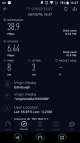
This is an example speed test result using the superhub in wifi
Screenshot_20180604-162708.png

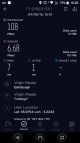
and this is a sample speed test result using the linksys
Screenshot_20180604-162047.png
I know there is a time difference but to be honest at any time of the day the superhub would give similar results.

Next stop now is to test out network sharing using some android apps.
 
Last edited by a moderator:
I suspect the 1 is 2.4ghz only then. 5ghz really is the king for connections over 60mb, its only downfall is its poorer coverage capability over 2.4ghz.

The SH1 can do 2.4 and 5ghz but not simultaneously (dual channel).

I'm a happy chappy and should I decide to boost my BB speed at a later date at least I have a gigabit router to go with it.
 
Back
Top