

Network Drive Problem

RaglanSurf

Suspended / Banned
Messages
11,477
Name
Nick
Edit My Images
Yes
I used to have a couple of NAS Drives which I dont use anymore but my iMac insists on looking for them, can anyone point me in the right direction and help me get rid of this pop up warning.

Please try not to be too technical, I have very little understanding how these things work. Thanks
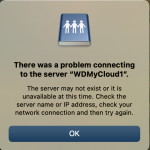
Screenshot 2022-07-10 at 13.30.16.png
 
To stop the madness...
in finder, go to the "Go" menu and select "Connect to Server..."
After the "Connect to Server" window pops up, click the button with the "clock icon" and select "Clear Recent Servers..."
A scary dialog box pops up, click "ok" if you are not scared.


Assuming that you have no others that you want to remain connected.
NB. I have never done this, I just checked for you on Google!
 

Assuming that you have no others that you want to remain connected.
NB. I have never done this, I just checked for you on Google!
Thanks Gramps, this wasn't actually the solution but following the trail further down gave me the answer (y)(y)
 
Jumped the gun, turned to computer again today and its back.
 
Back
Top