

Need help with my printer output

cosmix3

David Sullivan
Suspended / Banned
Messages
9,438
Name
Stuart
Edit My Images
No
Hi,

Have just tryed to print a shot to see what it looks like and Ahh, Much to dark compared to screen, am using a Canon iP4200 printer, monitor is a Samsung SyncMaster 2232BW, the monito is calibrated with an Eye-One Matche display 2, on the screen all looks OK, but when I print it is dark, have recalibrated just incase but has made no differance. This is the photo I am printing:
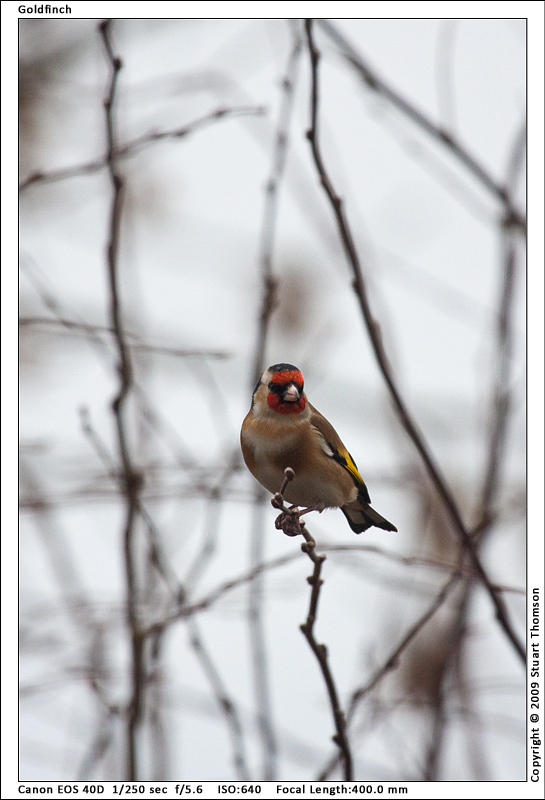
gf_9520.jpg


Have looked through the printer setting, chenged the profile but no diferance, can somone point me in the right direction as this is anoying me.
 
hmm this seems to be a common problem, it's so long since I used my 4300 but from memory it has pretty much similar manual setting to my 9500 for what you need to do. in the printer settings go to main then colour/intensity set it to manual, then in the manual adjustment window set the colour mode to linear tone then bring the intensity down somewhere around -5 to -8 that generally makes a huge difference and much closer to matchng the monitor.
 
Thanks, that seems to work in photoshop Elements 6, only issue now is that I dont normaly use that to print as it always puts a border on the image and I dont want that, I use Canons easy photo print for borderles but it seems to ignore this setting that I have done on the printer.

Also where would this stand with pro printing, do they take this into acount or would my pic likly be dark from them.

hmm this seems to be a common problem, it's so long since I used my 4300 but from memory it has pretty much similar manual setting to my 9500 for what you need to do. in the printer settings go to main then colour/intensity set it to manual, then in the manual adjustment window set the colour mode to linear tone then bring the intensity down somewhere around -5 to -8 that generally makes a huge difference and much closer to matchng the monitor.
 
Thanks, that seems to work in photoshop Elements 6, only issue now is that I dont normaly use that to print as it always puts a border on the image and I dont want that, I use Canons easy photo print for borderles but it seems to ignore this setting that I have done on the printer.
I don't know what OS you are using, but in XP if you put those settings in through printers & faxes on the taskbar it will use them as the default settings for the printer
However if you tell elements to print scale to media and set your print driver to borderless printing you should get exactly that.
Also where would this stand with pro printing, do they take this into acount or would my pic likly be dark from them.
I have never had any shots printed outside so can't really answer this, but in theory they should come back a fairly good match to the monitor, however if I were having it printed outside I would test with a small print from the same firm first before having a large print done just to be safe.
 
Thanks for that, am running Vista, set it in printers/Faxes, works in PS (and have now worked out borderless, was being abit thick :bonk:) the canon software ignores the setting for some reason and picks its own cant even tweek them, so will use PS from now on. will try that if I print via a pro.

I don't know what OS you are using, but in XP if you put those settings in through printers & faxes on the taskbar it will use them as the default settings for the printer
However if you tell elements to print scale to media and set your print driver to borderless printing you should get exactly that.

I have never had any shots printed outside so can't really answer this, but in theory they should come back a fairly good match to the monitor, however if I were having it printed outside I would test with a small print from the same firm first before having a large print done just to be safe.
 
Not every program uses the printer profile (although PS can), maybe the Canon program ignores the profile.

For printing, I always use Qimage : http://www.ddisoftware.com/qimage/
bit of a weird interface, but covers all the bases for me.
(Qimage can use the printer profile)
 
Thanks for that, thinking the Canon Software is ignoring it :bang: , am dowloading the trial of the one you sujested, getting my head aroung PS aswell.

Not every program uses the printer profile (although PS can), maybe the Canon program ignores the profile.

For printing, I always use Qimage : http://www.ddisoftware.com/qimage/
bit of a weird interface, but covers all the bases for me.
(Qimage can use the printer profile)
 
As said not all print programs can use custom profiles. Especially the canon one, that uses its own profiles designed for genuine canon inks and genuine canon paper.
I can vouch for QImage too. After creating my printer/paper/ink profile, load it into Qimage and you get nice sharp colour accurate prints
You can also set qimage to load your images using your monitor profile too
 
As said not all print programs can use custom profiles. Especially the canon one, that uses its own profiles designed for genuine canon inks and genuine canon paper.
I can vouch for QImage too. After creating my printer/paper/ink profile, load it into Qimage and you get nice sharp colour accurate prints
You can also set qimage to load your images using your monitor profile too

Thanks, have downloaded the trial just need to sit down and play with it. :D
 
Back
Top