
and help to keep the site free for all
You are using an out of date browser. It may not display this or other websites correctly.
You should upgrade or use an alternative browser.
You should upgrade or use an alternative browser.
My first RAW shots
- Thread starter ladysue
- Start date


Gordon Scott
Suspended / Banned
- Messages
- 794
- Name
- Gordon
- Edit My Images
- Yes
They seem to have come out OK. I was wondering if you have a Polarising filter, as I think using one would add some punch to these.
OP

ladysue
Suspended / Banned
- Messages
- 4,222
- Name
- Sue
- Edit My Images
- Yes
They seem to have come out OK. I was wondering if you have a Polarising filter, as I think using one would add some punch to these.
Thank you. No I dont have one. It will be something I will buy once I've got the money. I have only had the DSLR a few months. Do you think it is worth spending out for better filters or are they all OK?
Sue


swag72
Suspended / Banned
- Messages
- 7,969
- Name
- Sara
- Edit My Images
- Yes
Sue, I think that the first one takes it for me, it's well exposed, but just lacking a tad in sharpness. As mrgas asks, have you sharpened it?
The second one looks a little under exposed to me, and also looks a little unbalanced in composition. The upper part of the boat's not quite square and there is bg greenery on one side and not the other, which to my mind exacerbates this.
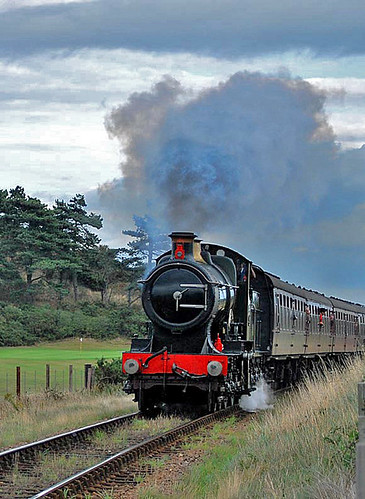
The other two steam train pics again look well exposed, but lacking a little in contrast I think, they look a little flat.
The black lab on the beach - with the black colour you've kind of lost him / her. Also don't think the composition has helped on this one at all. Would have been much more interesting if coming towards you with ears flying and tongue lolling.
Good try on RAW though, it's not as scary as it's made out really.
Hope that helps.
The second one looks a little under exposed to me, and also looks a little unbalanced in composition. The upper part of the boat's not quite square and there is bg greenery on one side and not the other, which to my mind exacerbates this.
The other two steam train pics again look well exposed, but lacking a little in contrast I think, they look a little flat.
The black lab on the beach - with the black colour you've kind of lost him / her. Also don't think the composition has helped on this one at all. Would have been much more interesting if coming towards you with ears flying and tongue lolling.
Good try on RAW though, it's not as scary as it's made out really.
Hope that helps.
OP
ladysue
Suspended / Banned
- Messages
- 4,222
- Name
- Sue
- Edit My Images
- Yes
have these been sharpened at all ?
Sue, I think that the first one takes it for me, it's well exposed, but just lacking a tad in sharpness. As mrgas asks, have you sharpened it?
The second one looks a little under exposed to me, and also looks a little unbalanced in composition. The upper part of the boat's not quite square and there is bg greenery on one side and not the other, which to my mind exacerbates this.
The other two steam train pics again look well exposed, but lacking a little in contrast I think, they look a little flat.
The black lab on the beach - with the black colour you've kind of lost him / her. Also don't think the composition has helped on this one at all. Would have been much more interesting if coming towards you with ears flying and tongue lolling.
Good try on RAW though, it's not as scary as it's made out really.
Hope that helps.
Thank you both for your comments. I havent done any processing on the computer like I would normally do- sharpening, contrast etc as I wanted comments on how I had done with the RAW processing in camera. I really dont know anything about white balance so wasnt sure how to correct it in processing the RAW photos.
The dog, Abby, is difficult to photograph cause of being black and shiny. Is there something I could do when photographing her to get her detail? Sometimes when I photograph her she comes out fine.
Thank you both for your help
Sue

Thank you both for your comments. I havent done any processing on the computer like I would normally do- sharpening, contrast etc as I wanted comments on how I had done with the RAW processing in camera. I really dont know anything about white balance so wasnt sure how to correct it in processing the RAW photos.
The reason it's better to shoot in RAW is because that format embeds a greater amount of information at the time of capture in a way that's non-destructive; everything recorded by the sensor is saved. Camera settings along with other meta data are tagged onto the RAW image data but don't actually change the information the imaging chip recorded.
Processing of RAW files is better done on the computer than in-camera.

Suvv
Suspended / Banned
- Messages
- 2,955
- Name
- Kev
- Edit My Images
- No
Thank you both for your comments. I havent done any processing on the computer like I would normally do- sharpening, contrast etc as I wanted comments on how I had done with the RAW processing in camera. I really dont know anything about white balance so wasnt sure how to correct it in processing the RAW photos.
The dog, Abby, is difficult to photograph cause of being black and shiny. Is there something I could do when photographing her to get her detail? Sometimes when I photograph her she comes out fine.
Thank you both for your help
Sue
Not sure if you realise it but the camera does not process the raw file at all.
Raw means that the data is raw i.e. "uncooked", no processing carried out at all.
However if you open the raw file in some programs then any camera settings will be applied at that point, although they can be changed without loss of quality.
Other programs will ignore the camera settings completely and just show the raw picture.
If you just use the raw file without any processing then, depending on the program used to open the file, either the camera settings will be applied (and you may just have well shot JPEG, except that if you got the camera settings wrong you can change them easily with raw) or no adjustments will be made and the picture will not be sharp and probably low contrast and low saturation.
Not sure how clear the above is but I hope it helps.

As you're using Photoshop Elements then none of the camera settings are accepted - you have a basic RAW file. All your processing has to be done in Elements. Nikon NX uses the camera settings but all other software ignores it - although in some programmes you can set up pre-sets which emulate in camera settings. All RAW file adjustments are non-destructive - so if you don't like the result - no harm done - you can go back and try again.