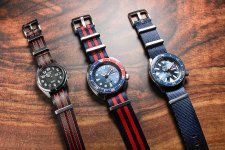
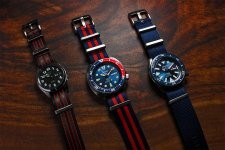
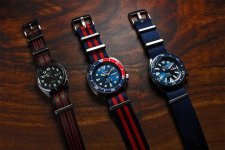
My best product photos so far as an amatuer photographer

totalwise

Suspended / Banned
Messages
25
Edit My Images
Yes
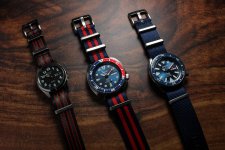
Here's my latest product photo, looking for feedback on it and some teething issues I'd like help with.

camera setting 1/200, f14, iso 100
canon eos 600d, kit lens,
Aided with Yonguo speedlight YN560ii

A lot of the settinngs I dont know what they do, I know aperature helps with field of view and iso does brightness, but a lot of it is just trying different settings with trial and error and just honing in the settings until I get a good result.

Speedlight is used off camera and shot from the angle you can see by the shadow. I used an a4 sheet to bounc light off the left. But the left is still too dark and I am struggling to get a nice even light. ISO 200 becomes too bright, ISO 100 is not light enough.

I've set all the watches to wind down and freeze and used photoshop focus stacking to get it sharp - though I think I needed more layers as only the middle watch dial is in focus.

I sell straps and the purpose of this photo is to show a few of the straps on seiko watches. Maybe I should have a few loose straps around.

The main issue I have is the watch crystal is reflective and shows the flash, so I have very little choice of where I can put the lighting, the left side is dark, and I cannot move the light towards that side becasuse the flash will show on the watch crystal.

feedback appreciated.

the phoots from the s3 bucket arent embedding, please use the link and let me know what error messages you get:

seiko1024.jpg
 
Last edited:
the watch on the left appears to have been working faster than the others:headbang: Maybe time it was mended :ROFLMAO: :ROFLMAO:
 
Last edited:
@totalwise the images are no longer visible. Did you include them directly in the post? If so be aware that the image sizes need to be max 500kb and longest edge 1024 pixels.
 
shoot, I just noticed. These are all automatic watches which wind down. but charge with a little movement. So it mustve got charged after I set it to 10 by 10.
 
@totalwise the images are no longer visible. Did you include them directly in the post? If so be aware that the image sizes need to be max 500kb and longest edge 1024 pixels.

Ahh thanks, 1024 seems quite restricrive, Ive fixed it.
 
Last edited:
Watch photography is pretty tricky at the best of times, but the two main issues you're having is 'light fall-off' due to the Inverse Square Law follow the link to YouTube for some explanations. The second with reflections is because you need to use some diffusion material in front of the flash - again YouTube is your friend and there are lots of videos on Watch Photography.

A good effort to start with though . . . (y)
 
Last edited:
Here's my latest product photo, looking for feedback on it and some teething issues I'd like help with.

camera setting 1/200, f14, iso 100
canon eos 600d, kit lens,
Aided with Yonguo speedlight YN560ii

A lot of the settinngs I dont know what they do, I know aperature helps with field of view and iso does brightness, but a lot of it is just trying different settings with trial and error and just honing in the settings until I get a good result.

Speedlight is used off camera and shot from the angle you can see by the shadow. I used an a4 sheet to bounc light off the left. But the left is still too dark and I am struggling to get a nice even light. ISO 200 becomes too bright, ISO 100 is not light enough.
Aperture controls depth of field, not field of view. Use a smaller aperture (higher f/) to increase depth of field, but there are limits, and your focus stacking is probably the right approach.

With flash, a combination of aperture and ISO controls exposure (brightness). Without flash, shutter speed would also be an equal factor.

The effect of the inverse square law has created/emphasied the fall-off of light. Having the products much closer together would help, arranging them differently would help and so would having a second light or an efficient reflector the other side.

Watch photography is pretty tricky at the best of times, but the two main issues you're having is 'light fall-off' due to the Inverse Square Law follow the link to YouTube for some explanations. The second with reflections is because you need to use some diffusion material in front of the flash - again YouTube is your friend and there are lots of videos on Watch Photography.

A good effort to start with though . . . (y)
A helpful answer, and diffusion would help, but what's needed is a much larger light source, diffusers don't make the light larger. This article may help https://www.talkphotography.co.uk/tutorials/creating-diffused-specular-highlights.137/
 
I used lightroom CC and added a linear gradient mask on both sides and lifted the brightness and a radial mask on the left hand side dial and lifted the brightness.
Over all, If you do a slow shutter speed for example 3 seconds and a F8 aperture in a well lit place you could get away with not using a flash.
 

Attachments

  • seiko1024-1.JPG
    seiko1024-1.JPG
    315.2 KB · Views: 17
Last edited:
Edit: It seems I forgot what I was going to tell you before I edited the image. You can shoot the watches with the screws pulled out. This stops they're hands. Then you can capture again with the screws in and simply mask the screws in one by one. Save the images. Then you can add the images to layers in Photoshop and stack them. That way the hands will not move past 10 ' 10. ;)

I agree with Green a softbox is a good idea. Did you manual focus when stacking? Do you have a macro lens? Did you know you can rent lenses from some camera shops? Like for $30 bucks.

I edited your photograph. It said under your name. edit your images: yes.
In photoshop. I unlocked layer. Image>adjustments>shadows and highlights. Then I duplicated layer and sharpened the next layer. Then I added an inverted mask and painted in just the numbers and.

I also cloned out some irritating scratches on the vinyl/badly veneered surface.
totalwise.jpg
 
Last edited:
I believe Graham's edit was a bit too quick and he missed the objective your going for?

And updated edit with the left most watch face illuminated by 10%. Untitled-1 2 3.jpg
 
Last edited:
Something which I used to do when I had got new watches:

1. Use a tripod
2. Set a long exposure on the camera, focus manually and set the camera on a 2 second timer
3. Use a dim handheld light and when exposing move it over the watch in circles

This will help you to get a soft light with very less equipment. Goes without saying that you will have to do this in a dark room.
 
Some PP work is always needed, and good PP can improve a good photo - but can't rescue a poor one, and it would need a massive amount of work to correct all of the faults here, which include defined specular highlights, light fall-off, hard shadows and uneven lighting.

The solution is as I explained earlier, a large light source at the right angle, possibly with some fill if needed, as shown in the tutorial that I linked to. Also shown in this lighting challenge. https://www.talkphotography.co.uk/threads/lighting-challenge-2-a-shiny-subject.760043/
 
A helpful answer, and diffusion would help, but what's needed is a much larger light source, diffusers don't make the light larger.

Indeed. Which is why I gave pointers to YT as they will all show this better than I can explain it . . . ;)
 
I believe Graham's edit was a bit too quick and he missed the objective your going for?

And updated edit with the left most watch face illuminated by 10%. View attachment 435418
Rough and quick but it showed it can be made to look brighter with little work.
 
Rough and quick but it showed it can be made to look brighter with little work.
I believe you missed the sentence where OP says he attempted to achieve even lighting. Your edit just illuminates the middle flash more.

I used an a4 sheet to bounc light off the left. But the left is still too dark and I am struggling to get a nice even light. ISO 200 becomes too bright, ISO 100 is not light enough.

OP. Have you attempted to use a wrinkle free sheet of aluminum foil? Or how am I supposed to spell it? Alamemium foil?
 
Last edited:
I believe you missed the sentence where OP says he attempted to achieve even lighting. Your edit just illuminates the middle flash more.


OP. Have you attempted to use a wrinkle free sheet of aluminum foil? Or how am I supposed to spell it? Alamemium foil?
Yes, that was the problem that the OP saw, and caused by having the light in the wrong place, and too small.
But those problems, easily cured as already stated, are the real problems, and as some of us have already pointed out, they can't be cured with editing. That's why this thread was moved to the Lighting Forum.

It's a pity that the OP hasn't responded yet.
 
Back
Top