Music on iPhone

Marc

TPer Emeritus
Suspended / Banned
Messages
34,670
Edit My Images
Yes
I have a load of music in my Music app on my MacBook, but none of it shows on my iPhone. I've tried syncing in Finder and manually dragging in Music, but the Music app on my iPhone remains empty. The strange thing is, when I click on my phone in Music on the MacBook, it lists all my songs! Anyone know what I'm missing (apart from music, obviously)?

iPhone 11, iOS16.3 btw.
 
Possibly forgetting now as it’s a while since I set up and may be missing a step/something and I’m not near computer to have a look however.

Do you have iCloud syncing on?

If so one of the options in Music on the Mac is sync or update library. Could be worth checking. I’ve probably got the wording wrong and without being in front of it I can’t say.

I know personally all I have to do is re-sync my music folder so that ‘Music’ adds to the library and typically I see down in bottom left hand corner it will show ‘updating iCloud library’ or words to that affect and sure enough they show up on iPhone/iPad.
Occasionally I have to force sync.

Assuming you do use iCloud and have syncing on then unfortunately I’m not sure so hopefully someone else offers something.

To check on iPhone.
Settings>Select you name>iCloud>Show all (under apps using iCloud)>scroll down to Music and see if it’s ‘on’

Possibly do the same on your Mac.

Hope you get sorted. I use this all the time and is a nice little feature. Especially for purchased music that’s not available in Apple Music.
 
Last edited:
Music is on in iCloud on the phone but, oddly, on the MacBook, there is no Music option under iCloud. That said, my phone is connected to the MacBook via a cable.
Not too sure then. I can have a look at any settings I may have selected but won’t be near Mac until later tonight.

Might be worth going through this if you haven’t already…


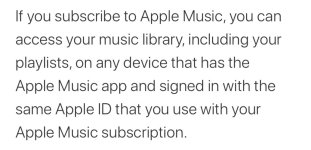
I may be reading it wrong but I’m wondering if it’s starting you need to be an Apple Music subscriber to make use of this feature.

Certainly worth working through the steps shown though. Rule it out.

On your iPhone though.

Settings scroll down to > Music check ‘sync library’ is checked
 
Last edited:
Not too sure then. I can have a look at any settings I may have selected but won’t be near Mac until later tonight.

Might be worth going through this if you haven’t already…


I may be reading it wrong but I’m wondering if it’s starting you need to be an Apple Music subscriber to make use of this feature.

Certainly worth working through the steps shown though. Rule it out.

On your iPhone though.

Settings scroll down to > Music check ‘sync library’ is checked
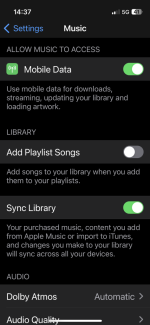
Can't see 'sync library' under Music on the phone.
 
Can't see 'sync library' under Music on the phone.
5DF5CF8A-D625-45FB-9CFB-435E9186B467.png

I wonder if then you ‘have’ to be a music subscriber for the option to be there?

I do subscribe but also purchase stuff so use the feature.

Are you using relatively new iPhone & Mac?

I know it worked on my iPhone 11 and with my 2020 MBP when I first started doing it.

Edit: sorry just noticed you have an iPhone 11 so that shouldn’t be the issue.
The Mac maybe?

Have you followed the steps in the link?
 
Last edited:
View attachment 380017

I wonder if then you ‘have’ to be a music subscriber for the option to be there?

I do subscribe but also purchase stuff so use the feature.

Are you using relatively new iPhone & Mac?

I know it worked on my iPhone 11 and with my 2020 MBP when I first started doing it.

Edit: sorry just noticed you have an iPhone 11 so that shouldn’t be the issue.
The Mac maybe?

Have you followed the steps in the link?
I have a 2022 MBP.

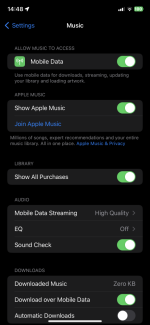
Nothing seems to match. Surely I don't have to subscribe to Apple Music to listen to music I've long since paid for?

IMG_1690.PNG
 
Surely I don't have to subscribe to Apple Music to listen to music I've long since paid for?

Based on these two screen grabs from the link I suspect that’s exactly the case…

9E981985-F0E5-497F-B400-B21B69BA8388.jpeg8E84C3E7-2989-4AD4-B149-8762CBDC16AE.jpeg

Bit rubbish but as this function (syncing your purchased music) doesn’t come out of your iCloud data I guess it is just a perk of being a subscriber.

I personally (family plan) find value in the subscription beyond this feature but obviously thats personal thing.

Could be worth a trial see whether it works for you.
 
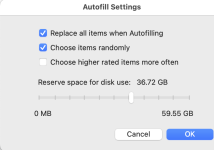
I've just spotted a workaround. In Music on the MBP. At the bottom f the screen when I select my phone, there's a settings button for Autofill. The reserve space for Autofill was set at zero. I changed it up and clicked Autofill and music is flooding onto my phone. Not ideal as I would've liked to be able to choose which music to transfer.

Screenshot 2023-01-30 at 15.05.40.png
 
Last edited:
I am on the wrong Mac at the moment, but do you have any options for syncing music if you plug your iPhone into your Mac, then select your phone in Finder - you get what was the old iTunes sync settings, where you used to be able to select playlists etc to sync.
 
I am on the wrong Mac at the moment, but do you have any options for syncing music if you plug your iPhone into your Mac, then select your phone in Finder - you get what was the old iTunes sync settings, where you used to be able to select playlists etc to sync.
Yes, that's what I was doing, but nothing was appearing on the phone. The only way around it appears to be Autofill.
 
The issue with this way is of course you are using the iPhones physical storage which may or may not be an issue of course.

The benefit to the subscription method is it’s in the cloud but at a cost vs personal worth and if you would get anything extra from the subscription.

With 3 daughters it’s worth it just for the peace :ROFLMAO:

Glad you have found a solution that for now works for you.
 
The issue with this way is of course you are using the iPhones physical storage which may or may not be an issue of course.

The benefit to the subscription method is it’s in the cloud but at a cost vs personal worth and if you would get anything extra from the subscription.

With 3 daughters it’s worth it just for the peace :ROFLMAO:

Glad you have found a solution that for now works for you.
There's only the 2 of us and we have prime music. My iPhone has 64gb of storage and all my music is only 10gb so no issues there.

Thanks for the help
 
There's only the 2 of us and we have prime music. My iPhone has 64gb of storage and all my music is only 10gb so no issues there.

Thanks for the help
Yeah. No point changing then.

At least you are sorted now.
 
Back
Top