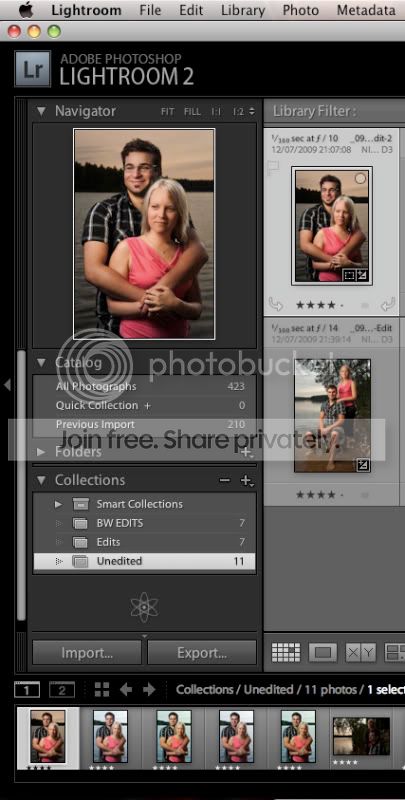
Moving photos within LR2 catalog results in duplicats..?

Cunniffe66_

Suspended / Banned
Messages
505
Name
Steven
Edit My Images
Yes
Hi, I'm having a little trouble with Lightroom 2 at the moment.
My workflow is generally like this: I import the bunch into a dated folder within lightroom, the main photos I import into CS3 for editing as a copy. I then save each PSD and a JPEG (from CS3) to a folder named 'processed' within the dated folder. This leaves me with two PSD files, the one I saved with appropriate name and the auto generated 'filename_edit.psd' from lightroom. I delete the edit.psd from disk as it's now a duplicate with an unappropriate name then sync the folder to import psd's and jpegs, I then have the sub folder 'processed' in lightroom and the correct files within it however when I attempt to drag and drop the relevent processed raw files from the dated folder into the sub folder I end up with a copy of the raw file in both folders in lightroom, although on disk I think there is only the one raw file.

Hope that makes sense and that somebody can shed some light on what is going wrong and why.

EDIT: Also, if i highlight the raw files in the root dated folder and remove from lightroom library they get removed from the processed folder also. Seems it imports into both folders and deletes from both folders.
Thanks, Steven.
 
Ah, I think I understand. A lightroom subfolder is more or less a library view filter, right? As in, if you view the root folder (in my case dated e.g. '12-07-2009') then you can see everything in that folder including anything within it's subfolders. Making said subfolders transparent at root level but their use comes into play when you want to view only specific photos from the bunch.

If this is an accurate interpretation of how it works then my question is now; How can I easily seperate stock, processed and rejected photos from a shoot in lightroom?

Once i've processed a photo I like to move it into a processed folder and then when I look at the root folder I can only see stock photos that haven't been processed or rejected yet.

This problem displayed itself in true colours today when I re-visited a shoot that I haven't worked on for over two weeks to get some more processed shots. seeing what I had already processed among the remaining stock really made things messy and harder to view.

Steven.
 
I don't really understand what you are asking, you may get more responses if you clarify it. It also looks a bit like you have answered your own question.

It sounds like your workflow isn't really being efficient going between LR and PS resulting in lots of extra files. Why are you creating the extra JPG? When you export the PSD into PS caould you not give it a custom name following your naming convention?

If you only want to see one copy of each image in your library, you could use stacks?
 
Can't understand why your creating two PSD's and a JPEG.

Personnaly I create a TIFF file and save it back in the original folder, but colour code the TIFF's so that I get the option of showing just the TIFF's in any particular folder. If you colour coded the RAW's aswell you can display either. Or you could use the Metadata do do the same thing.
 
My question is how can I easily seperate stock and processed images in lightroom for each batch, 'cause once i've done edits on a set and try to move the files into a subfolder 'processed' I can still see them in the root folder. I don't want that to happen because I would prefer to just see all the stock files in the root folder and all processed files in a processed sub folder.

I don't create two psd's purposefully, lightroom auto-generates one if I choose to open a raw file in CS3 for editing and gives it the name 'filename_edit.psd'
I don't want it to have that name so when I finish editing and save it with my preferred name in the processed subfolder. Then I delete the auto generated psd. In short, opening a raw file in CS3 from lightroom saves it as soon as it's opened.

Not sure why you think it's unusual to save a jpeg version, clients don't know what to do with a PSD or TIFF... Also, you can't upload PSD or TIFF's to flickR. I don't necessarily create jpegs for all processed shots but I do like to have them to hand so I can quickly view them without opening CS3 or lightroom.
 
Sounds like your really confusing what should be a simple process.

Workflow should go as follows:

Load relevant lightroom catalogue.
Plug in CF card.
Choose destination folder.
Import.
Within the library module, organize, rate, reject or sort into collections (if needed).

If editing in photoshop is required simply right click the image in the library module and select 'EDIT' and choose photoshop as external software.

When saving your the PSD it will automatically be saved into the same folder you created or chose before your import to lightroom.

Creating additional folders related to your catalogue outside of the lightroom process and exporting only to re-import is false economy and totally unnecessary.

Any JPEGS needed for clients or web upload can be generated by making full use of lightroom's export facility.

If you find that your keeping a truckload of JPEGS handy (unnecessary) and you'd rather view your images without opening Lightroom then this could be due to to having a single lightroom catalogue.

This isn't the most ideal way to work IMO as the more you add the more memory it will consume and the slower it will get. No good if your on a deadline for a client.

I recommend having individual catalogues as per client or as per category.

Each of my clients have a separate catalogue and for example, I shoot macro as a hobby, that too, has a separate catalogue.

Or if that is disagreeable to you then use a viewer like Bridge.

Hope this helps

:thumbs:
 
I'd agree with Tomas on this one, once you have imported them set up collections/collection sets for processing. To give an example for a wedding shoot once the images are imported to the disk and LR I will set up a collection set for that particular wedding and then have collections within that set which will be along these lines:
  1. Bridal preparation
  2. Ceremony
  3. Reception
  4. Formals
  5. B&G portraits
Once your images are in the sets edit as normal (if you want you can remove images from the collection by right clicking) and Ctrl/Cmd A to select all of the images in that set and use the export facility to create your images in the format you require.

Hope this helps. :thumbs:
 
Oops, TW added more info as I was typing. Git. :D
 
Oops, TW added more info as I was typing. Git. :D

Apologies mate, I have such a sneaky habit of doing that (slaps own wrists) :D

This is why I'm crap in an argument, I always think of the good stuff after the moment has passed :lol:
 
Interesting!!!!

I tried doing what I think is your workflow, and if I save an image exported from LR to Photoshop in a folder OTHER than the one it came from it does not appear in the Folder from which it came. It does however appear in the alternative folder within Lightroom. Lightroom seems to automatically generate that folder within its library even if it did not exist before. Additional images exported to that folder apear within that folder and are viewable within lightroom.

I know there were some integration issues between Lightroom and CS3, and these were to be resolved with CS4. Looks like an upgrade may be in order .

However why not down load the 30 day trial and see if it works for you.

I'm running a Mac but I can only assume it will work OK in Windows

I'm using LR 2.4 with CS4 and ACR 5.6
 
Thanks for the input. Particularly Thomas. :thumbs:

I tried CS4, didn't seem to friendly with my machine performance wise, not sure what the problem is as CS3 works fine.

I think trying seperate catalogues would be a good move for me, although im not sure how I would organise them as at the minute i'm a 'try my shutter at everything' photographer.

You can see where i'm coming from with the whole differentiation between already processed and still to process images thing though right?

I got myself a copy of 'inside lightroom 2' for inspiration on organisational methods but i'm still getting my head around it atm.

It's not the fact that lightroom or bridge is slow for me, it's just that opening a bulky application is unnecassary just to view images. Bulky compared to the likes of windows picture viewer for example. Maybe i'm old school in that respect (preferring windows explorer as an interface for browsing)
 
Thanks for the input.
I think trying seperate catalogues would be a good move for me, although im not sure how I would organise them as at the minute i'm a 'try my shutter at everything' photographer.

No problem. Separate catalogues are much quicker to load too.
I shoot a bit of everything but all my various personal stuff does go into one catalogue and that's a getting a little chunky these days :(

You can see where i'm coming from with the whole differentiation between already processed and still to process images thing though right?

Kinda but you can make these arrangements/collections/sets with in lightroom, it's totally unnecessary to do so externally and saves you time, effort and hard drive space:

Collections.jpg


At the end of the day, all you need is RAW and PSD.
JPEG are exported as and when you need them from your catalogue.
 
Ahh, I see, i've been using the folder pane - Doh.

The whole concept of lightroom organisation is unwrapping abit more the more I use it. Thanks for explaining this and it's solved my problem, I needed to think in terms of filtering the root folder rather than physically sifting through it.

Thanks again:thumbs:
Steven.
 
Ahh, I see, i've been using the folder pane - Doh.

The whole concept of lightroom organisation is unwrapping abit more the more I use it. Thanks for explaining this and it's solved my problem, I needed to think in terms of filtering the root folder rather than physically sifting through it.

Thanks again:thumbs:
Steven.

A pleasure to be of assistance Steven. :D
 
Back
Top