I keep reading / seeing comments online that LRC is the better of the two and since using the Adobe software I have always used the desktop LR.
I am not a pro and do not take 1000s of images but I thought I would take a look and see what I am / maybe missing.
Now my workflow is pretty straight forward. I go out, take some images, come home and copy them to my desktop to review. I shoot RAW and JPEG and once I have decided which images I want to keep I delete the rest and name the keepers, and add them to a folder (example folder name - walk in park June 2025). I will then upload the RAW files to LR and edit them. Once done, I will download the edited JPEGS and store these in the same folder along with the original RAW and SOOC JPEGS. This folder is then added to my 2025 back up folders on an external SSD and HD. So as far as sorting and storing the images, I keep nothing on my system, I have files going back a few years, all of which have individual folders with names and dates.
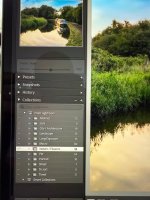
Now in LR I have set up various albums, like Landscape, or macro and so on. I then put the LR file into one of these albums and I have about 11 different ones. So my images are stored and then sorted in LR albums (I do not worry about the year in LR as data is easy to find).
So,
I loaded LRC yesterday and it pulled over all my LR albums so they now show in LRC (did this on its own).
But...and I appreciate this may not be the case for everyone, I find the UI of LRC to be really clunky and almost archaic. It is just not a particularly nice experience when compared the LR desktop.
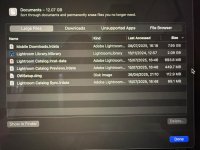
I then noticed that I had some catalogues and LR data stored on my internal ssd and I have been trying to understand the whole catalogue system, which again, I just don't get.
I have read that you should keep XYZ folders for LRC on system and then have a back up on an external...but to me I am already doing this myself.
What am I missing or doing wrong here? I do not sell images or need to store client files for weddings or events...
How do I go about moving the LRC data off my internal system and just use the external systems I have?
I feel it may just be me as I was an early adopter of cloud and have very, very little stored on any machines physically for any purpose. Perhaps I am just not suited to LRC and not tech savvy enough to understand it (wouldn't surprise me).
I thought perhaps LRC would be less RAM intensive than LR - but my experiences playing around editing the same files yesterday would suggest it is no better, possibly a little worse (which seems to be the consensus on sites I have read).
Any help or guidance on LRC would be appreciated because if I am missing out on the extra benefits, I would at least like to explore them more although I do not want data stored locally.
I am not a pro and do not take 1000s of images but I thought I would take a look and see what I am / maybe missing.
Now my workflow is pretty straight forward. I go out, take some images, come home and copy them to my desktop to review. I shoot RAW and JPEG and once I have decided which images I want to keep I delete the rest and name the keepers, and add them to a folder (example folder name - walk in park June 2025). I will then upload the RAW files to LR and edit them. Once done, I will download the edited JPEGS and store these in the same folder along with the original RAW and SOOC JPEGS. This folder is then added to my 2025 back up folders on an external SSD and HD. So as far as sorting and storing the images, I keep nothing on my system, I have files going back a few years, all of which have individual folders with names and dates.
Now in LR I have set up various albums, like Landscape, or macro and so on. I then put the LR file into one of these albums and I have about 11 different ones. So my images are stored and then sorted in LR albums (I do not worry about the year in LR as data is easy to find).
So,
I loaded LRC yesterday and it pulled over all my LR albums so they now show in LRC (did this on its own).
But...and I appreciate this may not be the case for everyone, I find the UI of LRC to be really clunky and almost archaic. It is just not a particularly nice experience when compared the LR desktop.
I then noticed that I had some catalogues and LR data stored on my internal ssd and I have been trying to understand the whole catalogue system, which again, I just don't get.
I have read that you should keep XYZ folders for LRC on system and then have a back up on an external...but to me I am already doing this myself.
What am I missing or doing wrong here? I do not sell images or need to store client files for weddings or events...
How do I go about moving the LRC data off my internal system and just use the external systems I have?
I feel it may just be me as I was an early adopter of cloud and have very, very little stored on any machines physically for any purpose. Perhaps I am just not suited to LRC and not tech savvy enough to understand it (wouldn't surprise me).
I thought perhaps LRC would be less RAM intensive than LR - but my experiences playing around editing the same files yesterday would suggest it is no better, possibly a little worse (which seems to be the consensus on sites I have read).
Any help or guidance on LRC would be appreciated because if I am missing out on the extra benefits, I would at least like to explore them more although I do not want data stored locally.