

Motion Blur and Stuttering - Part 2

drounding

Suspended / Banned
Messages
1,080
Name
Duncan
Edit My Images
Yes
Some may remember my original thread about motion blurring and stuttering a little while ago. There were lots of replies and explanations, some which seemed logical, other's which didn't. The general consensus was that it was due to a type of spyrographic effect of the speed of the car wheel vs the releative speed of the car and the road. That thread is here: http://www.talkphotography.co.uk/threads/motion-blur-and-stuttering.507565/ . That sort of made sense however, but......and now for the reason for 'part 2'.

Yesterday I was out in the park playing around catching some birds in flight. My intention was to get some semi-blurred images by panning the bird and using a slowish shutter speed. I achieved what I wanted and I am quite happy with the results but it also showed some so called stuttering again, yet this time of course there's no wheel to give the same affect as people suggested last time.

The two images below show the effect on the wings of the birds. At a slow shutter speed I would expect the bird's wings to be either blurred or not - not to exhibit a 'stutter'.

My initial thoughts are that the cause is due to the way in which the camera captures the images. In the camera the sensor (and electronics) has a period of time to capture the image, just how that data is collected and collated confuses me. The electronics are digital which suggests that some form of sampling must take place over the time the shutter is open which is then electronically accumulated for the period. If during that time the bird in (this case) moves then it is shown as a step movement in the accumulated data. I know the camera needs to be able to sample at extremely fast intervals for fast shutter speeds and I could thererfore be way off the mark here, but what other explanation is there that makes sense?
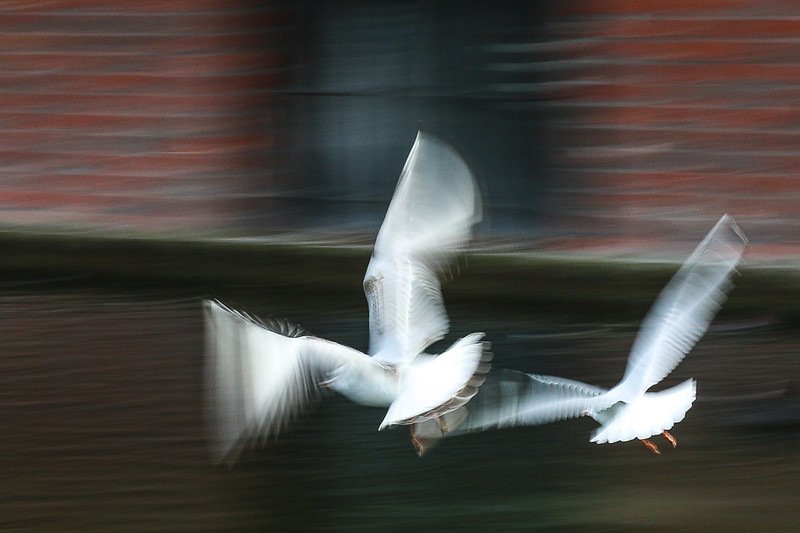

IMG_4274-10011
by DRounding, on Flickr
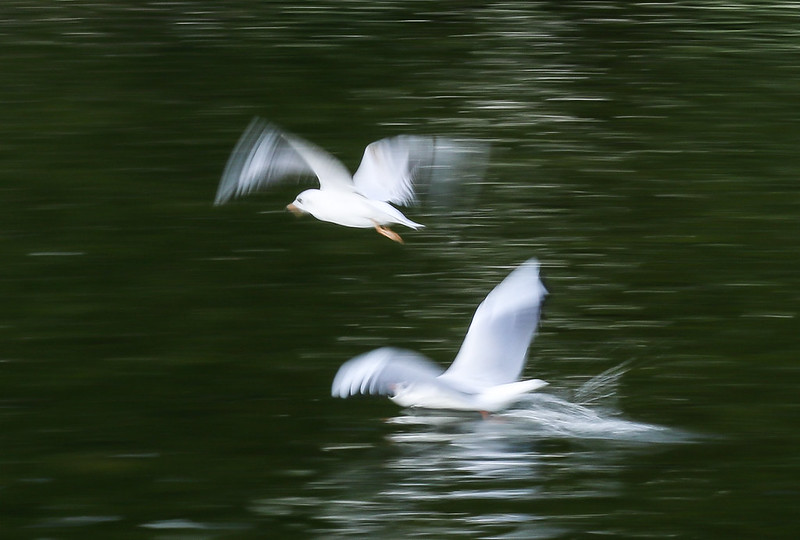

IMG_4262-10007
by DRounding, on Flickr
 
If you look closely at how wings move you'll find that their motion is not constant. There is a pause at the top of the beat and at the bottom of the beat as the wing movement changes direction. The pause of the wings at each end of the beat is sufficient to make the image of the wing at that point appear more strongly in the exposed frame. This shows up well in the first shot where the bird on the left appears to have two wings - and two tails for that matter. How moving objects are exposed depends entirely on how long they stay in a rest position during the exposure. If you appear to be getting a double effect then it simply down to the fact that the object rested longer in those two positions while the shutter was open. The movement between the two positions is recorded less strongly.
 
Not quite sure how your shutter operates, but does the shutter blind move left to right, right to left, up or down, down to up. This coupled with how the data is read from the sensor, ie scanned top left across then next line. I've no idea but all of these may have an effect on the actual image.
 
If you look closely at how wings move you'll find that their motion is not constant. There is a pause at the top of the beat and at the bottom of the beat as the wing movement changes direction. The pause of the wings at each end of the beat is sufficient to make the image of the wing at that point appear more strongly in the exposed frame. This shows up well in the first shot where the bird on the left appears to have two wings - and two tails for that matter. How moving objects are exposed depends entirely on how long they stay in a rest position during the exposure. If you appear to be getting a double effect then it simply down to the fact that the object rested longer in those two positions while the shutter was open. The movement between the two positions is recorded less strongly.
Whilst I do understand that the wing at the top (and bottom) of it's stroke is in position longer and will cause a brighter exposure at that point, I still can't understand why there seems to also be stronger exposures between the two extremes almost equally distanced apart. I also don't underdstand why the edge of the wing at the extremity of its movement (top or bottom) is also not gardually blurred into a lighter exposure along the rest of the movement.
 
Not quite sure how your shutter operates, but does the shutter blind move left to right, right to left, up or down, down to up. This coupled with how the data is read from the sensor, ie scanned top left across then next line. I've no idea but all of these may have an effect on the actual image.
This is sort of along the lines of my thinking - that it's to do with the camera electronics/mechanics, although I'm not sure if the shutter blind movement is a factor as there is more than one 'stutter' on each image.
 
After some more research and deliberation, to answer my own question - I think the stutter I am seeing is in fact the static feathers. (I guess It's the engineer in me that always questions logic)
 
Last edited:
Something to consider: The shutter has 2 curtains one opens and (dependant on the shutter "speed" set) the other follows, so not all of the sensor area is exposed at the same time for all of the time of the duration of the shutter being "open". This effect can be seen by taking a picture with a flash at a shutter speed higher than your sync speed. (you end up with an unexposed section of sensor).

Don't know if this has a bearing or not, just thought I'd pitch in! :)
 
There are a number of movement factors at play here. Nothing to do with the sensor - look at the background that is smoothly and evenly blurred.

The shutter runs top to bottom of the camera (but since the image is inverted, that's bottom to top of the picture). In other words, it's taking a vertical slice of time through the wings that are moving up/down and stationary inbetween. The shutter will take a different size slice depending on whether it's running with the wings or against them. This is overlaid with the panning movement that is not in perfect sync with the birds.

The stuttering effect is a combination of the shutter's vertical scanning chopping through the up/down of the wings, plus the horizontal movement, emphasised by the unusual nature of the subject, ie individual feathers.

Edit: what you are seeing is similar to the red car picture in your previous thread. In particular, look at how the wheels are blurred, but are rendered sharp at each end of the oval - that's the shutter chopping through, first curtain and then second curtain. There's a similar effect visible around the headlight. If the car had multiple wheels, this effect would be repeated in a 'stuttering pattern'. With the birds, the multiple feathers show this.
 
Last edited:
Thanks for the detailed explanation, that does make a lot sense.

Does the shutter curtain always move at the same speed across the sensor, regardless of actual shutter speed? And does the shutter time include the time it takes to open and close the curtains as it were?
 
Thanks for the detailed explanation, that does make a lot sense.

Does the shutter curtain always move at the same speed across the sensor, regardless of actual shutter speed? And does the shutter time include the time it takes to open and close the curtains as it were?

Yes, the shutter curtains move at a constant speed regardless, and the exposure time is the delay between the first curtain moving and the second curtain following. At higher speeds, ie above the x-sync ceiling around 1/200sec, the second curtain starts to move before the first curtain has reached the end of its travel and as speeds get higher still the two curtains are so close there's only a tiny slit between them, less than 1mm.

All shutters vary, but in round figures each curtain takes something like 2-4ms to run from top to bottom, with a pro quality DSLR being fastest. There are lots of videos about showing the shutter in slow motion, like this one

 
Great info, thanks for sharing. Interesting reading (and watchIng).
 
Back
Top