More beginner help needed in Lrc library

Marc1548

Suspended / Banned
Messages
126
Edit My Images
Yes
Sorry for my complete lack of competence in Lrc Library but It seems im having a complete nightmare with this! Im trying to move all my photos to an external hard drive from my Mac/Pictures folder so that in the future all my images from camera can be imported to this & a backup drive rather than my Macs HD & then to Lrc Library, as this seems to be the recomendend way to go about things according to Scot Kelby & others on YouTube. So followed that & I made a new folder in LR for my new HD all well & good thus far, but when I try to drag & drop from pictures as per the insructons I get an error msg, 'The folder Pictures contains your LR catalog & can't be moved While LR is running"??? So I then tried an alternative method as per the LR Queen web sight option2 for this outside of LR by first copying the pictures folder onto the new HD no problems there & then getting LR to recognise that, but when I followed the instructions further by right clicking the parent folder etc to find missing folder it didn't work & my LR folder still has no photos whatever I do.
Im at the end of my tether with this, so any help would be much apreciated
Thanks. Marc.
 
The basic 'rule' is once images have been imported into Lightroom you should only move them from within Lightroom.
The first problem you had (as I understand it) is that you had everything in a big 'Pictures' folder - both the images and the catalogue - so when you tried to drag the folder to the new location it couldn't do that (as the catalogue which keeps track of where the images are was one of the files you were potentially moving).
You would need to have selected the files within the folder, and dragged them to the new location.

I think you have then gone out of Lightroom, and manually moved the Pictures folder to the new location.
This will fail because in doing so, you have moved the catalogue file, so when you go back into Lightroom there is no catalogue file in the original 'Pictures' folder on your HD, so it has no record of the imported files.

My suggestion would be to move the pictures file back to your Mac HD - then open Lightroom as check your pictures are back.
If so, you can then (in Lightroom) move then images over to the new location on the external hard drive - this will ensure the Lightroom catalogue knows where they are, and keeps everything in sync.
 
Sorry for my complete lack of competence in Lrc Library but It seems im having a complete nightmare with this! Im trying to move all my photos to an external hard drive from my Mac/Pictures folder so that in the future all my images from camera can be imported to this & a backup drive rather than my Macs HD & then to Lrc Library, as this seems to be the recomendend way to go about things according to Scot Kelby & others on YouTube. So followed that & I made a new folder in LR for my new HD all well & good thus far, but when I try to drag & drop from pictures as per the insructons I get an error msg, 'The folder Pictures contains your LR catalog & can't be moved While LR is running"??? So I then tried an alternative method as per the LR Queen web sight option2 for this outside of LR by first copying the pictures folder onto the new HD no problems there & then getting LR to recognise that, but when I followed the instructions further by right clicking the parent folder etc to find missing folder it didn't work & my LR folder still has no photos whatever I do.
Im at the end of my tether with this, so any help would be much apreciated
Thanks. Marc.

I would suggest that you post a couple of screenshots showing the folder tree on your Macs hard drive and another showing the folder tree in Lightroom. Then we can tell you which folders to move where by using the same folder names that you are using.
 
One point worth mentioning is that you should never keep your Catalogue in your Pictures folder.
 
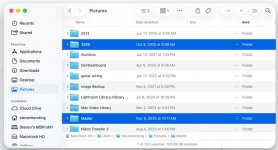
Ok, on my computer I have a folder labeled "Pictures" (left side). Inside that folder are all of the random pictures I have. Also inside that folder is my LR catalogue "Master", and the image folders LR uses locally ("2025").

Untitled-.jpg

If I told LR to use the "Pictures" folder then LR couldn't move it because the catalogue "Master" is inside it and running. Instead, Lightroom uses the folder "2025," and the folders inside of that; which LR can move.
 
Close LR and move your catalogue folder out of the pictures folder. Then, when you open LR tell it to open another catalogue and point it to the new location.

Personally I think that is bad advice and an unnecessary complication as the default location for the Lr Catalog is “Pictures”. What the OP needs to do is just move the folders that actually contain his images.
 
If you want to run LR from and keep you images on an external disk

if all your images are in a LR Catalogue on your hard disk use the instruction ..............IN LIGHTROOM .....File.....Export as a Catalogue,(half way down the file menu) ........(it will say "exporting a Catalogue with X number of images - check that the number is correct) .........and then name the new Catalogue and type where you want it to be exported to, e.g. an external disk

you will/should then have 2 LR Catalogues which are identical

Back up
your new Catalogue, check that both work and then you can delete the (original) Catalogue that is on your hard disk ..... don't just click ..... read carefully what is happening, (it is important in LR that your understand what is happening when you import and export files and images)......... leave what you have deleted in your BIN until your are sure that all is OK

as an extra safeguard copy all your images, (drag and drop) that should be in your pictures folder on you Hard disk, to some kind of external media.

NEVER, NEVER mess around with images outside LR that you have imported into LR

and remember to back up LR, and your LR Catalogues, (at least daily when you use it?), on a different external disk to one you use for normal processing, (use Time Machine it you use a Mac)
 
Last edited:
Thanks for all your help im sure there are different ways but I managed to sort the issue I Think by moving the pictures folder back to Mac as suggested above & moving only the image folders back I think that's how I dit it anyway & ,Im still not sure how I managed to get into the mess in the first place ill take that advice from now on & not mess around with images outside of LR.?? Big learning curve that one. but thanks everyone.
 
Last edited:
Back
Top