Monitor for Photo Editing

taxboy

Suspended / Banned
Messages
1,985
Edit My Images
Yes
I am considering upgrading my 23 inch 1080p Dell for a larger monitor

1) Having read around the Internet I'm totally confused - some articles state you should really only look at 4k monitors whilst others suggest 2560x1440 is the sweet spot. Similarly 27 inches is suggested as the best real world size for desks at home, whilst others claim bigger is better and don't go below 30 inches. Any input from the people on here appreciated, especially if you went through the same issues before purchasing.

2) My PC handles Lighroom and Photoshop OK, although larger multi layered images do slow it down a tad. If I change monitor will I need to budget for a new graphics card as a minimum. My computer knowledge is limited so I don't know if I meet the specs required on the manufacture's Web pages

PC spec is i5-4570 3.2 GHZ
Intel (R) Graphics 4600
16GB RAM

Many thanks for your input
 
If its any help I have the 23" dell and as a main monitor a dell U2515 which is 2560*1440 running off my on board graphics ( Intel HD 530)without any problem the PC spec is the same or similar to yours , quad core i5-6500 3.2 ghz, 16 gb DDR4 .
If you have the real estate get the 27 to go with the 23 and have a dual monitor set up, with hindsight I should have got the 27" Dell but I cannot remember why I did not-probably funds.
 
If its any help I have the 23" dell and as a main monitor a dell U2515 which is 2560*1440 running off my on board graphics ( Intel HD 530)without any problem the PC spec is the same or similar to yours , quad core i5-6500 3.2 ghz, 16 gb DDR4 .
If you have the real estate get the 27 to go with the 23 and have a dual monitor set up, with hindsight I should have got the 27" Dell but I cannot remember why I did not-probably funds.
Many thanks much appreciated
 
Coming from 1080p, 1440p is a real step up. I went from 24" 1080p to 27" 1440p almost eight years ago and haven't really felt the need to move on (although I keep looking, obviously, and the Dell U3219Q keeps calling me). If you can afford it then 32" 4k is better but the price of an equivalent quality monitor jumps significantly and you will definitely need more than the integrated graphics. The next issue is then what GPU your PC's motherboard, case and PSU are capable of supporting.
 
Coming from 1080p, 1440p is a real step up. I went from 24" 1080p to 27" 1440p almost eight years ago and haven't really felt the need to move on (although I keep looking, obviously, and the Dell U3219Q keeps calling me). If you can afford it then 32" 4k is better but the price of an equivalent quality monitor jumps significantly and you will definitely need more than the integrated graphics. The next issue is then what GPU your PC's motherboard, case and PSU are capable of supporting.
Thanks for that. I think I will stick with a 27" 1440, otherwise I'm almost building a new pc to run a monitor
 
I just went from 24" 1080 to 27" 1,40, and it's a lovely improvement. Not just for photo editing - my regular spreadsheet work has benefitted too, and the text is not too small, even with no scaling employed.
 
I just went from 24" 1080 to 27" 1,40, and it's a lovely improvement. Not just for photo editing - my regular spreadsheet work has benefitted too, and the text is not too small, even with no scaling employed.
Thanks for that. It's always good to have real world experience. I'm still researching and from what I can make out if you are printing then a 4k monitor can make judging sharpening more difficult ? However you will get a more detailed image on screen.

If anyone has a 27" 4k does it impact on the size of the editing bar / sliders in PS or Lightroom please.

Perhaps it's just one of those PC v Mac arguments....
 
I have two monitors, the new 1440, and an old 1080.

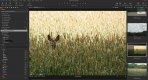
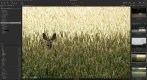
Looking at Capture One, you can see a lot more things on the editing menu. Here's a comparison for you:
1080
1080.JPG

1440
1440.JPG

Hope that helps
 
Back
Top