Minimum Partition Size for Windows

  • Thread starter Thread starter Deleted member 49549
  • Start date Start date
D

Deleted member 49549

Guest
Hi all,

getting a macbook with a 128gb hard drive for work.

I will need to install windows as a bootcamp partition. I will only need ms office, ms project. File storage will be on the osx partition.

What is the minimum partition size you would recommend?
 
Cheers Neil - the hard disk required for office is 3 gb, ms project requires 2 gb.

So minimum requirements 20 gb + 5 gb programs = 25 gb.

Will i suffer any performance penalty for going for the minimum?
 
on a vm not really, if windows completely runs out itll cause bother but you may jsut have to monitor in the vm for low space

Cheers Neil. 90% of the time I will be accessing via vmware. But on the other 10% time when I access via bootcamp directly I will play it safe and set the partition as 30gb.
 
Over a year, how much space will these typically need?
 
dont forget temp files, cache, recycle bin, swap files / etc / etc...
I'd put 40Gb just to be sure.
Windows REALLY suffers if you cramp its C drive.
 
Don't forget Windows updates!
Install the update that lets you clear down the old update files. Otherwise its a nightmare on machines with limited drives.
dont forget temp files, cache, recycle bin, swap files / etc / etc...
I'd put 40Gb just to be sure.
Windows REALLY suffers if you cramp its C drive.

Indeed. Its (slowdown) less of an issue on a VM than a physical drive though.
 
unfortunately the machine only has a 128gb hard drive. which is why am keen to limit it as much as possible.
 
I'd still make it 40Gb - or get another 256Gb drive... Why make your life hard >?
 
I'd still make it 40Gb - or get another 256Gb drive... Why make your life hard >?

its a work machine... so i cannot upgrade the hard drive.

it has taken me 5 months to get the base spec!
 
Surely, if it's for work, you need something that's going to be able to do the job?
 
it will do the job fine, but I wanted the windows partition as small as is reasonable, hence the question. all my work files are either on one drive or a network share, so no requirement to have a lot of space for the work machine.
 
i've gone for a virtual machine as the performance is indistinguishable from a native install for the apps I use.

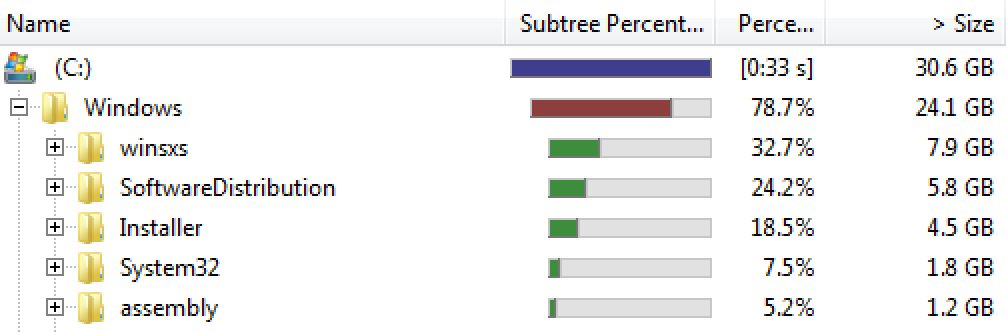
and you were not wrong - windows needs a lot of hard disk space! Heres the current state of play (30.6GB used), minimal apps (office and project) and no files.
Tx2Ap11W8W.png
 
and more digging - nearly 1/2 gig in fonts ??
 
run the clean up for system files and select the windows updates, that might shrink the winsxs folder a bit.

remember the OS will always be bulkier because of the wide range of hardware it has to run on. but mostly its the update cache (winsxs - official MS description here) folder that is the bulk. out of 26gb windows folder mine is currently 13gb. and thats only going to get worse since MS are no longer developing service packs.
 
Last edited:
might also be worth disabling and removing the hiberfil.sys also (follow the guides online for the correct process), that'll clear a file equal to the size of the memory allocated.
 
run the clean up for system files and select the windows updates, that might shrink the winsxs folder a bit.

remember the OS will always be bulkier because of the wide range of hardware it has to run on. but mostly its the update cache (winsxs - official MS description here) folder that is the bulk. out of 26gb windows folder mine is currently 13gb. and thats only going to get worse since MS are no longer developing service packs.


Thanks for that info. Neil, saved 5.5gb that ccleaner never touched.
 
run the clean up for system files and select the windows updates, that might shrink the winsxs folder a bit.

remember the OS will always be bulkier because of the wide range of hardware it has to run on. but mostly its the update cache (winsxs - official MS description here) folder that is the bulk. out of 26gb windows folder mine is currently 13gb. and thats only going to get worse since MS are no longer developing service packs.

With the bolded part in mind, is it possible to get a 'slim' version of windows to run on a vm?

PS, currently going through your 2 recommendations, will post how much that saves me shortly - cheers.
 
you could have a look at the embedded OS, 8 for example has a min requirement of 8gb disk space.

however i do not know whether a) the OS is readily available, b) would work on a VM or c) would offer everything you need as i believe the embedded OS are very cut down.
 
Back
Top