


Nostromo
Suspended / Banned
- Messages
- 6,236
- Name
- Dominic
- Edit My Images
- Yes
Hi all
I have an old Dell precision t5500 (i know it's not the best, but it does me fine) which I mainly use for lightroom and a bit of Photoshop.
I rarely turn it off and just put it into sleep mode, now the other day it went stupidly slow, it would take about 30-40 seconds for the cursor to react to mouse movement (and even then it was all jerky). So I turned the computer off and restarted it. As it was beginning it's boot up this message came up on screen
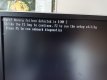
Not knowing much about computers I hit F1 and let windows carry on loading.
Now today I checked to see how much of my ram is working and the computer says "8 gig is not available" (I have 12gb ram), so obviously that only leaves me with 4gb of ram.
But if only one 4gb ram is not working (dimm2), why am I missing 8gb.
This is a pic of the ram
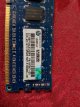
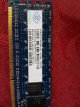
And this is where they fit
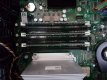
Also is this a pretty bog standard ram that I can pick up anywhere?
I have an old Dell precision t5500 (i know it's not the best, but it does me fine) which I mainly use for lightroom and a bit of Photoshop.
I rarely turn it off and just put it into sleep mode, now the other day it went stupidly slow, it would take about 30-40 seconds for the cursor to react to mouse movement (and even then it was all jerky). So I turned the computer off and restarted it. As it was beginning it's boot up this message came up on screen
Not knowing much about computers I hit F1 and let windows carry on loading.
Now today I checked to see how much of my ram is working and the computer says "8 gig is not available" (I have 12gb ram), so obviously that only leaves me with 4gb of ram.
But if only one 4gb ram is not working (dimm2), why am I missing 8gb.
This is a pic of the ram
And this is where they fit
Also is this a pretty bog standard ram that I can pick up anywhere?

 but my excuse is it was on its way out.

