Medium Format Film, New Scanner, Large files, how large can they go?

EdBray

Suspended / Banned
Messages
7,179
Name
Edward Bray
Edit My Images
Yes
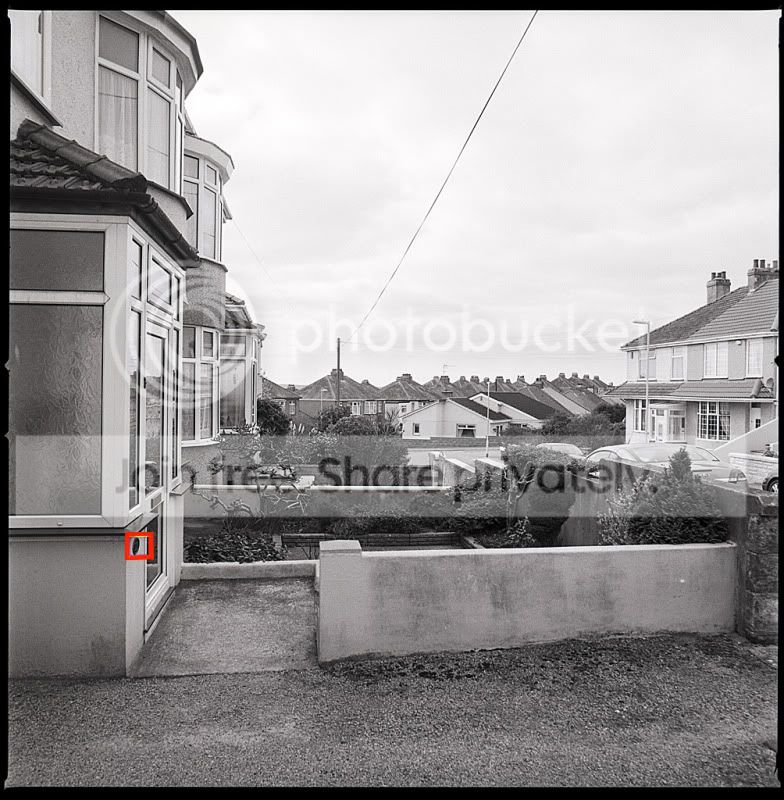
Shot some frames on the Hasselblad while the weather was overcast, not great subject matter just the view down the road but the aim was to produce some negatives to try out on my new scanner an Epson Perfection 750 Pro.

Film was Ilford FP4+ Lens was Carl Zeiss 50mm Distagon

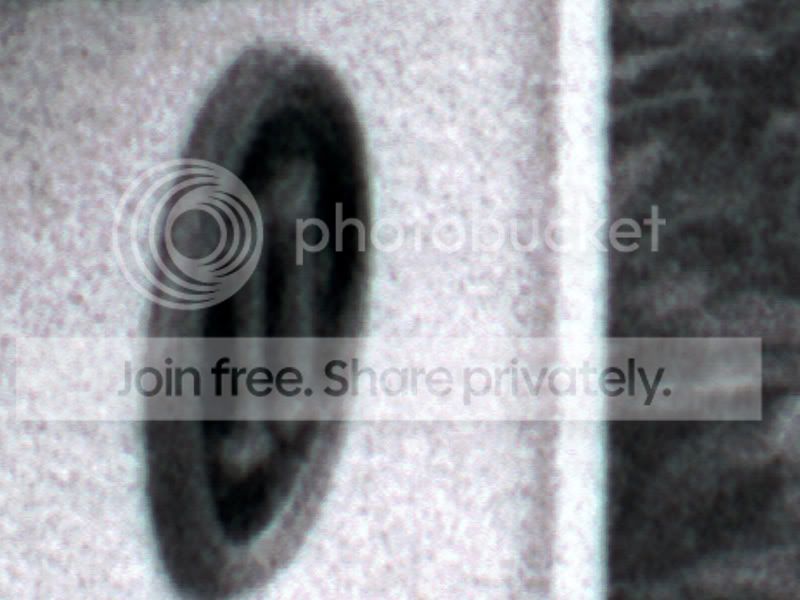
Scanned a 6x6cm Hasselblad negative at 11520 dpi which is just below the 12800 maximum resolution of the scanner, but there is a 4GB file limit so that was as high as I could go.

This produced a file with a size of 25358 x 25876 pixels which turned out to be 3.67GB. A bit slow to work with in Photoshop. and would have required a monitor of 30 feet square at a resolution of 72 dpi and would have produced a print of 85 inches square (almost 7 foot square) at a resolution of 300 dpi.

The 100% crop was taken from the area of the red box at the side of the door. Whilst grainy and lacking sharpness it is a very small part of the overall negative. The amount of detail and smooth graduation of tones which can be acheived at smaller enlargements from this resolution are simply mind blowing.
TestScan6.jpg


10011.jpg
 
Impressive detail Ed, I've got a roll of Velvia in my newly acquired RZ67 that should be finished soon, it will be interesting to see the results as all my other MF stuff has been shot on either a pinhole or my old Agfa Clack.
 
One could argue that you're scanning noise at that resolution for that scanner. Flatbed scanners don't have much more than true 2400dpi optical resolution from what I've read and scanning with interpolated settings does not increase the level of captured detail. It could help you get a bigger print though.

If your scanning software supports "size reduction", you could scan at, say, 4800dpi with a size reduction of 2 and you'll get a file sizes for a 2400dpi scan but with the software averaging that with the 4800dpi in case you scanner has more true resolution above 2400dpi.
 
The Epson 750 Pro has two optical scanners one of 4800 and one of 6400, it also has an optional Free Fluid Mount System (mine has yet to arrive) and this gives it almost the performance of the Nikon Coolscan 9000.

Specs:

Scanner Type
•Flatbed color image scanner with Epson Dual Lens System®, High-Pass Optics and Digital ICE™ Technologies

Photoelectric Device
•Color Epson MatrixCCD™ line sensor

Optical Resolution
•Epson Dual Lens System, 4800 dpi and 6400 dpi

Hardware Resolution
•4800 x 9600 dpi, 6400 x 9600 dpi with Micro Step Drive™ technology

Maximum Resolution
•12,800 x 12,800 dpi with software interpolation

Effective Pixels
•40,800 x 56,160 (4800 dpi), 37,760 x 62,336 (6400dpi)

Color Hardware Bit Depth
•48-bits per pixel internal, 48-bits per pixel external (External bit depth is selectable to 48 bits depending on the image editing software.)

Grayscale Hardware Bit Depth
•16-bits per pixel internal, 16-bits per pixel external (External bit depth is selectable to 16 bits depending on the image editing software.)

Optical Density
•4.0 Dmax

Transparency Unit
•8" x 10" Transparency Adapter built-in lid with four film holders: 35mm slides (12 frames), 35mm film strips (24 frames), medium format strips 2-1/4", 120/220, 6x20cm (2-6 frames) and 4" x 5" film (2 frames); 8" x 10" film area guide. Fluid mount tray and film guide for wet mount film scanning. (Mounting fluid and supplies not included.)

I agree that interpolated scans are not the best and will be avoided, and to be honest the 6400 High Resolution lens will give more than satisfactory results from Medium Format negatives especially when coupled with the Wet Scan System (fluid and mylar film is another £70 though).

Still, its nice to have a play, just trying to get to grips with Silverfast Ai Studio now (i took the oportunity to upgrade from AI).
 
...
it also has an optional Free Fluid Mount System (mine has yet to arrive) and this gives it almost the performance of the Nikon Coolscan 9000.
...

That sounds great. I've tried two wet scans on two different scanners. My initial conclusions is that I got a bit more shadow detail but otherwise, for computer screen display, I didn't notice much of a difference. I would use wet scanning for prints made from a scan though. But I also hear the light source of a scanner can be a factor on how much your wet scan can benefit.
 
Bit on the expensive side (but then, you've got a blad, i don't think that's a problem for you ;) ) but impressive. Have you tried other scanning settings? Might find that you can get a better quality image rather than a giant image.
 
****One could argue that you're scanning noise at that resolution for that scanner. Flatbed scanners don't have much more than true 2400dpi optical resolution from what I've read and scanning with interpolated settings does not increase the level of captured detail. It could help you get a bigger print though.***

Well I agree.....and when you come to think of it, how could a general purpose flatbed scanner for £450 (scanning at 12800 dpi) achieve results equal to an expensive drum scanner.
 
****One could argue that you're scanning noise at that resolution for that scanner. Flatbed scanners don't have much more than true 2400dpi optical resolution from what I've read and scanning with interpolated settings does not increase the level of captured detail. It could help you get a bigger print though.***

Well I agree.....and when you come to think of it, how could a general purpose flatbed scanner for £450 (scanning at 12800 dpi) achieve results equal to an expensive drum scanner.

Who said they could? The Nikon Coolscan 9000 ED is not a drum scanner it is a multi format film scanner with a 4000dpi optical head, the Epson has a 6400 optical head, the Nikon still wins out just, because its autofocus and lack of glass help. Wet scanning can help to mitagate that and the results are not so different than you may think.

The Nikon costs circa £2500 if you can find one, the Epson is about £550. Is the difference between the worth 5 times the price? not to me.

Flatbeds are a lot better now than they were in the past to the extent that there are few if any True Film Scanners available new in the marketplace.

How can a Canon 5DMk2 outperform a Canon 1DsMk2 when one originally cost £2000 and the other £5000? Hmm, tricky that.
 
Last edited:
Who said they could? The Nikon Coolscan 9000 ED is not a drum scanner it is a multi format film scanner with a 4000dpi optical head, the Epson has a 6400 optical head, the Nikon still wins out just, because its autofocus and lack of glass help. Wet scanning can help to mitagate that and the results are not so different than you may think.

The Nikon costs circa £2500 if you can find one, the Epson is about £550. Is the difference between the worth 5 times the price? not to me.

Flatbeds are a lot better now than they were in the past to the extent that there are few if any True Film Scanners available new in the marketplace.

How can a Canon 5DMk2 outperform a Canon 1DsMk2 when one originally cost £2000 and the other £5000? Hmm, tricky that.

erm well the point was:- From "flatbed" advertising you think you are getting 12800dpi at best, but 2400dpi is about right. When you scan higher all you get is less pixel breakup, so large size photos don't look grainy....but then you can use de-noise programs to prevent this (grain) but the image is really turning into digital :(

Hexanon 28 f3.5 superia 200asa
11niceviewofchurchatthetop.jpg


De-noised crop..sorta looks digital eh
crop2.jpg
 
...
the Nikon still wins out just, because its autofocus and lack of glass help. Wet scanning can help to mitagate that and the results are not so differen than you may think.
...

Sadly, you need to use the glass carrier on the 9000ED for best results. And that thing is a nightmare for controlling dust and you get newton rings on occasion. Plus the light source on it really picks up every tiny thing making post scan clean up for BW film much longer than other scanners. It's not much a problem with color film since you can use infrared cleaning or ICE option in the scanning software.
 
I have the same scanner and find 2400-4800 works best. You might want to try tuning the height of the holders and then check sharpness at each height setting. If you use multiple scan passes, sometimes it will improve the image - but more than 2 passes risks heating up the negative and causing it to curl. I have the fluid mount but have not used it yet. What I really want, is an upgrade to the Silverfast software that features 'multiple exposure' scan settings - supposedly able to pull out more shadow detail. Its available as an update, I think - see the Silverfast Website.
 
I have the same scanner and find 2400-4800 works best. You might want to try tuning the height of the holders and then check sharpness at each height setting. If you use multiple scan passes, sometimes it will improve the image - but more than 2 passes risks heating up the negative and causing it to curl. I have the fluid mount but have not used it yet. What I really want, is an upgrade to the Silverfast software that features 'multiple exposure' scan settings - supposedly able to pull out more shadow detail. Its available as an update, I think - see the Silverfast Website.

Yes, I bought the upgrade to Silverfast AI IT8 Studio (multi exposure) and it cost me about 80 euros as an upgrade and with the Epson Promo code.

Just trying to get my head around it now.

I did a couple of old Kodachrome 35mm slides at 4800 dpi earlier and I am well chuffed with the results.
 
Did you calibrate for Kodakchrome with the 'Silverfast' targets? I don't have much Kodakchrome, so trying to figure if its worth the 80 Euro (or whatever).
 
I calibrated Silverfast with the Monaco target supplied with the scanner, then I did my scans. The image below is from a 30+ year old Kodachrome slide.

Church.jpg
 
I got a 80x60cm poster printed from my scan of a 6x4.5cm slide. Scan was done on an older epson 3200 with a home-made negative holder. It looks awesome!!! So I think I'd agree that you really don't need a drum scanner to be able to do good size prints from medium format film. Having said that, of course I'd like to see just how much detail can be in my prints. I wonder what I could knock up with the microscope in work :)
 
Back
Top