Management of Creatve Cloud

mal robb

Suspended / Banned
Messages
48
Edit My Images
No
Hopefully a quick one.

I have Adobe Creative Cloud for Photographers that I pay a monthly subscription for. I understand this entitles me to 2 downloads of Lightroom on 2 devices. How can I manage this as I am trying to download Lightroom onto a desktop PC but it mentions it is only Lightroom 5.2.7.1. I thought we are way past Lightroom 6. Just want to download the correct version but struggling.

Thanks

Mal
 
Have you installed Creative Cloud on both and signed in with the same logins? The Apps tab should then show your available Apps then install them from there.
 
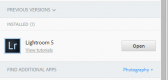
I have just installed Creative Cloud on my desktop, and then downloaded LR but as shown it only has Version 5.
upload_2016-3-20_13-48-22.png
 
That's odd, mine shows Lightroom CC (2015), try logging out and logging back in and then check for updates
 
Thanks. Yes it is weird as Photoshop CC has installed. Here is my plan and I have never bought a standalone copy of LR.

upload_2016-3-20_16-11-16.png
 
If you open the creative cloud app on your desktop and then go 'home' it should give you a list of what is installed and or updated,is that showing LR CC installed?
 
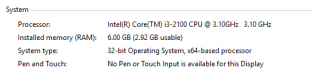
Thanks. I have just spent a fair bit of time with Adobe support and bizarrely it "presents" me with LR 5 as you mentioned!. After it being escalated it turns out that my PC is 32 BIT and you require 64BIT to run LR CC.

I was going to add some RAM (16GB) to make it more usable but this might be nugatory. Is there any way of upgrading or is it new PC time?

upload_2016-3-20_17-59-46.png

Thanks

Mal
 
Last edited:
I'm not a computer geek by any stretch of the imagination, but if a 64 bit system will run then upgrade the OS and stick some more RAM in it or if funds permit buy a new pc.
I am certain people with more knowledge than me will be a bit more specific
 
Your PC has 64 bit hardware so it is capable of running a 64bit operating system and 64bit applications. For some strange reason you computer has a 32bit operating system installed.

You would have to install (free of charge) the 64bit version of your operating system to allow you to install and use the 64bit versions of Photoshop and Lightroom. You cannot do a upgrade of the Operating system it had to be a clean install.

Why did you choose a 32bit OS? As you can see from you system information screen shot your 32Bit OS can only use half of your 6GB of available RAM. If you install 64 bit OS your computer will be faster as all the 6GB of RAM can be used.
 
Last edited:
Thanks again for all the input.

Redsnappa, I had an old Windows PC that I had been using as a media centre PC and then decided to make it a dedicated photography editing machine. I intended to put more RAM in it as understand it will support upto 16GB RAM. I just ran the Windows 10 Upgrade utility to upgrade this from W7 and got to where I am right now. I appreciate that with current 32 Bit OS it will only use 4GB RAM and it is not great to use dissimilar RAM(ie 4Gb and 2GB) but this is what it came with. I will DL the USM media creation tool and perform a clean install as believe this will be the way ahead.

Thanks for taking the time to provide the advice and guidance; much appreciated.

Mal
 
Back
Top