mamiya rb67 help!

onefunkypenguin

Suspended / Banned
Messages
1,587
Name
dave
Edit My Images
Yes
right. in here is most likely the best place to ask!

i have my lovely rb67 and im looking to shoot some of my college fashion unit on it, only problem is i want to use speedlights with it.

i currently have a canon 580ex, how do i connect it to my rb67? i am getting some of fitp receiver/triggers, would these work or do i need a cable of some sort?

should be interesting using this set up, if it works it should be lovely though!
 
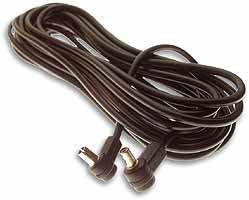
You need to pull the rubber cover off the side of your 580 EX to get at the socket, then run a PC flash cable from there to the flash socket on your RB lens. Make sure the switch by the lens socket is set to X (electronic flash).

It's only going to work in Full Manual Mode though - the RB67 has no TTL flash capability. I don't think the fitp triggers will work but no doubt fitp will advise.

The ideal flashgun to my mind for the RB would be an old semi auto one like a Vivitar 285 or one of the old Metz guns (where you have choice of auto apertures and a sensor on the front of the flashgun) which would give you a degree of auto operation and be pretty accurate. The 580EX will do the job though.

hama-flash-cable-pc-5m-6975.jpg


No sync worries though - the RB will flash sync at all shutter speeds.
 
You will need a cable to go from the PC sync. connector on the lens to the transmitter. I would expect the transmitter to be supplied with a suitable cable.


Steve.
 
Actually, I'm advising you wrongly - the 580EX doesn't have a flash socket - it's a power socket (The 580EX 2 does have a flash socket)

b****r! I think you can get an adaptor which plugs into the flash socket on the lens which gives you a basic hotshoe on the other end.
 
thank you kind people.

i was looking to use the 580 because i can then trigger the 430 i have with that too or am i talking out my ****? think i may possibly be!

just iv seen loads of mamiya pictures with off camera lighting used and by the looks of it more than one flash, how would i do that?
 
I think you can set the 580EX as a master and the 430 as a slave as long as they're both on the same channel, (but just check that's right). When you fire the 580 it will then fire the 430, but again they'll both be in full manual mode.
 
manual mode doesnt bother me tbh, i know how to use them and il have the 5d there as a guide before i put the polaroid back on then the film itself, loads of hassle but i dont think you can beat film for these types of shots!

so from listening i connect my 580 to the mamiya by way of cable, set it in master mode and 430 in slave mode and have the lens marked dial thingy to x.

am i correct?

sounds simple enough... :D

oh, anyone also know where i can get cheap enough polaroid/fuji instant film to fit the back?
 
I'd buy flitp's set up with 2 recievers for the two flashes for reliability and ease of thinking

it DOES come with a pc cable as I have one and use it with my salyut c via the pc connector ;)
 
I'd buy flitp's set up with 2 recievers for the two flashes for reliability and ease of thinking

it DOES come with a pc cable as I have one and use it with my salyut c via the pc connector ;)

so if i get the receivers, im going to anyhoo for off camera stuff without having to have a bloody big 580 as a trigger on top of camera, how do i go about connecting things?
 
Yep you got it. You're just gonna need a cable with a normal plug to plug into the lens and a hotshoe on the other end to take the 580EX. The hotshoe only needs one contact - it just has to fire the flash - no other functions at all.
 
this seems like a pain in the ass but im sure when iv set it all up it will be fine, famous last words i guess!

now to look for the cable.
 
Must admit I didn't realise till I checked tonight that the 580EX doesn't have the flash socket. Pretty poor for a top end gun!
 
yeah i told my lecturer it did, was more annoyed than shocked when i came home and bloody checked!
 
is this what i need?

That's the baby.

OR you can get the shoe separately which has a flash socket so you can just use a conventional flash cord. That would give you the option of a longer cable if you wanted. I'm sure I saw one of those last time I was in Jessops.
 
That's the baby.

OR you can get the shoe separately which has a flash socket so you can just use a conventional flash cord. That would give you the option of a longer cable if you wanted. I'm sure I saw one of those last time I was in Jessops.

ah, a hotshoe adaptor? we had them in college but i never needed one due to me having the pc sync connection in the camera. a longer cable would be much more beneficial me thinks, il maybe pop into jessops over weekend if i get a chance.
 
so if i get the receivers, im going to anyhoo for off camera stuff without having to have a bloody big 580 as a trigger on top of camera, how do i go about connecting things?

mine came with a pc-pc cable, so the pc port on the camera to the one on the Tx (the cable had locking ends and the Tx a thread so it'll even lock in - no thread on salyut but might bt on the rb)

then with that plugged in it works the same way as if it was plugged into the 5d hotshoe (perfectly)
 
For the record, the RF-602 no longer comes from the factory with a pc->pc cable. No idea why :shrug:
 
mine came with a pc-pc cable, so the pc port on the camera to the one on the Tx (the cable had locking ends and the Tx a thread so it'll even lock in - no thread on salyut but might bt on the rb)

then with that plugged in it works the same way as if it was plugged into the 5d hotshoe (perfectly)

maybe me being an eejit, but whats a Tx?
 
thank bigyin.

going to put order in for the stuff, hope its here soon! im impatient. lol
 
I agree with everyone who suggested FITPs wireless triggers. I bought a set and use them onmy rb, they work fine
 
I agree with everyone who suggested FITPs wireless triggers. I bought a set and use them onmy rb, they work fine

how do they work on it? im expecting santa over tonight to empty his sack... :lol: (read other threads to see what im on about)
 
Back
Top