

- Messages
- 11,730
- Name
- Chris
- Edit My Images
- Yes
I've decided that at the end of each year I should export my processed images from C1Pro onto off-site disks. This is really so that if I eventually have to leave C1Pro for another edit/DAM tool, I don't have too massive a task. (I'm getting older, so it's probably better to do complicated tasks earlier rather than later!) My first year with C1Pro was 2021, so it's not currently too big a job. From 2020 and earlier years I have both the image originals and Aperture-processed versions (created by ApertureExporter); very few of these have had any further PP done in C1Pro, so I think I can safely ignore those.
By the way, I'm on C1Pro 23; generally no point in paying to upgrade unless there are new features I _really_ need, or I actually buy a newish digital camera!
C1Pro has some cunning aids for this sort of task, in the form of tokens (of which my understanding is weak, though now better than it was!). My general organisational approach is that each year has a top level folder (C1Pro Group), within which are multiple folders, one for each film. Most of these are C1Pro Projects (for 2021/22, a few Olympus films are simply albums). Within each project/film is an Album holding the actual images, and sometimes a Smart Album for the images rated above a certain level.
I've built myself a test export recipe which seems to do roughly what I need, but raises some questions.
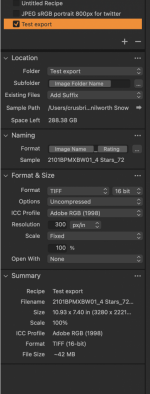
(The 72 at the end of the Sample line above comes from an appended counter, intended as a tie breaker if the same image name is used twice. I'd rather it re-started each Project, rather than incrementing for the whole year!)
Most of my images start from JPEG sRGB scans, so it seems a bit like saving them as 16-bit TIFFs in Adobe RGB is a bit of overkill (some did start from TIFFs or Vuescan RAW, so there's at least some argument for TIFFs). I'd actually quite like to have the option that ApertureExporter had, to export most images as JPEG, but 4* or above images as TIFFs, but I can't see any way to do that! I guess is every project had a smart album for the higher rated images, I could export the whole project as JPEGs and then the smart album as TIFFs, quite a bit of extra work. I suppose that since the eventual destination is off-line disks, the file sizes don't matter too much!
Note, I plan to backup the referenced originals to the same external disk as part of the process.
Another issue I've found is that I can't see a way to select more than one Project at a time. If I select a Project and then shift/click on the next Project, only the second one ends up being selected. I'm wondering if I select the top level Group for that year, maybe that will automatically select all the contained Projects? Unless that works, I'm going to have to export one Project (film) at a time.
Has anyone any comments on this approach, suggestions for improvements, etc? Thanks, Chris
By the way, I'm on C1Pro 23; generally no point in paying to upgrade unless there are new features I _really_ need, or I actually buy a newish digital camera!
C1Pro has some cunning aids for this sort of task, in the form of tokens (of which my understanding is weak, though now better than it was!). My general organisational approach is that each year has a top level folder (C1Pro Group), within which are multiple folders, one for each film. Most of these are C1Pro Projects (for 2021/22, a few Olympus films are simply albums). Within each project/film is an Album holding the actual images, and sometimes a Smart Album for the images rated above a certain level.
I've built myself a test export recipe which seems to do roughly what I need, but raises some questions.
(The 72 at the end of the Sample line above comes from an appended counter, intended as a tie breaker if the same image name is used twice. I'd rather it re-started each Project, rather than incrementing for the whole year!)
Most of my images start from JPEG sRGB scans, so it seems a bit like saving them as 16-bit TIFFs in Adobe RGB is a bit of overkill (some did start from TIFFs or Vuescan RAW, so there's at least some argument for TIFFs). I'd actually quite like to have the option that ApertureExporter had, to export most images as JPEG, but 4* or above images as TIFFs, but I can't see any way to do that! I guess is every project had a smart album for the higher rated images, I could export the whole project as JPEGs and then the smart album as TIFFs, quite a bit of extra work. I suppose that since the eventual destination is off-line disks, the file sizes don't matter too much!
Note, I plan to backup the referenced originals to the same external disk as part of the process.
Another issue I've found is that I can't see a way to select more than one Project at a time. If I select a Project and then shift/click on the next Project, only the second one ends up being selected. I'm wondering if I select the top level Group for that year, maybe that will automatically select all the contained Projects? Unless that works, I'm going to have to export one Project (film) at a time.
Has anyone any comments on this approach, suggestions for improvements, etc? Thanks, Chris