

sk66
Suspended / Banned
- Messages
- 9,557
- Name
- Steven
- Edit My Images
- Yes
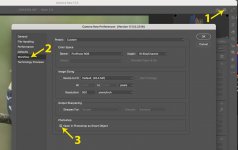
I just learned something new to me. You can change the ACR preferences so that it opens images in PS as a smart object. Then, if you double click on the layer it will reopen the raw data in ACR to make changes, and then it will update the layer when done.
But, what is happening is that the raw data and LR/ACR edits are being saved in the PS document (tiff/psd); which makes the file that much bigger. I.e. if you update the original raw file's metadata (xmp file/ LR edits) it will not affect/update the raw data/ACR edits in the PS document.
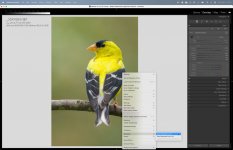
The way this can be used with LRC is to make lightroom *write the metadata to file (edits to xmp). Then instead of opening the raw file from LRC into PS, open the raw file with PS directly. That will cause ACR to open the image with all of the LRC edits applied, and then open that as a smart object in PS (embedded raw data/edits). Now all of the PS edits can be truly non-destructive, and you can go back and edit/update the raw data being used at any point. Plus, it saves all of the edits into a single file (i.e. no need to retain the xmp or acr sidecar files).
But there are some limitations to working with smart objects and 16 bit tiffs in PS; e.g. some filters/edits are not available.
(* you can have LR always create xmp files, but that is mostly just a waste of drive space and unnecessary redundancy (assuming you do regular backups))
But, what is happening is that the raw data and LR/ACR edits are being saved in the PS document (tiff/psd); which makes the file that much bigger. I.e. if you update the original raw file's metadata (xmp file/ LR edits) it will not affect/update the raw data/ACR edits in the PS document.
The way this can be used with LRC is to make lightroom *write the metadata to file (edits to xmp). Then instead of opening the raw file from LRC into PS, open the raw file with PS directly. That will cause ACR to open the image with all of the LRC edits applied, and then open that as a smart object in PS (embedded raw data/edits). Now all of the PS edits can be truly non-destructive, and you can go back and edit/update the raw data being used at any point. Plus, it saves all of the edits into a single file (i.e. no need to retain the xmp or acr sidecar files).
But there are some limitations to working with smart objects and 16 bit tiffs in PS; e.g. some filters/edits are not available.
(* you can have LR always create xmp files, but that is mostly just a waste of drive space and unnecessary redundancy (assuming you do regular backups))
Last edited:


