
LR Catalogue

Graham

Suspended / Banned
Messages
7,448
Name
Graham
Edit My Images
Yes
Hi all,
Sorry but this may seem strange.
Yesterday I loaded my CF card to the PC, opened LR import to copy photos from PC folder and went back to my explorer thus forgetting LR for a little while.
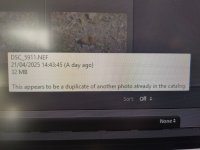
When I remembered about it I opened LRC and looked at my photos and edit some photos, I did one, export to my folder and went back to LRC, When I want to try another edit the folder was not there in the library and yet I ad just edited one so I went to upload the photos again from my PC to LRC and it said something like what you see in the photo caption below.
I have no idea how it came to this and I have scratched my head trying to sort it out.
I have tried to look in the LRC Cat folder but all it brings up is photos that are from last week and beyond.

Any ideas ?

Thanks in advance.
 

Attachments

  • IMG_20250422_170447.jpg
    IMG_20250422_170447.jpg
    182.1 KB · Views: 30
Is there anyone here that could help please ?
 
Graham - if you know the image number of one of the files, can you search, (your hard disk), for the image to see were it is - (i.e. it should near the current ones in your camera)
 
Thanks Bill.
I searched with a photo file number and found the LR CAT and deleted all the ones within that folder that it said were duplicates.
No change :mad:
 
Thanks Bill.
I searched with a photo file number and found the LR CAT and deleted all the ones within that folder that it said were duplicates.
No change :mad:

Graham, have you 2 different images (files) with the same number? - I have experienced this on occasions ......(i.e. 2 different Nikon DSLR's), and had to fix it by changing the image number, I just added an "a"
 
Graham, have you 2 different images (files) with the same number? - I have experienced this on occasions ......(i.e. 2 different Nikon DSLR's), and had to fix it by changing the image number, I just added an "a"
That`s what I was thinking but thats a lot of photos to add a letter or number too.
 
Is there somewhere in LR preferences that allows me to change this preference to accept duplicate number files ?
 
That`s what I was thinking but thats a lot of photos to add a letter or number too.

just start another numbering system, presumably on your Z9 ............that's how mine came about .... are you using DSC_ .........I now use say D85_xxxx.NEF and D81_xxx.NEF etc.,........ i.e. the camera number
 
Ah ok, I understand.
I actually have managed to delete all my duplicates now and all is ok but boy oh boy, what a faff. (Thanks to YT)
Thanks for your help Bill.
 
That`s what I was thinking but thats a lot of photos to add a letter or number too.
One of the options when importing into LR is to change the filename. As I have multiple Sony cameras, I prefix the filename with the camera.
EG If I had image 12345.arw shot on my A6000, LR would rename it to A6000_12345.arw. You Set the value of he prefix when you import, and it will remember a list of options.
 
One of the options when importing into LR is to change the filename. As I have multiple Sony cameras, I prefix the filename with the camera.
EG If I had image 12345.arw shot on my A6000, LR would rename it to A6000_12345.arw. You Set the value of he prefix when you import, and it will remember a list of options.
Thank you for the info.
 
Back
Top