Looking for Advice on Monitor

Your link takes me to/via some sort of affiliate link.......not for me!

Can I suggest if you are seeking insight about a specific monitor, just state the model and/or link directly to the specs page :)
 
Your link takes me to/via some sort of affiliate link.......not for me!

Can I suggest if you are seeking insight about a specific monitor, just state the model and/or link directly to the specs page :)
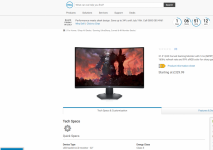
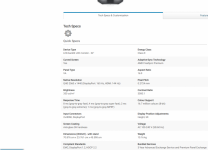
Hi, Thanks I tried past and copy from the Dell site and the link I have placed is that why it is going to another sire before I don't no but here is couple images of the Dell page.
 

Attachments

  • Mon_1.PNG
    Mon_1.PNG
    376.7 KB · Views: 12
  • Mon_2.PNG
    Mon_2.PNG
    310.5 KB · Views: 12
Well, looking at what is there and IMO....

I would not buy a curved screen and as the panel is a VA type also not for me.

I suggest at the very least you find one with an IPS type panel.
 
Pick the phone up,ring Dell tell them what you want it for and your budget and let them advise
 
You should be able to buy something pretty decent with a £500 budget depending on what you are looking for .. have you looked at any of the BenQ monitors ?

Have a look here Monitors for 2021 this may be of help


Coho-Blue
 
Benq and Dell ultrasharp are popular on here.
I went for the Dell U2720q which was a little over £500 at the time. Regrettably the price has increased since then.
 
I have a Benq PD3200U, decent 4k just over GBP 500 at the moment.
 
Does this monitor provide power through USB-C, Tim, and if so how much (can't see on the specs)?
Looks like no power, I've just tried charging a phone and that doesn't work
 
Just had an email from Dell they are having a black friday sale, might be worth having a look if you are not sorted

 
Just had an email from Dell they are having a black friday sale, might be worth having a look if you are not sorted

Hi, Yes thankyou that is the link I tried to get to work in my OP and yours does the same thing sends to an affiliate link. Russ.
 
Benq and Dell ultrasharp are popular on here.
I went for the Dell U2720q which was a little over £500 at the time. Regrettably the price has increased since then.
I just oredered that one as well should be here tomorrow.What is your opinion of please
 
I am absolutely disgusted with a company called "Laptopsdirect"
They were contracted by accepting payment to deliver today by way of paying extra for next day delivery.
Just had an email claiming late delivery from their suppliers so it should be here tomorrow. So I demanded the £9.99 back but doubt if that will happen
Don't ever buy anything from them
 
Thanks for ll the input actually ended up with an NEC Multisync Monitor. Russ.
 
I am absolutely disgusted with a company called "Laptopsdirect"
They were contracted by accepting payment to deliver today by way of paying extra for next day delivery.
Just had an email claiming late delivery from their suppliers so it should be here tomorrow. So I demanded the £9.99 back but doubt if that will happen
Don't ever buy anything from them
Oddly enough I had the same problem with my Dell monitor. It showed as stock but clearly wasn't. In the end I cancelled and bought direct from Dell.
 
I've just ordered a 32" 4k monitor from Samsung. It's supposed to have 'billions' of colours (99% sRGB, not clear if 10 bit or dithered 8 bit) and 178 degree viewing angles. Hoping it doesn't suck.
 
I've just ordered a 32" 4k monitor from Samsung. It's supposed to have 'billions' of colours (99% sRGB, not clear if 10 bit or dithered 8 bit) and 178 degree viewing angles. Hoping it doesn't suck.
does it have an IPS screen. if it does then what is shown on the screen can be seen at any angle. If not mainly seen square on. Out of interest which model did you get?
 
Last edited:
from that company just read
Awaiting Despatch
Payment has been taken and the item will be despatched shortly.

From DPD
We'll deliver your Buy it Direct Group parcel

TOMORROW
27th July 2021

Someone in that company needs sacking, they would not have lasted long in the company I had before retiring
 
does it have an IPS screen. if it does then what is shown on the screen can be seen at any angle. If not mainly seen square on. Out of interest which model did you get?

Samsung S70A. I'm reasonably sure it's a VA panel, although the claims made and what little information I can find suggests this may be close to IPS in terms of viewing angles and colour without the disadvantages of IPS like backlight bleed and low contrast.
 
I already have a 27" Dell monitor not 4K though, I have not noticed any backlight bleed but may be just lucky. Also have a smaller Dell monitor stuck under the desk as I don't use it any more
 
My U2412M isn't bad, but the bleed is visible on a black screen.
 
New 32" 4K VA monitor hooked up to old computer (I'm about to start building the new one, but I really wanted to see how it would be).

From the box it was low contrast with a slightly green tint. Switching to sRGB mode helped considerably, though I've had to drop the brightness considerably. Sat at arms length from the screen there's probably around a third stop of luminance fall off at the edges of the screen and it's definitely not even like an IPS screen. Presently debating returning it because although I like the size, it's behaving a lot like the old TN screen I had years ago, and isn't really as good as their marketing material suggests.

4K is nice in some ways, but even at 32" the pitch is just a bit too fine. If this goes back then there's an ASUS 'calibrated' 27" QHD screen that I'll buy instead.
*edit* organising the return now. :p

The Sammy is packaged up & ready for return. I'm back on the Dell, and having had that experience I can see with this that there's a *little* fall off at the edges & a small colour shift, though much less than the other. Overall this screen looks MUCH cleaner and crisper, more evenly lit, better colour.
 
Last edited:
New monitor number 2 is here - Gigabyte M27Q.

I chose this because it's a wide gamut IPS monitor, 8 bit >99% sRGB and also capable of displaying a high proportion of adobe RGB. I'm going to need to borrow a screen calibration to begin with because it's not quite neutral, with what I think it a small hint of cyan/yellow (will wait to day light to assess again). Images look slightly different, with more complex colours than before, however there's a kicker tucked away - pixel arrangement of BGR instead of RGB, so that fonts slightly display colour banding, or perhaps different banding, compared to what I'm used to.

Seems I got lucky with this one, because some purchasers report strong backlight bleed and stuck pixels, but this *seems* to have neither and there's less BLB than the Dell.

I'm not absolutely certain it will stay, but it's more likely than the last one - at least drop-off towards the edges is minimal, and the panel seems evenly lit.
 
New monitor number 2 is here - Gigabyte M27Q.

I chose this because it's a wide gamut IPS monitor, 8 bit >99% sRGB and also capable of displaying a high proportion of adobe RGB. I'm going to need to borrow a screen calibration to begin with because it's not quite neutral, with what I think it a small hint of cyan/yellow (will wait to day light to assess again). Images look slightly different, with more complex colours than before, however there's a kicker tucked away - pixel arrangement of BGR instead of RGB, so that fonts slightly display colour banding, or perhaps different banding, compared to what I'm used to.

Seems I got lucky with this one, because some purchasers report strong backlight bleed and stuck pixels, but this *seems* to have neither and there's less BLB than the Dell.

I'm not absolutely certain it will stay, but it's more likely than the last one - at least drop-off towards the edges is minimal, and the panel seems evenly lit.

Personally I would have had great reservations buying that monitor for photo editing or colour critical work.

It's intended market is gaming and the bgr vs RGB sub pixel structure makes for interesting and disconcerting reading here

I hope it works out for you.
 
Personally I would have had great reservations buying that monitor for photo editing or colour critical work.

It's intended market is gaming and the bgr vs RGB sub pixel structure makes for interesting and disconcerting reading here

I hope it works out for you.

Thanks for the link - it's interesting because the link doesn't mention anything that will affect the use of the monitor for colour managed work, but it does mention issues with text. Based on initial evaluation last night, fonts are a little smudgy, but nothing like as bad as they were when I had my first 17" LCD screen, and not really any worse than running a 4k RGB screen at 125%. The solutions suggested - running inverted, using cleartype for BGR would fix it if this were an issue - not ideal but ok.

The real critical stuff for photo work like colour calibration, contrast, gamut appear to be close to professional monitor performance in the reviews I read. Other things that I worried about like stuck pixels (none) and IPS panel backlight bleed aren't significant. The biggest disadvantage I can see is that images have a depth on this, probably due to the size and gamut, that they won't on ordinary monitors, and so subtlety will become dullness, details become noise.

I need to review it in daylight without the honeymoon effect, but if text is tolerable long term then I'll be happy.
 
Thanks for the link - it's interesting because the link doesn't mention anything that will affect the use of the monitor for colour managed work, but it does mention issues with text. Based on initial evaluation last night, fonts are a little smudgy, but nothing like as bad as they were when I had my first 17" LCD screen, and not really any worse than running a 4k RGB screen at 125%. The solutions suggested - running inverted, using cleartype for BGR would fix it if this were an issue - not ideal but ok.

The real critical stuff for photo work like colour calibration, contrast, gamut appear to be close to professional monitor performance in the reviews I read. Other things that I worried about like stuck pixels (none) and IPS panel backlight bleed aren't significant. The biggest disadvantage I can see is that images have a depth on this, probably due to the size and gamut, that they won't on ordinary monitors, and so subtlety will become dullness, details become noise.

I need to review it in daylight without the honeymoon effect, but if text is tolerable long term then I'll be happy.


Hi Toni

I did see one review that was quite praiseworthy about is colour gamut but made an odd statement (even though they made adjustments to the colour setting), saying that "it could not be calibrated...." That was the Toms Hardware review. and as far as I could see in the review it did not expand on what they meant and by what they just the adjustments made???
 
The key reviews I used were:
https://www.tomshardware.com/uk/reviews/gigabyte-m27q-27-inch-170-hz - RBG mode only allows adjustment of brightness.
View: https://www.reddit.com/r/Monitors/comments/k6i5xl/hardware_unboxed_gigabyte_m27q_review_impressive/


The reviews on Reddit were a bit scary because some obviously had seriously substandard panels, but this one doesn't have the issues many described. Last night I set things up with a flat black screen, and as described in a couple of reviews, there was a little gentle orange bleed at the bottom left & right, only noticeable in a dark room.

FWIW when I sat down a few min ago I wasn't happy with the font display, so went through the cleartype setup process. Text is now cleaner than it had been on my old Dell, fewer coloured fringes in Firefox and office apps, although there are some still present. I don't know if Lightroom and On1 photoraw uses cleartype, but fonts again look completely normal. Just opened the pdf version of David DuChemin's Pilgrims and Nomads - this opened in Edge, and the text was no more smudgy than is normal for a pdf. At present the font thing is a complete non-issue.

One other complaint was that ergonomics were poor because the screen couldn't be rotated, but I've never rotated my screen yet, and the Dell was always annoying because it was hard to get the monitor exactly level. This has a good range of height adjustment, unlike some of the budget screens with fixed height

I still have some fiddling to do. If I could borrow a calibration device from somewhere that would be really useful, not that I plan to do a lot of colour-critical work, but it's good to have a 'right' starting point & then work from there. A little drift over a couple of years is unlikely to be a problem.
 
Last edited:
is the dell u2720q any good for photo editing pics and video
 
is the dell u2720q any good for photo editing pics and video
Looks like a very good monitor for photography work.

My one question that only other 4k monitor users can comment on is whether 4k on a 27" screen is it a tad too small or is 32" the smallest to aim for???
 
ASUS PROART PA278QV is the one I got last year it seems very accurate out of the box and not expensive
It's nicer than the U2412M I still use on older PC but that was a good one too.
 
Last edited:
Looks like a very good monitor for photography work.

My one question that only other 4k monitor users can comment on is whether 4k on a 27" screen is it a tad too small or is 32" the smallest to aim for???

27 inch is fine. I wouldn't say not to 32inch but honestly 27 is plenty.

I use this


Actually love it.

In all honesty, you need 100% SRGB, 99% aRGB, IPS. Don't settle for anything less.
 
Last edited:
Back
Top