

Long exposure problems .... help appreciated

Guy Fawkes

Suspended / Banned
Messages
201
Name
Lee Thurston
Edit My Images
Yes
Just got back from a week on the Costa Blanca .... had a lovely time but was a bit frustrated with a couple of aspects of the photography I tried (nb I am a bit of a beginner).

1) I took my tripod and camera out on evenings to try to get some long exposures. There was a very nice, well lit little bay which coudl be seen from a coastal path, i set up my tripod, set the camera to 'TV' (its a canon 400d), set the exposure and then tried to shoot. However it just kept focusing in and out, and wouldnt take, so, after much [technical term] faffing - i had to set the lens to MF rather than AF and do my best/worst. The resulting image(s) (attached below to give you an idea of what I am talkign about), despite having the potential to look great (imho) turned out poor and somewhat unsharp which has left me frustrated. :'(

2) I also tried some long exposure type shots at the beach in broad daylight. Trying to achieve some of the lovely silky wave/water shots so many people are proud of. This time the focus was fine but everytime i tried lenghtening the exposure time to give the effect I wanted, the shot was drowned in brilliant white light! I just couldnt get it anywhere near the desired exposure, so consequentially, the images were razor sharp! :lol:

Anyway, if anyone can shed any light on the problems I have encountered, and could suggest a solution for next time I would greatly greatly appreciate it, and i apologise if my errors are elementary.
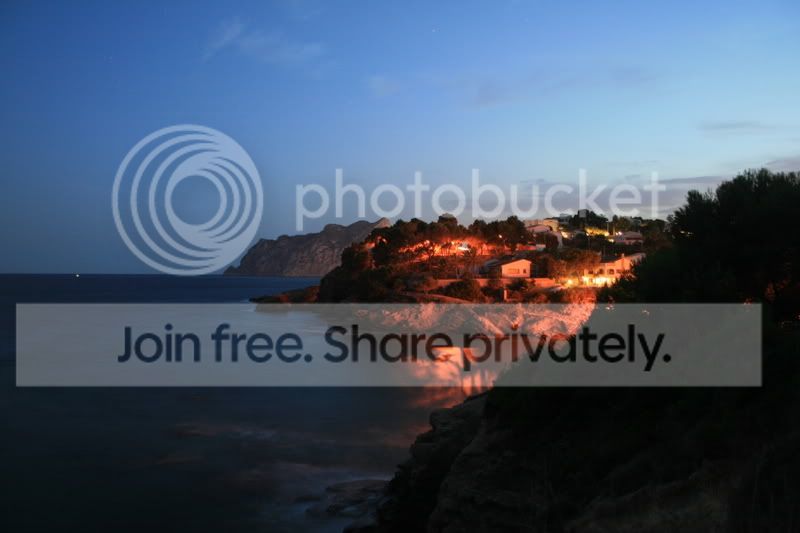
9c2e9de7.jpg
 
1 - MF is often best in such low lighting conditions as the camera will struggle to collect enough information to auto-focus and ends up 'hunting' for the focus

2 - small apertures and ND grad filters are needed for this kind of shot in order to lengthen the shutter speed without over-exposing the shot

HTH! ;)
 
Guy Fawkes,

your twilight picture looks about right apart from the camera shake - I don't think your focus was out because i cannot see a sharp zone of focus anywhere. Even on a tripod you can induce camera shake when you press the shutter button, or if it windy the tiny vibrations going through the whole set up can cause this - and much worse!

Answer to the above: in wind weigh the tripod down by hanging a weight of some sort off the central column - your camera bag? a bag with stones in? It doesn't matter, just weigh it down to help prevent vibrations.
To prevent shutter button induced camera shake, use the self timer facility - then when the shutter fires the vibrations you have caused by pressing the button (you have a pulse in your finger and this can be enough in some situations, or even your hand against the body) .....the vibrations you have caused by pressing the button will have had time to subside before the shutter curtain opens.

Twilight - general rule for scenic type shots. Stop the lens down to about f8 (most lenses will be sharpest at around f8 or f11, then fall off a bit as you stop down more.)
You could also use the mirror up facility on your camera - this allows you to press the button to lift the mirror, then wait a few seconds tolet the vibrations subside, then press the shutter to fire the shot. A cable release will overcome the shutter vibrations too.

Daylight slow shutter speed shots on the beach. You simply had too much light for the effect. Had you tried the same at earlier or later in the day, when the light was much less it would have worked.

If you are doing twilight shots of a harbour and you have a shutter speed of more than about 1 second, then the boats will go soft if there is any movement in them.
 
1) I took my tripod and camera out on evenings to try to get some long exposures. There was a very nice, well lit little bay which coudl be seen from a coastal path, i set up my tripod, set the camera to 'TV' (its a canon 400d), set the exposure and then tried to shoot. However it just kept focusing in and out, and wouldnt take, so, after much [technical term] faffing - i had to set the lens to MF rather than AF and do my best/worst. The resulting image(s) (attached below to give you an idea of what I am talkign about), despite having the potential to look great (imho) turned out poor and somewhat unsharp which has left me frustrated. :'(

Some good advice already given. Don't be frustrated if you do not get it right first time.

Your image is taken at f4 / 8 sec exposure; ISO 400.
EXIF data says the camera was in landscape mode rather than Tv. Try to get out of the auto modes and into the creative modes. Av is the mode to use for this kind of shot. What you are interested in is massive Depth of Field, so use an aperture of f9.0 (ish), the camera will select the shutter speed which could be way more than 8sec. If you are on a good tripod that won't matter. Also leave the ISO at 100.
Pay attention to your tripod technique with the advice from Lensflare. A good quality tripod and head does make a lot of difference but you can get good results with cheaper tripods.

2) I also tried some long exposure type shots at the beach in broad daylight. Trying to achieve some of the lovely silky wave/water shots so many people are proud of. This time the focus was fine but everytime i tried lenghtening the exposure time to give the effect I wanted, the shot was drowned in brilliant white light! I just couldnt get it anywhere near the desired exposure, so consequentially, the images were razor sharp! :lol:

As Lensflare points out, you are trying do the shot at the wrong time of day. The trouble with getting up early is often that the wind (and therefore waves) has not picked up because the sun is still low, great for the still shot but not great for that silky water shot. You might be better at the back of the day.
 
to get long exposures in bright light, get a neautral density (ND) filter. You can get a vareity of different ones, but 2 (0.3) 4 (0.6) and 8 (0.9) are the most common. They reduce the amount of light by 1, 2 and 3 stops respectively. You can go higher than this if you want really long exposures, or you can stack more than one ND on top of each other.
 
Some very good advice given here about long exposures generally, but this image will sharpen up nicely. When you reduce an image in size as you have here it will lose definition, look soft and must be sharpened, regardless of whether it's been previously sharpened at the larger size.

This image looks pretty much how I'd expect it to look when reduced in size and prior to sharpening being applied. Try applying USM in small increments till it looks it's best.

It's quite a nice shot actually.The horizon needs a half degree rotate to the left, but do it before you sharpen, as rotating softens the image too.
 
Back
Top