Lockdown lighting Project 3

Garry Edwards

Moderator
Messages
13,475
Name
Garry Edwards
Edit My Images
No
This is another one that we can all do during lockdown, it needs very little in the way of space or equipment.

I’ll start off by boring you with a bit of history. A lot of years ago, long before digital, I wanted to photograph some very expensive hand-made dog collars. Their USP was that they were waterproof, so I decided to demonstrate this quality by taking splash shots of them.

It was a completely new challenge for me, I got a fish tank, set up a 35mm camera with black & white film (so that I could develop it instantly) for practice and set up a studio flash for general lighting and a hotshoe flash for sidelighting / backlighting and learned on the job. When I started to get a result I switched to a medium format camera with polaroids, then loaded transparency film and eventually got a good shot, after about 20 rolls of film:)

It’s so easy now, using digital, and when digital cameras became available I experimented with dropping drips into a wine glass with red wine (or it may have been blackcurrant juice) This worked, but the most dramatic results came from dropping in a large, heavy machine nut, which produced a good splash. Other good subjects are fruit, fish, cans of coke, deodorants and similar, all of which look good with splashes and water.

The technique is simple. Fish tank or similar to hold the water, one or more IGBT flashes to freeze the action (which is why hotshoe flashes are ideal) right up against the walls of the tank to avoid unwanted flare and in a backlighting / rimlighting position to make the most of the movement, and trial and error. Clever triggers are available to fire the camera / flash at exactly the right moment, but they aren’t needed.

Dropping the subject into the tank and photographing the splash is one way of doing it, another way is to suspend the subject in the water (or partly in the water) with a bit of string that’s retouched out later, and dripping in some water to add the movement and diffraction. And, if you have one, you can also use one of those small air pumps that go into fish tanks, which create bubbles.

And of course, you don’t even need to have a fish tank, so there’s no excuse for not taking on this project if you don’t have one. There are wine glasses, as mentioned above and you can also use a nice shiny spoon – clamp it in place, fill it with milk and drop a strawberry or similar into it. From memory, Michael Sewell @Michael Sewell did a nice shot like this.

Another of our resident experts is Owen Lloyd @Scooter who is posting some very nice splash shots on fakebook at the moment.

Please have a go, ask questions, post your results. Maybe later on we can ask Owen to post some of his own examples, with detailed explanations, but I think that right now people need to experiment and use their imagination, rather than to be shown good examples.
 
It is certainly much much easier to do this with digital. My setup also benefits from having live view on a big monitor - and I spent a lot of time working my way around the tank and the surroundings with a torch to see where the light appeared if I aimed it at some bit of the tank, or the background. Here's a example - the surface of the water in a tank, when viewed from underneath reflects the tabletop behind the tank - so illuminate that, and you get that light on the underneath of the water's surface. There are few ways to get a live view from the camera to a remote device - some cameras with WiFi will do this to a phone or tablet. I use a piece of software on a Windows laptop called "Control my Nikon" (there's also Control My Canon) which is around £40.

Another tip for controlling your light from speedlights is to use A4 black card rolled into a tube as a "snoot". I find these much more effective than commercially available snoots as you can slide the tube back and forth to tune the spread of light.

Let's see what you can freeze - a lot of what I've shot recently was done with one light so the setups don't need to be complicated.
 
Right, well as no one has posted here yet, I thought I'd add my latest. This is an extension of the Dark Field lighting technique that Garry has explained a few times. It's actually "almost dark field" or "dark field with fill" as my background is not completely black. I lit it with a very dim wash of blue light as I knew I would light the subjects with orange, yellow and red lights, however the theory is the same: all four lights are firing in this blank plate shot but with nothing in the tank to interact with, they don't show up at all - we only see the blue light.:-
_OHL0775-Website.jpg

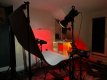
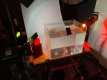
The camera is in front of the tank and below it, angled up so it "sees" the underside of the water's surface.

IMG_6682.jpg

The top half is the underneath of the water's surface. It's reflecting the light grey paper on the table behind the tank. This paper then continues up in a seamless sweep behind the tank and this is what we can see in the bottom half - the view through the tank to the sweep beyond. Now you don't *need* a paper roll: you can just as easily use a wall, but the wall at the back of my studio is a very dark grey, and I would have had to turn the background light up to light it (and so the flash duration would have increased and I would have motion blur on the bubbles and blocks).

You can also absolutely just do this with the background light only. The result will be monochromatic of course, but that's also a very nice effect. The side lights could also just as easily be speedlights. In fact they are probably more practical considering how close the lights are to the tank. You don't need 3 either - just one with a contrasting colour to blue, will make a nice image. You don't strictly need a tank either - a large vase would do the trick - and including the sides would be a nice variation.

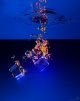
Disturb the water however, and you refract and reflect the light from the other 3 heads, into the camera - and refract some of the blue light away from the camera, forming dark areas in the blue field. In the shot below, I loaded 3 fake acrylic ice cubes into a cardboard tube (from some sort of wrapping paper) so they would all land in roughly the same spot one behind the other. See that boom arm in the back of the BTS shot above? Look at the end of it and you can see a wire hook. I had previously used this to suspend larger objects such as a can of coke in the water, and for this shot, I lowered the hook into the tank to pre-focus my shot. I marked the lateral position on the tank that lined up with the centre of the frame with a bit of tape so I knew where to drop the cubes.


_OHL0772-Edit-Website.jpg

I have the camera on a radio remote, and set to continuous shooting (about 7fps on this D850). The lights are all on really low power, and are all IGBT regulated so will easily keep up. Unlike small cans of tonic water, real ice, or expensive fake ice, acrylic lumps are heavier than water, so I have to carefully fish out the cubes after 3 goes, so it really does pay to know where your towel is. It is important to keep the lights where they need to be, so the red, orange and yellow lights should not reflect off the underside of the water's surface, or light the sweep at the back (so shining them at the back of the tank is a bad idea as the tank will reflect it onto the paper). With a larger distance to the background (and a much larger background) you could solve this as the light would spread out into nothing before it got there (and your actual background light would be closer to the background. Because of the abstract nature of the subject though (mainly bubbles and other density variations in the water) the exact angle of the lights is not too critical (versus lighting an actual object like the cans)

Post production is all about adjusting colour and tone curves to taste: I ended up at about 3700K for the temperature and small magenta tint. You can stop here and for use on the web/Instagram it'll be just fine.

If you are going to print it though, it's worth spending 30 minutes on some cleanup. <Photoshop terms ahead> Layer your shot on top of the plate shot in Photoshop, and let that show through where you want to erase indistinct or otherwise messy bubbles, Flatten that down and then to get rid of particles in the water and other stuff that is also in the plate shot. Make a duplicate and use the Dust and Scratches filter on that new layer. Mask this off the bubbles. I also used the "blend-if" sliders on the red and green channels on this dust and scratches layer so I can actually apply it over small clusters of bubbles and it will still remove blue blobs, leaving the red/yellow bubbles intact. Flatten again. Last step in cleanup: I apply the global background cleanup I always use on graduated backgrounds: duplicate the layer, and on this new layer select the bubbles (I just draw a rough selection around it all using the lasso tool, but you can try the select object tool which is very good these days, for more accurate selection). Cut out the selection (press CTRL-X). Now blur this layer with 120 points of Gaussian blur. Next add some noise. On my D850 at ISO 200, 1% of monochromatic Gaussian noise matches the original shot and tbh, if you don't want to work out what values you need, just use this. Applying this noise will ensure your smoothed out background will blend seamlessly with the the original parts left around the subject, and get rid of the banding you get in artificially smooth graduated areas. Now paste the subject back (CTRL-SHIFT-V). Blend these top two layers down (CTRL-E). Now apply a mask to this top layer and use a black brush to mask it off anywhere you forgot to cut out (such as the "horizon"). Address any local problem areas with the tool of your choice: I like the content-aware spot healing brush, and just selecting larger areas and using content aware fill. These both preserve the gradients on the background. Sharpen etc to taste. </PS>

Now I know if you don't know Photoshop already, that last paragraph will not make a lot of sense, however it's not practical to explain step by step here the concepts of layers, masks, blend modes and the various tools. I'll record the next post-production session. It's totally optional though tbh - keep the tank clean (I cover it after each shoot) and your lighting precise and you won't have too much cleaning to do in post. The plate shot at the top of this post has had no Photoshop work - just the colour and contrast adjustments synced in Lightroom. It still looks pretty clean at web sizes.

Lastly - trying rotating the image 180 degrees, so the bubbles and cubes appear to be launching out of the water. This shot can be as simple or as complicated as you like - so start out with just the background light and drop things into the water. To start off, just pour water in from a small jug and shoot the resulting bubbles. One extra thing I might try is leaving the modeling light on one of the side lights with a longer exposure firing the flash at the end (rear curtain sync) for some motion trails on the cubes. Might just be a mess, but we'll find out :)


IMG_6680.jpg
 
Last edited:
Excellent post. This really is something that everyone can do, it requires almost nothing in the way of space, equipment or experience to get good, creative shots.
Owen of course has plenty of both equipment and experience, and something as complex as this shot needs both, but simpler shots need neither.

As Owen has demonstrated, gels can add a lot, but the lack of gels needn't hold people back - coloured sweet wrappers, any kind of coloured plastic or even coloured paper can be used instead.
 
Back
Top