Lightroom update and now cant access old catalogue? :-(

McNyat

Suspended / Banned
Messages
493
Name
Ciaran
Edit My Images
Yes
Hi all, I have tried accessing old photos from an old Lightroom catalogue after a programme update. The pics are there in the library, but when I choose one and go to the develop module it says 'The file could not be found'. What can I do as I'm afraid that this will be the case for all my old pics???? Please help... please.

 
This error normally occurs when the catalogue has a location for the image that does not match the location on your machine. Usually caused by moving images manually outside of lightroom.
EG Catalog has C:pictures/2025/MyImage.jpg, but it's now at C:pictures/2025/Favourites/MyImage.jpg
There should be an option to locate the image when it gives the error.
Just browse to the correct location and select the file.
 
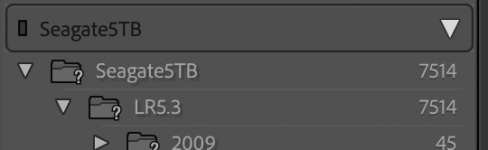
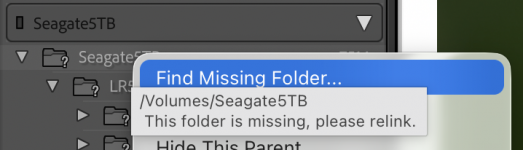
The drive/folder should have a question mark next to it. Right click on the folder, select "find missing folder", and repoint it to the current location of the images.

1764869775952.png

1764869732063.png
 
The help you folks give on here is spoon good. Thanks to you all. Sorted now
 
Back
Top