Lightroom preview time consumption

A_S

Suspended / Banned
Messages
864
Name
Andrew
Edit My Images
Yes
Has anyone got any recomended preview settings or experience they can pass on.

My £1500 super laptop which can denoise and do AI in seconds still takes days to create previews.... and I need to work quickly. It just slows the whole of lightroom to a crawl as well. I've just set it "creating standard previews" on 7,000 images from the weekend gone for a walk. I took a screenshot before and a secreenshot an hour and a half later and its moved well less than 1000 photos... plugged in and on max performance power plan....

I've read lots but not come up with the answer... hence the post.

I think, having read this elsewhere, because the screen resolution is 3200x2000 its not actually creating the (small) standard previews I specified in the options but full 1:1 previews....

I really need a solution to this as I am about to really loose my sh!t with it, lol. I have stuff i need to do. Photos I need to find. Photo mechanic good for getting the initial batch done but then the grunt work needs to be done via lightroom unfortunatly.
 
That doesn't sound right - unfortunately I don't have a device with me that has lightroom installed right now.
 
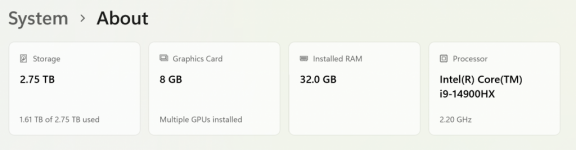
32gb and a 2tb SDD second HDD for the catelogue and images

afdasd.png
 
Might be worth checking to see if the second SSD could be a bottleneck in some way.

Also consider importing your images first to C: and then moving them after processing over to the other drive.
 
LR is configurable in the options to choose whether the GPU or CPU is used for certain tasks. I recall that exporting performance went from acceptable to a crawl (at least 5 times slower) following one LR update as it opted to use my elderly 6Gb graphics card instead of the 8 core CPU. I changed the settings to use the CPU and got the performance back again. Some laptops have an on-chip GPU and a separate high performance one. You should check that LR isn't opting to use the less powerful on-chip GPU. Use task manager to monitor the memory, CPU and GPU utilisation during import to see if there are any bottlenecks.

Make sure you aren't applying various presets on import, particularly de-noise. It's best just to let LR build the bog standard 1:1 previews to allow you to quickly use and navigate through the photos and you can Pick the photos you want to edit. At this stage you can then apply your presets, copy edits etc. to the smaller selection of photos instead of them all.

I used to have a windows 10 laptop (2021 vintage) with an 8 core Ryzen CPU, 32Gb RAM, a fast SSD and a 3060 GPU. It took about 45 minutes to generate full size 1:1 previews for about 3-4000 24MP images - usually on battery power. Sometimes the battery would run out before it finished them all. If you have 50+MP RAW files, then it will take a bit longer. I also found that it took a lot longer (as in about twice as long) to process cRAW files compared to the full size RAW files. I assume this is because cRAW uses some sort of zip/compression function to reduce the file size, and LR has to decompress each file before it can work with it.

This year I swapped out the windows laptop for a M4 Macbook, and it does generate 1:1 previews much quicker than the laptop, probably by a factor of about 3 to 4 times better.

One other thing that might be happening is thermal throttling, of either the CPU, GPU or the SSD. Some SSDs do get very hot through constant use and can reduce performance massively when they get too hot. However, building 1:1 previews is more CPU/GPU intensive than storage.
 
32gb and a 2tb SDD second HDD for the catelogue and images

View attachment 456334
I’ve always been led to believe that if you have catalogues (and I believe images) on a second drive it slows it down.

I have the main catalogue and images on the main drive, I’ve loaded just over 5500 50mp raw files, totalling 320gb this weekend and previews were built in under an hour, and that was whilst I was working on and exporting the images at the same time.
 
I have a top of the range P.C that cost over 3 grand I spent probably another 1k on upgrades and off late it was taking a long time to generate previews.

The other day I got a M4 Mac Studio and while it was extortionately expensive by the time I added all the upgrades, I added my first wedding on to it and it imported and generated previews for over 7k images in well under 10 minutes, my P.C would have taken much longer at a guess maybe an hour. I barely had time to make a coffee.

I have set them both up similarly catalogues on one drive and images on another so it’s not what @snerkler mentioned above. I am using exceptionally fast NVME drives on both.

From what I have read single core processing performance is what is important in terms of specification when it comes to the current version of Lightroom. This is why my Mac Studio is drastically out performing my P.C. I haven’t read anywhere that having catalogues and images on different drives make any difference to speed as long as you are using fast drives. To be fair I am way out of the loop when it comes to these sort of things other than some recent research when buying the Mac Studio.

What type of previews are you generating?

Edit - Sorry just seen that you are generating standard previews. How old is your laptop? You will prob find it’s the processor causing it to struggle Lightroom has had so many updates in even the last year.

I also wouldn’t say that a £1500 laptop would be “super” these days anyway, that seems to be the sort of cost you would expect to pay for a middle of the road laptop.

To cut down on the time in front of the computer have you considered using A.I culling? Aftershoot does a pretty decent job of culling if you are regularly shooting a lot. You can also use it for A.I editing as well. Adobe are expected to launch A.I culling as part of Lightroom soon as well they have already been demonstrating it. Lightroom culling is expected to be priced on a credits system though the way they do with A.I image generation were as Aftershoot can be bought annually with no restriction on how many images you can run through it.

I can cull a wedding in Aftershoot with 7-8k images in under 10 minutes.
 
Last edited:
Back
Top