
and the site receives a small commission
You are using an out of date browser. It may not display this or other websites correctly.
You should upgrade or use an alternative browser.
You should upgrade or use an alternative browser.
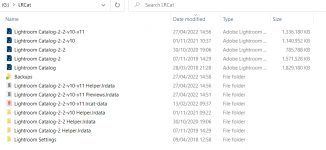
Lightroom Housekeeping - can i remove old Catalog files ?
- Thread starter mikeyw
- Start date


john.margetts
Suspended / Banned
- Messages
- 2,996
- Name
- John
- Edit My Images
- Yes
It us quite safe to delete them if you never use them. You will need to keep at least one catalogue.

Major Eazy
Suspended / Banned
- Messages
- 1,150
- Name
- John 'Jack'
- Edit My Images
- No
@mikeyw
Using an analogy, think of it this way...
Your computer's hard drive is like a shoebox.
Your digital photos on your computer are like your prints.
Lightroom's Catalog is like an album, that book-like-thing you buy from a shop, and slip your prints into.
So...
Deleting Catalogs is like taking the prints out of the album, then throw away the empty album itself, and you're left with just the prints, which you'll just put back into the shoebox.
The Catalog does not hold the actual photos, the Catalog is nothing more than a database, it shows thumbnails of your photos, and it got links to your actual photos.
If you delete them all, you'll just need to make a fresh new Catalog and import your photos into it. Or you can simply keep one that you prefer to keep, but delete the rest of the others.
If you are worried: Always remember to back up your photos to an external drive before you delete a Catalogue in case of a goof.
Hope this helps?
Using an analogy, think of it this way...
Your computer's hard drive is like a shoebox.
Your digital photos on your computer are like your prints.
Lightroom's Catalog is like an album, that book-like-thing you buy from a shop, and slip your prints into.
So...
Deleting Catalogs is like taking the prints out of the album, then throw away the empty album itself, and you're left with just the prints, which you'll just put back into the shoebox.
The Catalog does not hold the actual photos, the Catalog is nothing more than a database, it shows thumbnails of your photos, and it got links to your actual photos.
If you delete them all, you'll just need to make a fresh new Catalog and import your photos into it. Or you can simply keep one that you prefer to keep, but delete the rest of the others.
If you are worried: Always remember to back up your photos to an external drive before you delete a Catalogue in case of a goof.
Hope this helps?

droj
Suspended / Banned
- Messages
- 5,069
- Name
- droj
- Edit My Images
- No
The catalogue doesn't just contain references to the image files that you've fed into it, it also contains a record of all the LR adjustments that you've made to those images along with any keywords, ratings or what-have-you. So beware of chucking stuff away you might want.
For a given version of LR, you just need the latest catalogue. It's sensible to have a backup, but you only need the one.
A newer version of LR will happily ingest the catalogue from an earlier version and re-record it according to its own parameters. But the process won't work in reverse - cats aren't backwards compatible. An earlier version can read sidecar files from a later version, though - but presumably ignoring any adjustments that it doesn't recognise.
Going forwards, if you want to employ a non-subscription version of LR, the last one not needing online activation is 5.xx, which just needs a serial no. V6.xx is the last non-sub version but needs activation and this facility will likely be withdrawn eventually.
We are driven to play leapfrog with camera files, computer operating systems and software. If budget conscious, DNG conversion can be a reasonable workaround.
For a given version of LR, you just need the latest catalogue. It's sensible to have a backup, but you only need the one.
A newer version of LR will happily ingest the catalogue from an earlier version and re-record it according to its own parameters. But the process won't work in reverse - cats aren't backwards compatible. An earlier version can read sidecar files from a later version, though - but presumably ignoring any adjustments that it doesn't recognise.
Going forwards, if you want to employ a non-subscription version of LR, the last one not needing online activation is 5.xx, which just needs a serial no. V6.xx is the last non-sub version but needs activation and this facility will likely be withdrawn eventually.
We are driven to play leapfrog with camera files, computer operating systems and software. If budget conscious, DNG conversion can be a reasonable workaround.
